 Aeromexico Rewards
 Air Canada Aeroplan
 American Airlines AAdvantage
 Atmos Rewards (Alaska/Hawaiian)
 Azul Fidelidade
 Delta SkyMiles
 Etihad Guest
 Finnair Plus
 Flying Blue (AF/KL)
 GOL Smiles
 Jetblue TrueBlue
 Qantas Frequent Flyer
 SAS EuroBonus
 Turkish Miles&Smiles
 United MileagePlus
 Virgin Atlantic Flying Club
 Virgin Australia Velocity
Points Path and AwardFares solve different parts of an award search. Points Path is a browser extension that adds award prices to Google Flights and helps you compare miles with cash. AwardFares is a standalone award search platform with its own Search, Alerts, Seat Maps, Flight Schedules, and Journey Planner. AwardFares does not add prices to Google Flights, and the regular Points Path flight search begins inside Google Flights.
If I only want to see whether miles or cash offer better value for a flight in Google Flights, Points Path makes that easy. When I need to search more programs, compare flexible dates, monitor several routes, check a cabin, or organize separate flights into one trip, I use AwardFares. That is the main difference to understand when looking for a Points Path alternative.
AwardFares vs. Points Path: The Short Answer
- They are different products: Points Path works inside Google Flights. AwardFares is a standalone award search platform.
- Points Path compares points with cash: It adds award prices and cash comparisons to Google Flights. It covers 17 programs, with five included in the free Standard tier.
- AwardFares covers the wider award search: It starts outside Google Flights, opens up dates and destinations, monitors the trip, and keeps separate flights together.
- Both help you find options: The loyalty program still shows the final price and availability when you book.
Disclosure
This guide is written, reviewed, and published by AwardFares. AwardFares is one of the products compared.
What AwardFares Does
AwardFares Search starts with the loyalty programs, routes, dates, airports, or metro areas I want to search. Each result can show the mileage price, taxes where supported, number of available seats where known, and the programs that can book the flight. If the same flight is available through several programs at different prices, I can compare them on one card.
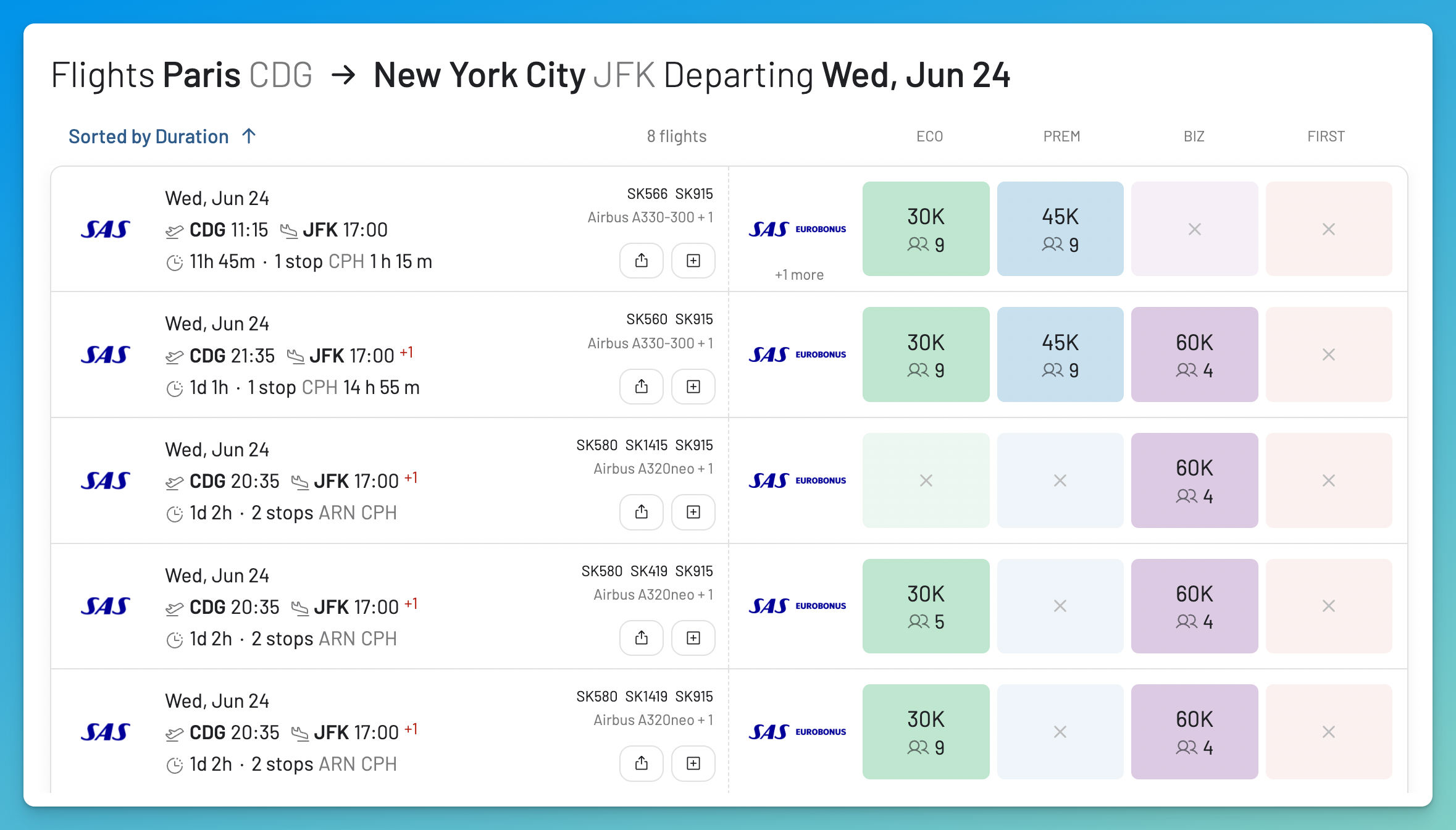
The AwardFares flight list can show award availability across several cabins, with mileage prices and seat counts per program.
Around that Search sit the tools that carry a result forward:
- Timeline View and Broad Search help when my dates or destination are flexible. I can compare several days or look for recently found availability across a country, continent, or award zone.
- Live and Flex Alerts keep watching when nothing works today, either for an exact trip or for broader criteria.
- Seat Maps show the cabin and current seat assignment pattern for a flight.
- Flight Schedules show operating days, aircraft, and booking class information where supported.
- Journey Planner collects flights from separate searches into a saved, shareable itinerary.
The AwardFares program directory currently lists 17 searchable loyalty programs. Points Path covers 17 programs, with five included in the free Standard tier. AwardFares Basic is free and previews existing results. Running new searches and using Alerts, Flight Schedules, and Journey Planner requires Gold or Diamond.
What Points Path Does
Points Path is a browser extension for Google Flights. You start a normal search at flights.google.com. As Google loads the cash fares, Points Path searches its covered airline programs and adds award prices to the same results.
Google AI Mode can also show points and miles rates from supported partners. Google starts that search in AI Mode, while Points Path starts with the flights in a standard Google Flights search. We tested the native Google feature separately in our Google Flights with points and miles comparison.
Deal arrows show whether Points Path considers the flight a good use of miles or a better cash purchase. It makes that comparison with its own median value for each program’s miles, including the taxes and fees on the award.
Three details of this design deserve real credit:
- The information button under an award price opens more options. It shows each covered program that can book the flight, the bank points that transfer to those programs, and any active transfer bonus shown by Points Path.
- Round trip searches use round trip award pricing. Points Path prices each direction instead of doubling a one way estimate.
- Google Flights provides the flexible airport inputs. You can search up to five airports in each field or use a metro city code.
When you pick a flight, Points Path adds a link to book with points on the airline’s own website next to Google’s standard booking options. It does not sell tickets. Its regular search checks the flights returned by the Google Flights query.
Points Path does not include an open destination search page, Seat Maps, Flight Schedules, or an itinerary workspace. Regular results follow the Google Flights search you entered, while paid Flex Alerts can monitor broader criteria. The extension requires the US English version of flights.google.com, but it can display any currency. It officially supports Chrome, Edge, Opera, Brave, Arc, and Safari. It also works through Safari on iPhone and iPad. Android browsers do not support the extension, so there is no Android version.
AwardFares vs. Points Path at a Glance
| Task | AwardFares | Points Path |
|---|---|---|
| Where the search starts | Its own Search: programs, routes, dates, metro areas | A Google Flights cash search |
| Points vs. cash on one flight | Mileage prices and taxes per program; no cash fare verdict | Deal arrows comparing points against Google’s cash fare |
| Program coverage | 17 searchable programs | 17 programs, with five included in Standard |
| Broad discovery | Broad Search by country, continent, or award zone; Timeline View | Regular results follow Google Flights; paid Flex Alerts add broader monitoring |
| Alerts | Live Alerts: email and optional push; Flex Alerts: push only | Flight Alerts and Flex Alerts on paid plans; email notifications |
| Seat Maps | Yes, with seat assignment labels | Not offered |
| Flight Schedules | Yes, where supported | Not offered |
| Trips with several flights | Journey Planner itinerary workspace | Google Flights itinerary plus booking links |
| Browsers | Any modern browser; nothing to install | Chrome, Edge, Opera, Brave, Arc, and Safari |
| Mobile | Installable web app | Safari extension on iPhone and iPad; no Android |
Points Path covers 17 loyalty programs. Five are included in Standard. Check that the exact program you need is covered before choosing a plan.
Points Versus Cash, Then the Wider Trip
1. Pricing a Flight You Already Found
This is the main reason to use Points Path. If I am already searching Google Flights, it can place the award price, cash comparison, and transfer partners beside each result. That quickly answers an important question: should I use miles or pay cash?
How I Compare Award Prices Across Programs
AwardFares starts with the award search. I search the route across my programs and compare mileage prices, taxes, seat counts, and when each result was last refreshed. This is useful when the best way to book is through a partner program. The Flight List guide explains every field.
I still check the cash fare separately. Points Path makes that comparison easier inside Google Flights, while AwardFares gives me more ways to search the award itself.
I found American Flagship First from Buenos Aires to New York with AwardFares by searching the route, nearby dates, First Class, and the Boeing 777-300ER. I later flew it for 78,500 AAdvantage miles plus about $95. A paid First Class fare on this route can cost more than $7,000, so this is a clear example of why I want to know both the award price and the cash price. My American Flagship First trip report documents the redemption and the flight.

American Flagship First from Buenos Aires to New York. I paid 78,500 AAdvantage miles plus about $95.
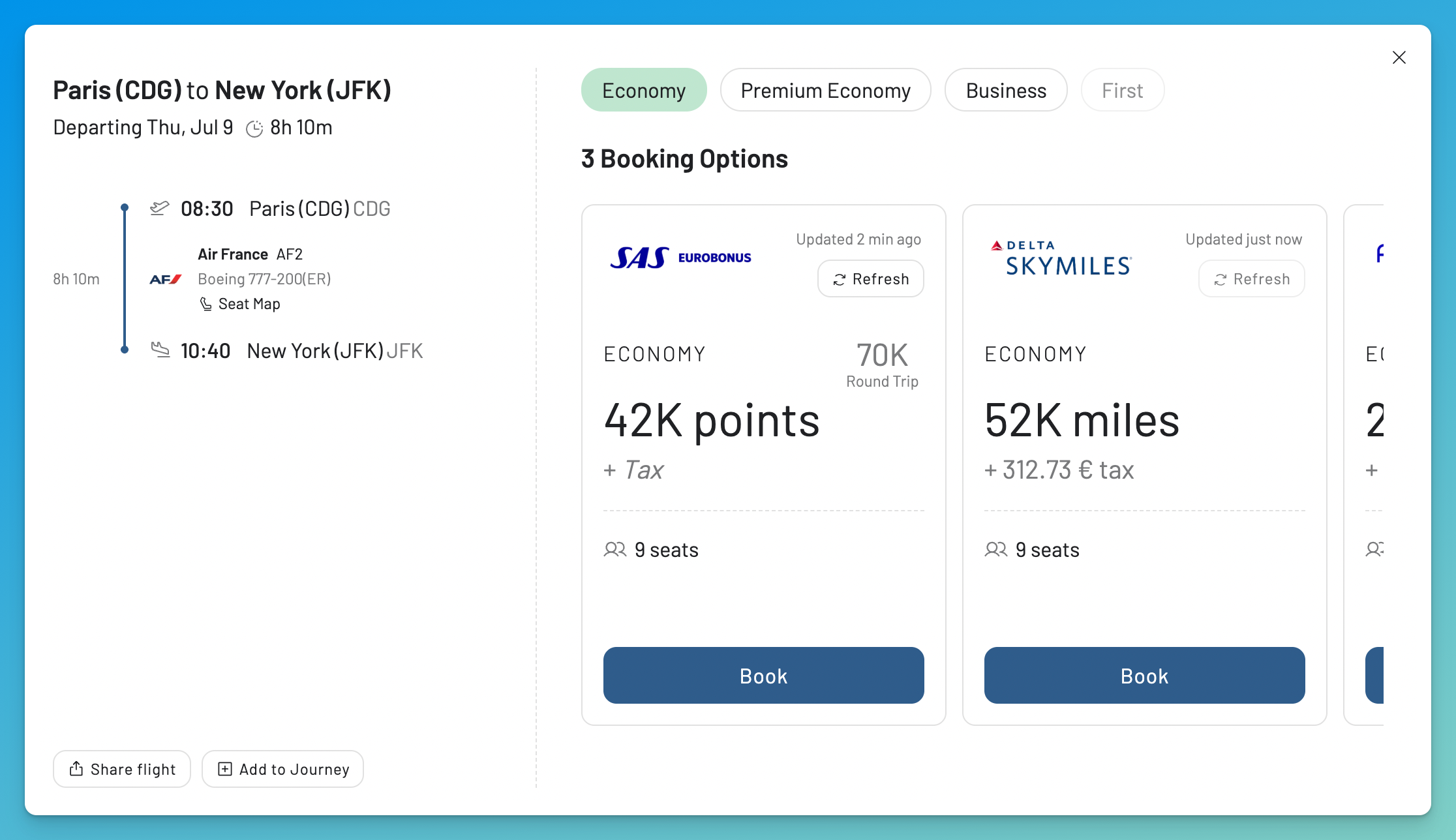
Flight Details keeps the booking programs, prices, taxes, and freshness attached to the itinerary they belong to.
2. Searching Beyond the Cash Results
Points Path follows the origin, destination, and dates entered in Google Flights. You can include up to five airports in each field, but you still need to define where you want to go. It cannot answer a broad question such as, “Where can I use 60,000 SAS EuroBonus points for Business Class next spring?” Points Path does not price EuroBonus, and this type of search does not begin with one destination in Google Flights.
How I Search When the Destination Is Flexible
When my destination is flexible, I use Broad Search to review recently found availability by country, continent, or award zone. I can then run a live Search for the route that interests me. If I know the route but can change the dates, Timeline View lets me compare availability across several days and cabins.
Broad Search uses recently collected availability. I run a live search before booking.
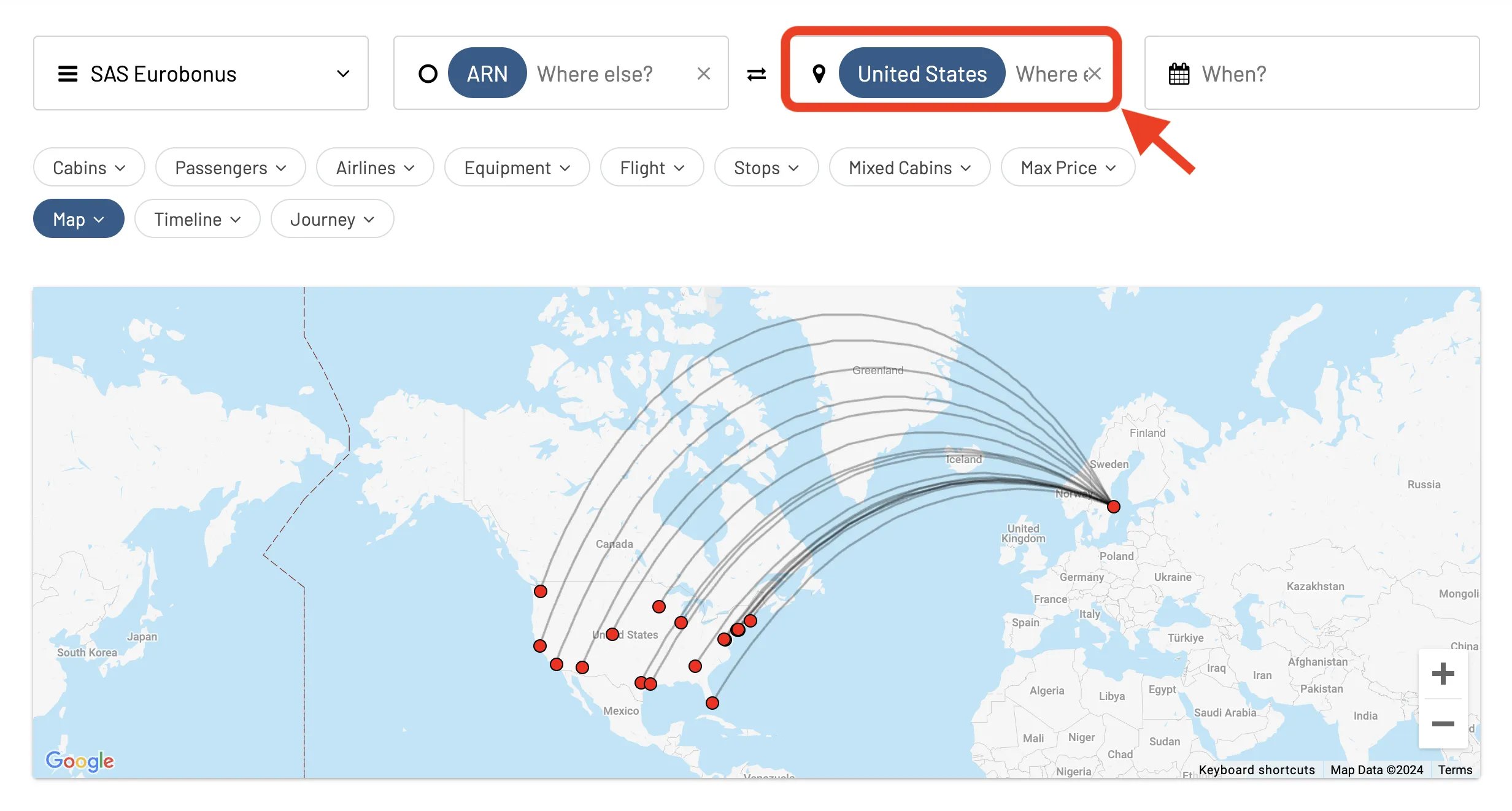
A Broad Search from Stockholm to anywhere in the United States. I do not need to choose one destination first.
3. Watching a Flight Until Something Changes
Points Path paid plans include Flight Alerts. You can choose a specific one way flight in Google Flights and receive an email when the points price changes or award space appears. Points Path checks tracked flights several times a day. Its dashboard includes price history and a target price. Flight Alerts currently track one way flights. Flex Alerts can monitor broader criteria such as travel dates, points budget, airlines, departure times, and number of stops. Pro includes 30 Flight Alerts, three Flex Alerts, and a seven day points calendar for supported programs around the selected date.
How I Monitor Exact and Flexible Trips
AwardFares Alerts separate exact searches from flexible ideas. A Live Alert repeats a search for the routes, dates, cabins, and programs I choose. A Flex Alert can watch several dates or destinations without requiring a separate alert for every combination.
The complete Alerts guide explains how both types work and how many are included with each plan.
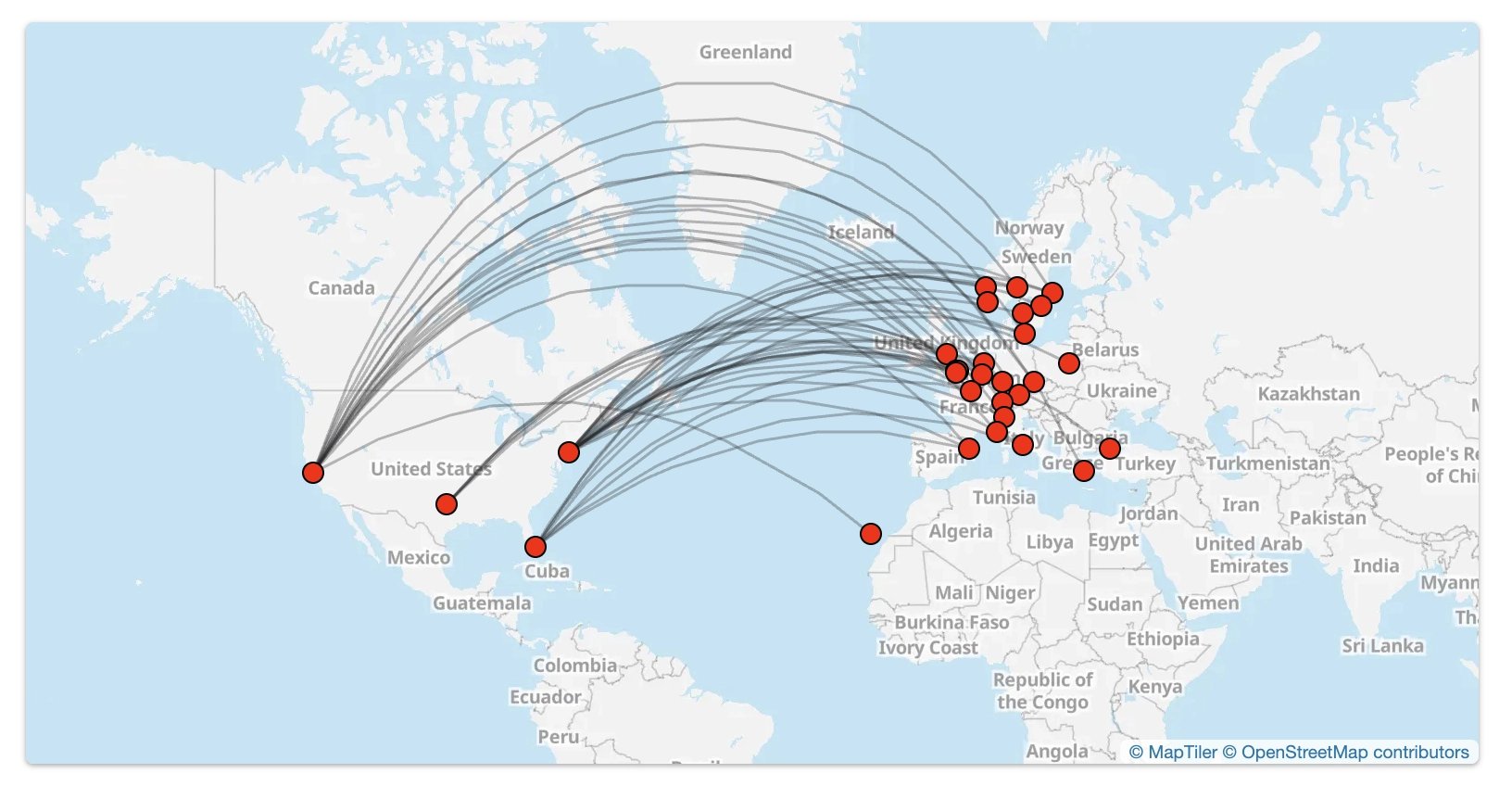
One Flex Alert can watch many route combinations at the same time.
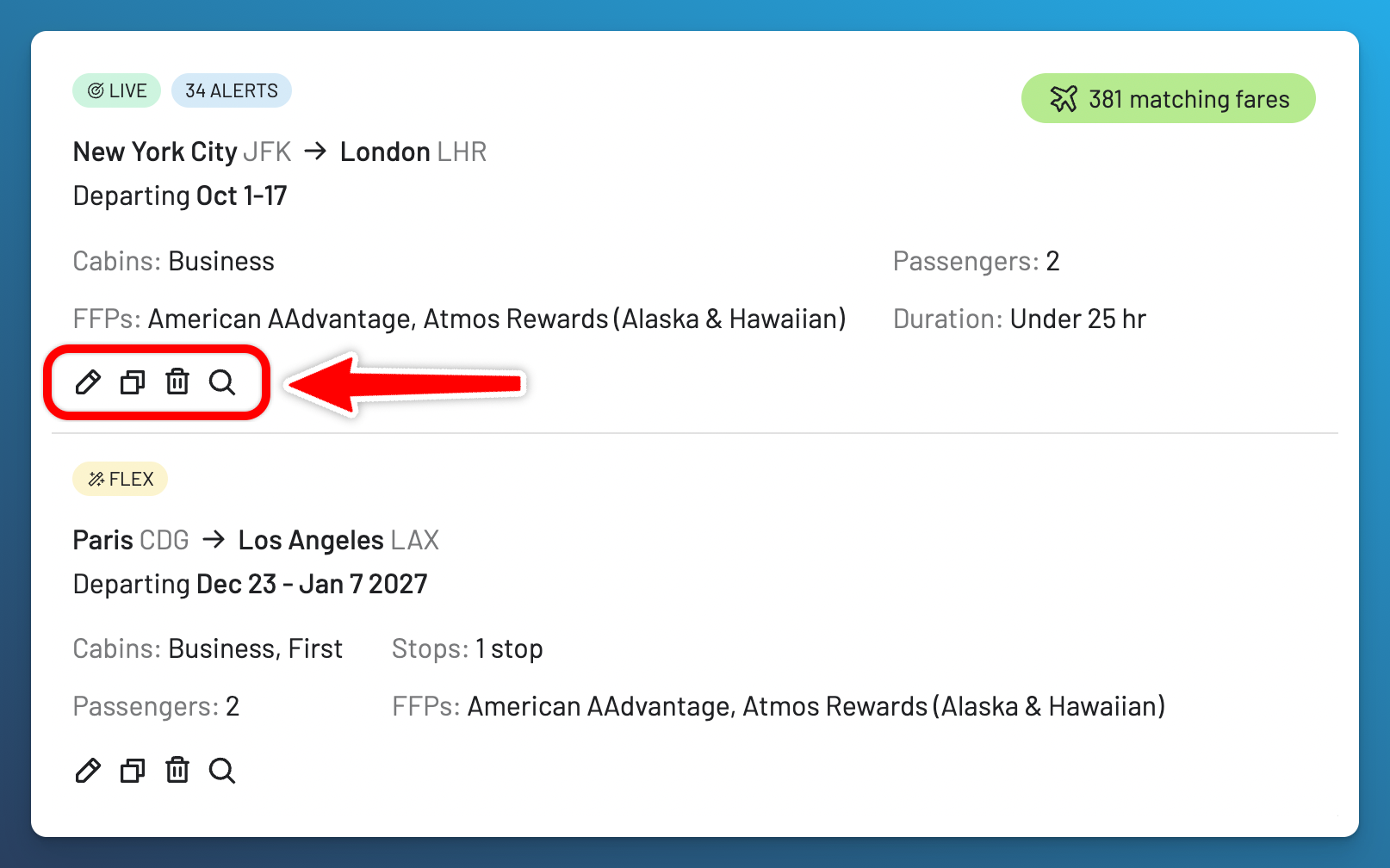
A Live Alert for a defined New York to London search beside a Flex Alert for a flexible trip.
4. Turning Results Into a Trip
Points Path follows the itinerary built in Google Flights and adds links to book with points. It does not include a separate place to save one flight found today, add another flight later, compare trip options, or review Seat Maps and Flight Schedules.
How I Organize Flights Found in Separate Searches
In AwardFares, I save flights from different searches and programs to Journey Planner. I can arrange them in order, compare versions, and share a link that other people can view. Flight Schedules show operating days and planned aircraft. Seat Maps show the cabin layout and current seat assignments.
A Journey helps me plan. It does not hold availability or complete a booking. The Journey Planner guide explains the full process.
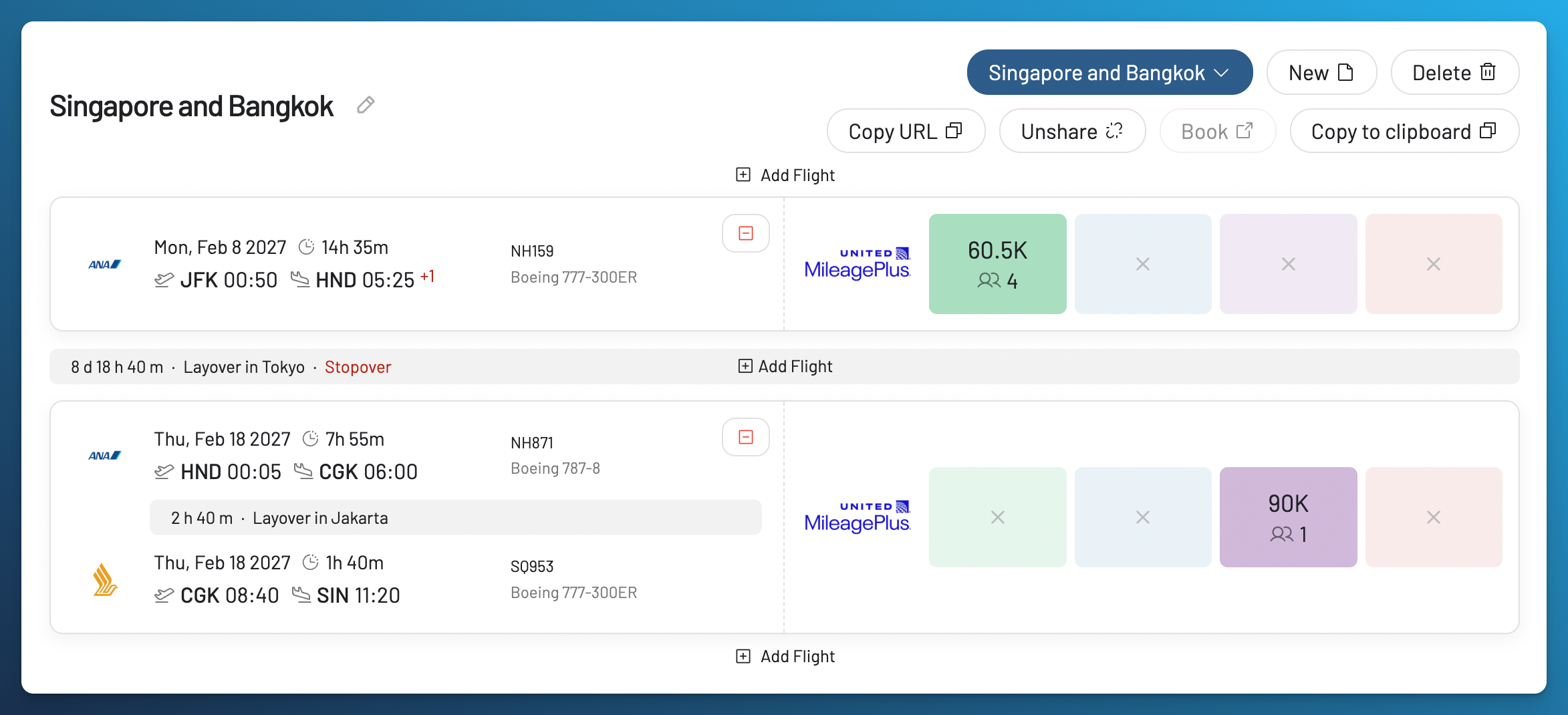
Journey Planner is the workspace between finding flights and booking them.
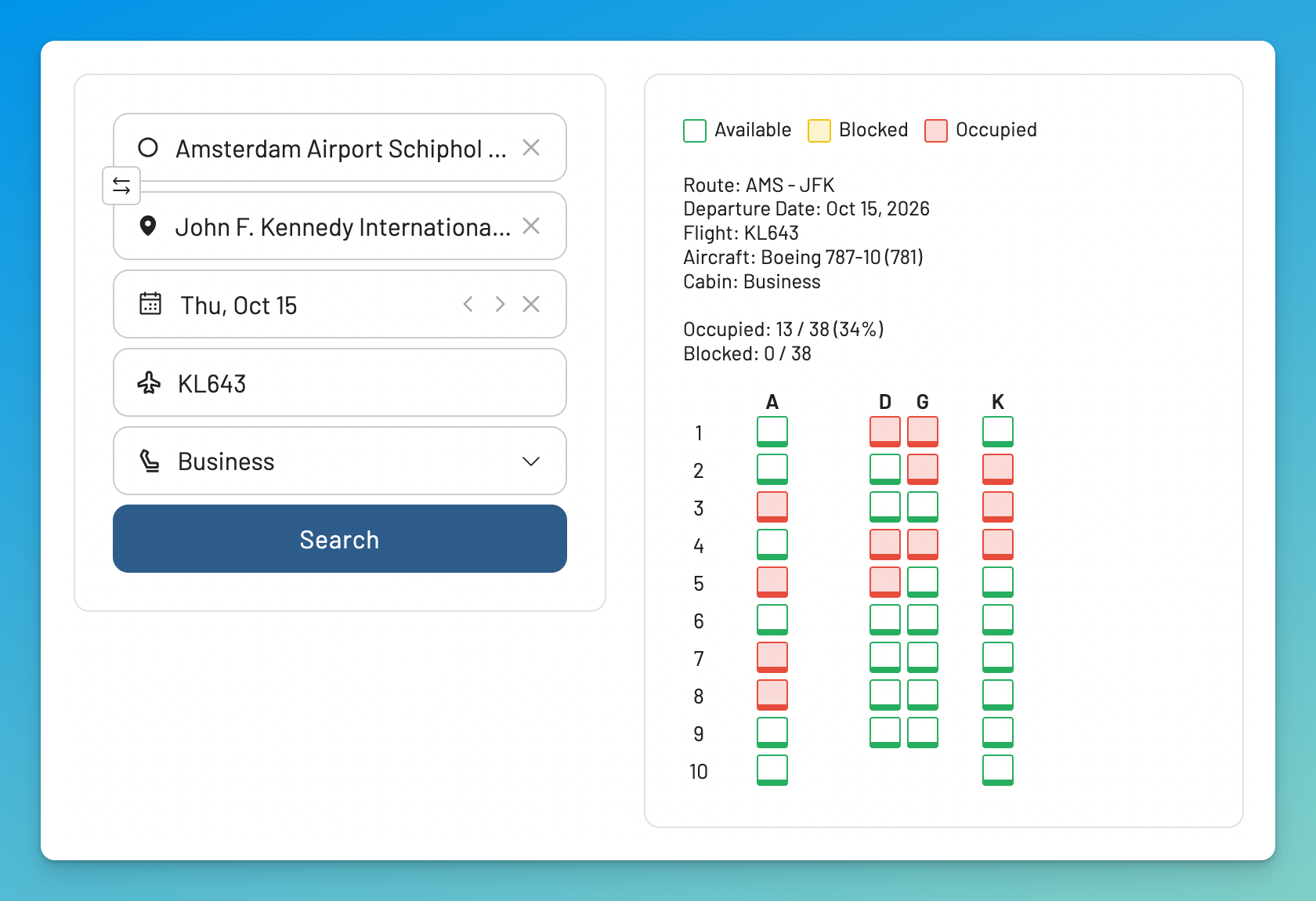
A Seat Map shows the cabin layout and current seat assignments. It does not show how many tickets have been sold or prove award availability.
Plans, Prices, and Access
Prices and plan limits can change. Check each pricing page before subscribing.
AwardFares
- Basic is the free tier. It previews existing availability for one program and includes five Seat Map lookups per month. It does not run new searches or include Alerts, Journey Planner, or Flight Schedules.
- Gold currently costs $9.99 per month or $99 per year: 100 Live Searches per day, two programs per search, 30 Live Alerts, 100 Flex Alerts, Journey Planner, Flight Schedules, and 30 Seat Map lookups per month.
- Diamond currently costs $19.99 per month or $199 per year: unlimited Live Searches, five programs per search, 500 Live Alerts, unlimited Flex Alerts, faster result refreshes, and 200 Seat Map lookups per month. Usage controls apply.
- The 24 hour trial is separate from Basic. Eligible new customers can try Gold or Diamond after adding a payment method. Billing starts unless the trial is canceled. The pricing page has the current terms and amounts.
Points Path
The current Points Path plans are:
- Standard is free. It includes five loyalty programs, round trip pricing, deal arrows, bank transfer partners, and transfer bonus indicators.
- Alerts currently costs $34.99 billed annually. It adds up to 10 Flight Alerts and one Flex Alert at a time to the free access.
- Pro currently shows a special price of $7.99 per month or $79.99 per year. The regular prices shown are $9.99 per month and $99.99 per year. Pro adds international programs, 30 Flight Alerts, three Flex Alerts, a points wallet, a seven day points calendar for supported programs, selected cardholder award discounts, a Lufthansa First Class dashboard, and custom points values.
- Points Path currently offers a 30 day money back guarantee on annual plans and a seven day guarantee during the first month of monthly plans.
Check that the exact program you need is included before choosing a plan.
Which One Should You Use?
I use AwardFares when the search needs to go beyond the Google Flights result. It lets me change the programs, dates, airports, and routes, then monitor and organize the flights I find. AwardFares does not add points prices to Google Flights.
Points Path adds the cash comparison to Google Flights. I use AwardFares for the wider award search, monitoring, Seat Maps, Flight Schedules, and the planning that follows.
If those are the parts you need, check the current AwardFares program list, then create a free Basic account or compare Gold and Diamond. For a broader look at this market, read our 2026 award search tools guide.
Related Articles



Frequently Asked Questions
What Is the Best Points Path Alternative?
If you need more than points prices inside Google Flights, AwardFares is my answer. It lets you search the award itself, expand the trip, monitor it, and keep the useful flights together. Check that your programs are in the AwardFares directory first.
Is Points Path Free?
Its Standard plan is free and includes round trip pricing and transfer partner information. The live program status page lists Alaska, American, Delta, JetBlue, and United as the five free programs. Flight Alerts and the international programs require a paid plan.
Does AwardFares Work Inside Google Flights?
No. AwardFares is a standalone platform with its own search inputs and results; it does not insert prices into Google Flights. Points Path is the tool for that specific job, and the two can be used side by side.
Does Points Path Work on Phones?
On iPhone and iPad, yes, through a Safari extension. Points Path does not have an Android version because Android browsers do not support the extension. It requires the US English version of flights.google.com, but any currency works.
Which Loyalty Programs Do They Cover?
AwardFares currently lists 17 searchable programs. Points Path covers 17 programs, with five included in Standard. Check the exact program before choosing a plan.
How Do the Alerts Compare?
Points Path Flight Alerts track a specific one way flight from Google Flights and send an email when the points price changes. AwardFares Live Alerts repeat a defined search, while Flex Alerts watch broader dates and destinations.
Should I Confirm the Result With the Airline?
Yes. Confirm the flight, date, cabin, passenger count, mileage price, and taxes with the loyalty program before transferring points. Availability and prices can change, and most point transfers cannot be reversed.
Methodology
AwardFares information comes from firsthand use of our own product. Points Path information comes from its public homepage, instructions, pricing page, and program status page. We did not install the extension, create an account, reproduce its interface, compare its results in a controlled test, or reuse its artwork or screenshots. Our research process for the full category is documented in the award search tools guide.
Prices, coverage, and plan limits can change; check the linked sources before subscribing.
Find & Monitor Award Flight Availability
Use AwardFares to instantly search multiple frequent flyer programs. Find available award seats, set up alerts to monitor availability, check flight schedules, view seat maps, and more—all in one place.