 Aeromexico Rewards
 Air Canada Aeroplan
 American Airlines AAdvantage
 Atmos Rewards (Alaska/Hawaiian)
 Azul Fidelidade
 Delta SkyMiles
 Etihad Guest
 Finnair Plus
 Flying Blue (AF/KL)
 GOL Smiles
 Jetblue TrueBlue
 Qantas Frequent Flyer
 SAS EuroBonus
 Turkish Miles&Smiles
 United MileagePlus
 Virgin Atlantic Flying Club
 Virgin Australia Velocity
Ever looked at a flight ticket and wondered what the single letter like ‘Y’, ‘W’, or ‘J’ means? You’re not alone. The world of airline booking class codes, also known as fare classes, can feel like a cryptic language. These codes are the backbone of airline pricing, determining everything from your ticket’s cost and flexibility to how many miles you earn.
Understanding these codes is the key to unlocking advanced travel strategies. This guide will demystify airline booking classes and show you how to use the AwardFares Flight Schedules tool to see the exact seat availability for each code, a powerful advantage for booking specific fares, planning upgrades, or even for staff travel.
What You'll Learn In This Guide
- Decode Any Fare: Learn the meaning behind common booking class codes like F (First), J (Business), Y (Full-Fare Economy), and more.
- Check Real-Time Seat Inventory: Use the Flight Schedules tool to see how many seats each booking class is still selling on any flight.
- Find Specific Airline Codes: Get insights into fare codes for major airlines like United, American, Delta, and others.
- A Powerful Tool for Staff Travelers: See how to complement services like myidtravel by checking live seat availability before you list.
- Integrate with Seat Maps: Go directly from a flight schedule to its seat map to see which seats are open.
What Are Airline Booking Class Codes (Fare Classes)?
Booking Class Codes (or Fare Classes) are the single-letter codes (e.g., Y, M, J, F) that airlines use to manage their seat inventory. The industry’s official name for them is RBD, short for Reservation Booking Designator — if an airline agent or a fare rule mentions your RBD, they mean this letter. While you might book a “Business Class” or “Economy Class” ticket (these are called Cabin Classes), the booking code specifies the type of fare you purchased within that cabin.
For example, two passengers sitting next to each other in Economy could have different booking codes. One might be on a full-fare, flexible ‘Y’ class ticket, while the other is on a deeply discounted, restrictive ‘T’ class ticket.
- Seat Inventory & Fare Buckets: Each booking class corresponds to a “fare bucket,” which is the pool of seats an airline is willing to sell at a particular price with specific rules. The Flight Schedules tool lets you see how many seats are left in each bucket.
- Yield Management: Airlines use these codes for yield management, the science of maximizing revenue. They can release more seats in cheaper buckets to fill the plane or restrict them to encourage higher-priced bookings.
- Rules & Benefits: The booking class dictates the rules of your ticket: mileage accrual, upgrade eligibility, change fees, and refundability.
Common Booking Class Codes Chart
While codes vary significantly between airlines, some letters have a generally accepted meaning across the industry. Here’s a quick reference chart.
| Cabin Class | Common Codes | General Meaning & Characteristics |
|---|---|---|
| First Class | F, A, P | F is typically full-fare First Class. A and P are often discounted First Class or award/upgrade inventory. Highest level of service and most expensive. |
| Business Class | J, C, D, I, Z | J and C are usually full-fare Business Class. D, I, Z are common for discounted Business Class or award/upgrade inventory. |
| Premium Economy | W, R, G | W is the most common code for full-fare Premium Economy. R or G can be used for discounted or award seats in this cabin. |
| Full-Fare Economy | Y | The most expensive, fully flexible, and refundable Economy ticket. Often earns 100% of miles and has high priority for upgrades. |
| Discounted Economy | B, H, M, K, L, Q, V | A wide range of codes representing various levels of discounted Economy fares. Each airline ranks its own buckets; the letters themselves don’t follow a fixed order. |
| Deep-Discount Economy | N, S, T, E, O | These are typically the cheapest, most restrictive Economy fares. They may have strict no-change/no-refund rules and often earn few or no miles. |
| Award/Special | X, I | X is a very common code for Economy award seats (using miles), and I is frequently used for Business award seats across many alliances. |
Booking Class Letters, A to Z
Spotted a single letter on your ticket and want to know what it means? Here’s the whole alphabet in one place. Remember: these are the most common uses — the same letter can mean something different on another airline, so always confirm with the airline’s own fare rules or by checking the live inventory in our tool.
| Letter | Most Common Meaning | Watch Out For |
|---|---|---|
| A | Discounted First Class | Premium Economy on United |
| B | Mid-tier flexible Economy | Basic Economy on American |
| C | Full-fare Business Class | Fairly consistent across airlines |
| D | Discounted Business Class | Common upgrade bucket too |
| E | Deep-discount Economy | Basic Economy on Delta |
| F | Full-fare First Class | Rare on airlines without true First |
| G | Deep-discount Economy | Premium Economy on some carriers, including Delta Premium Select (P/A/G) |
| H | Mid-tier discounted Economy | — |
| I | Business Class award/upgrade inventory | Key code for award hunters |
| J | Full-fare Business Class | The universal “Business” shorthand |
| K | Discounted Economy | — |
| L | Discounted Economy | — |
| M | Mid-tier Economy | — |
| N | Deep-discount Economy | Basic Economy on United; Premium Economy in the Lufthansa group |
| O | Deep-discount Economy | Premium Plus (Premium Economy) on United |
| P | Varies widely | Premium Economy on American and Delta; Business on United and Lufthansa; discounted First on some carriers |
| Q | Discounted Economy | — |
| R | Varies widely | Premium Economy on United; Business on American in some cases |
| S | Discounted Economy | Delta Comfort+ (extra-legroom Economy) on Delta |
| T | Deep-discount Economy | Upgrade instruments on some carriers |
| U | Discounted Economy | Upgrade inventory on several airlines |
| V | Discounted Economy | — |
| W | Premium Economy (most international airlines) | A standard Economy fare on United; Delta Comfort+ on Delta |
| X | Economy award inventory (miles bookings) | The code to watch for award space; a paid Main Cabin fare on Delta |
| Y | Full-fare, fully flexible Economy | The closest thing to a universal code — nearly every airline uses Y for Economy |
| Z | Discounted Business Class | Used this way by Air India, United, Lufthansa, and many others |
What Your Booking Class Affects
That single letter determines more than most travelers realize:
- How many miles and points you earn. Most programs award a percentage of flown distance (or revenue) based on booking class. A full-fare Y ticket might earn 100% of miles; a deep-discount fare might earn 25% — or nothing at all. This isn’t theoretical: Delta’s Basic Economy (E) earns zero SkyMiles, and American’s Basic Economy (B) stopped earning AAdvantage miles for tickets bought from December 17, 2025.
- Elite status credit. Qualifying miles, segments, or points often accrue at different rates per booking class. Two passengers on the same flight can make very different progress toward status.
- Upgrade eligibility and priority. Many airlines only allow upgrades from certain booking classes, and fare class is often one factor in upgrade priority, alongside elite status and request time. Some upgrade instruments even require specific inventory (like the “C” or “R” buckets) to be open.
- Change and refund rules. The booking class and fare basis (more below) point to the fare rules that decide whether your ticket is refundable, changeable for a fee, or locked in.
- Award availability. When you book with miles, you’re drawing from dedicated award buckets — typically X for Economy and I for Business. If those show zero, the flight usually can’t be booked at saver level, no matter how many miles you have.
Airline-Specific Booking Class Codes (United, American, Delta, etc.)
It is critical to remember that the chart above is a general guide. Each airline defines its own fare codes. A ‘W’ on United might be a standard Economy fare, while on another airline, it’s Premium Economy.
Our Flight Schedules tool shows you the actual codes for the flight you’re looking at. Here are some examples for major US carriers to illustrate the differences:
| Airline | Common First/Business Codes | Common Premium Economy Codes | Common Economy Codes | Common Basic Economy |
|---|---|---|---|---|
| American Airlines | J, R, I (Business) | W, P | Y, H, K, M, L, V, G, S, N, Q, O | B |
| Delta Air Lines | J, C, D, I, Z (Business) | P, A, G (Premium Select) | Y, B, M, H, Q, K, L, U, T, X, V (W, S = Comfort+) | E |
| United Airlines | J, C, D, Z, P (Business) | O, A, R | Y, B, M, E, U, H, Q, V, W, S, T, L, K, G | N |
International carriers follow the same logic, with local quirks. A frequent question is what Z means on Air India: it’s a discounted Business Class booking class — a convention United and Lufthansa share. What a Z fare actually allows (changes, refunds, mileage earning) depends on the specific fare attached to it, so check the fare conditions rather than assuming the worst. On most Star Alliance carriers, X marks Economy award space and I marks Business award space, which is why award-search tools watch those two letters so closely. When in doubt, the airline’s mileage accrual chart is the authoritative source for what each letter earns.
Fare Basis Codes: Reading the Full String
The single-letter booking class usually appears as the first character of a longer code called the fare basis code — a string like QLA7XSDN printed on your e-ticket receipt. If the booking class is the headline, the fare basis is the fine print.
Here’s the general anatomy, using a made-up but typical string, QLA7XSDN:
- First letter (
Q): on most airlines, this matches the booking class (RBD) — everything covered above. - The rest (
LA7XSDN): airline-specific shorthand for the fare’s rules. Common patterns include a season indicator (H for high season, L for low), a weekday/weekend flag (X for midweek, W for weekend), advance-purchase requirements (a number like 7 or 21 for days), and letters marking one-way vs. round-trip fares or private/negotiated deals.
There’s no universal dictionary — each airline builds fare basis codes its own way, and a few (American among them) note that the first letter can differ from your actual booking class. When in doubt, your e-ticket receipt usually lists the booking class separately. If you want to look up what your specific fare basis allows, the fare rules section of your booking confirmation (or the airline’s “fare conditions” link during checkout) spells out the restrictions in plain language.
How to Find Your Booking Class
Not sure what letter you’re actually flying on? Check these places, in order of ease:
- Your e-ticket receipt or confirmation email. Most airlines print the booking class next to each flight segment, either alone (“Class: Q”) or as the first letter of the fare basis code.
- During booking. Many airline websites show the fare class if you expand the fare details or conditions link before paying. Third-party engines like ITA Matrix show booking classes for every fare they price.
- Your frequent flyer account. After the flight credits, the activity statement usually lists the booking class it earned under — useful for checking you got the miles you expected.
- Our Flight Schedules tool shows you which booking classes are open for sale on any flight you search — see the step-by-step below.
A Note for Staff Travelers (myidtravel, ZED Fares)
If you’re an airline employee or eligible family member who uses myidtravel or ZED (Zonal Employee Discount) fares for non-rev travel, you know that success depends on seat availability. While myidtravel provides a general load indicator (the smiley faces), it doesn’t show you the real-time, granular seat count available to the public.
This is where the AwardFares Flight Schedules tool is an invaluable companion.
- Check the Real Numbers: Before listing on myidtravel, use our tool to see what the airline is still selling in each booking class. A flight showing
Y9 J9(at least 9 seats for sale in both Economy and Business) is a good sign. - Make Informed Decisions: If a flight shows
Y1 J0, commercial sales are nearly shut down — a warning worth taking seriously when choosing which flight to list for. - Find Open Flights: Quickly scan multiple flights or dates to find the one with the best availability, saving you time and reducing the stress of being stuck at the gate.
While our tool doesn’t show employee-specific data, it gives you one of the best public signals available. Just remember that clearance also depends on things no public tool can see: no-shows, oversales, blocked seats, and how many colleagues are listed ahead of you.
What do the codes on myidtravel mean? The class letters you see when listing (Y, C, F and so on) are the same RBDs explained throughout this guide — myidtravel uses booking classes to define which cabin your ZED fare lists into. The load indicators, however, are deliberately vague, and that’s where this tool helps: Y9 B9 M9 in the public inventory gives you a much clearer read than a neutral face icon — even if it can never be a guarantee.
How to Use the Flight Schedules Tool
Here is a step-by-step guide to finding the flight information you need.
1. Log in to your AwardFares account (or sign-up).
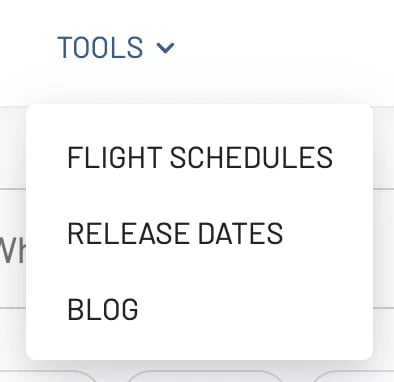
2. Under Tools, select Flight Schedules.
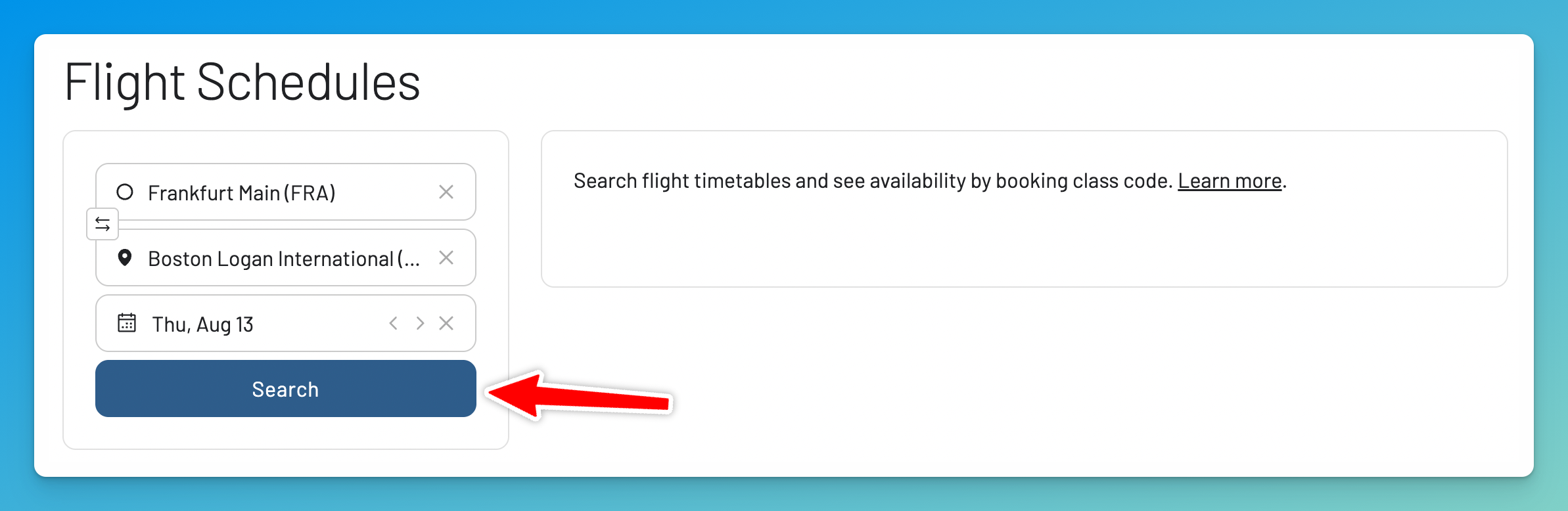
3. Enter Origin, Destination and Date, and hit Search.
Pro Tip: Use Airport Codes
For this advanced tool, it’s crucial to be specific. Always use the three-letter IATA airport code for both origin and destination (e.g., FRA for Frankfurt, BOS for Boston). This ensures you get the exact schedule for that airport, not a metropolitan area.
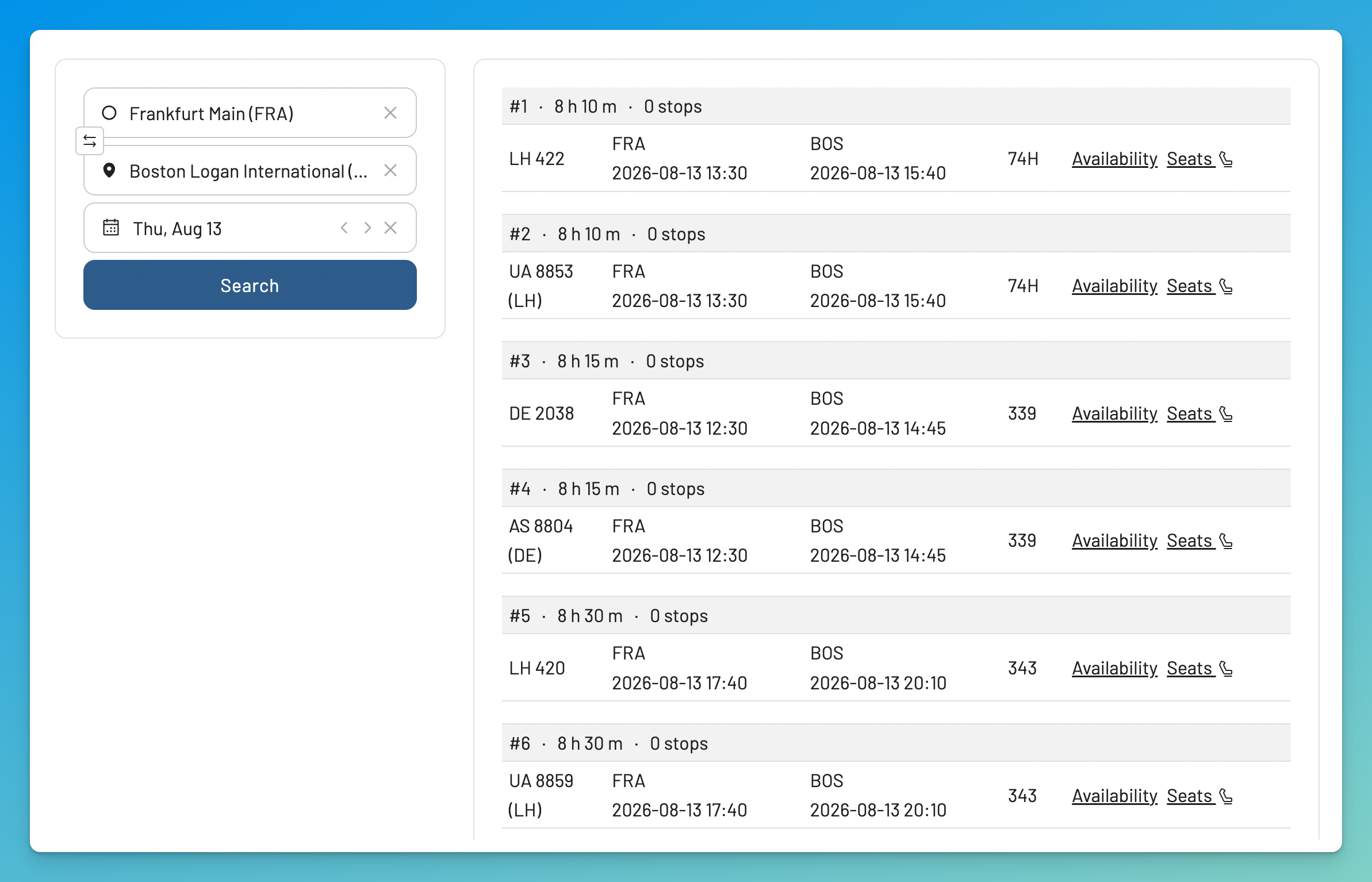
4. Check the results on the right
On the right side of the screen (Desktop) or below (mobile), you’ll see a list of all the flights for that date, including both direct and connecting options.
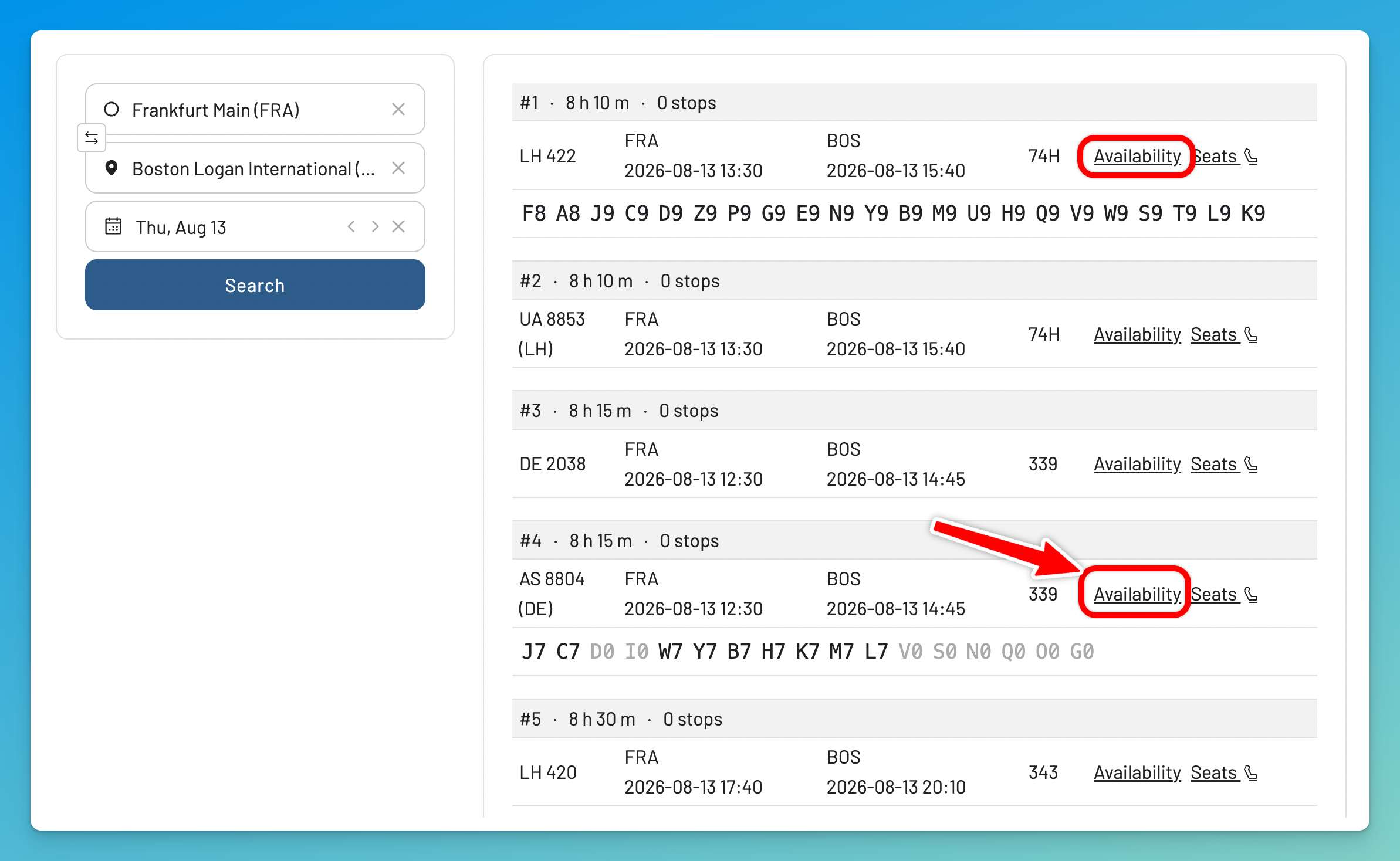
5. Check Real-Time Availability by Booking Class
For more details, click on the Availability link. A new pane will expand below and show you all the availability for each booking class code. A ‘9’ means the airline will sell at least 9 more seats in that booking class; a lower number like ‘4’ means it will currently sell up to 4; ‘0’ means that fare bucket is closed.
One caveat worth understanding: these are sales buckets, not physical seats. Several buckets draw from the same pool of seats, so you can’t add the numbers together to count how many seats are empty. What the codes tell you is what the airline is willing to sell right now — which is exactly what matters for booking a specific fare, chasing an upgrade, or listing standby.
Also: if you check a flight departing within the next few hours, the pane may say “No availability for this flight.” Close to departure this often just means the airline has stopped selling seats online — though it can also mean the flight is genuinely sold out. Search the same flight on a later date and the fare buckets reappear.
6. Tap on Seats to view the seat map (optional).
You will be redirected to our Seat Map Tool, and the flight you selected will be pre-populated for you.
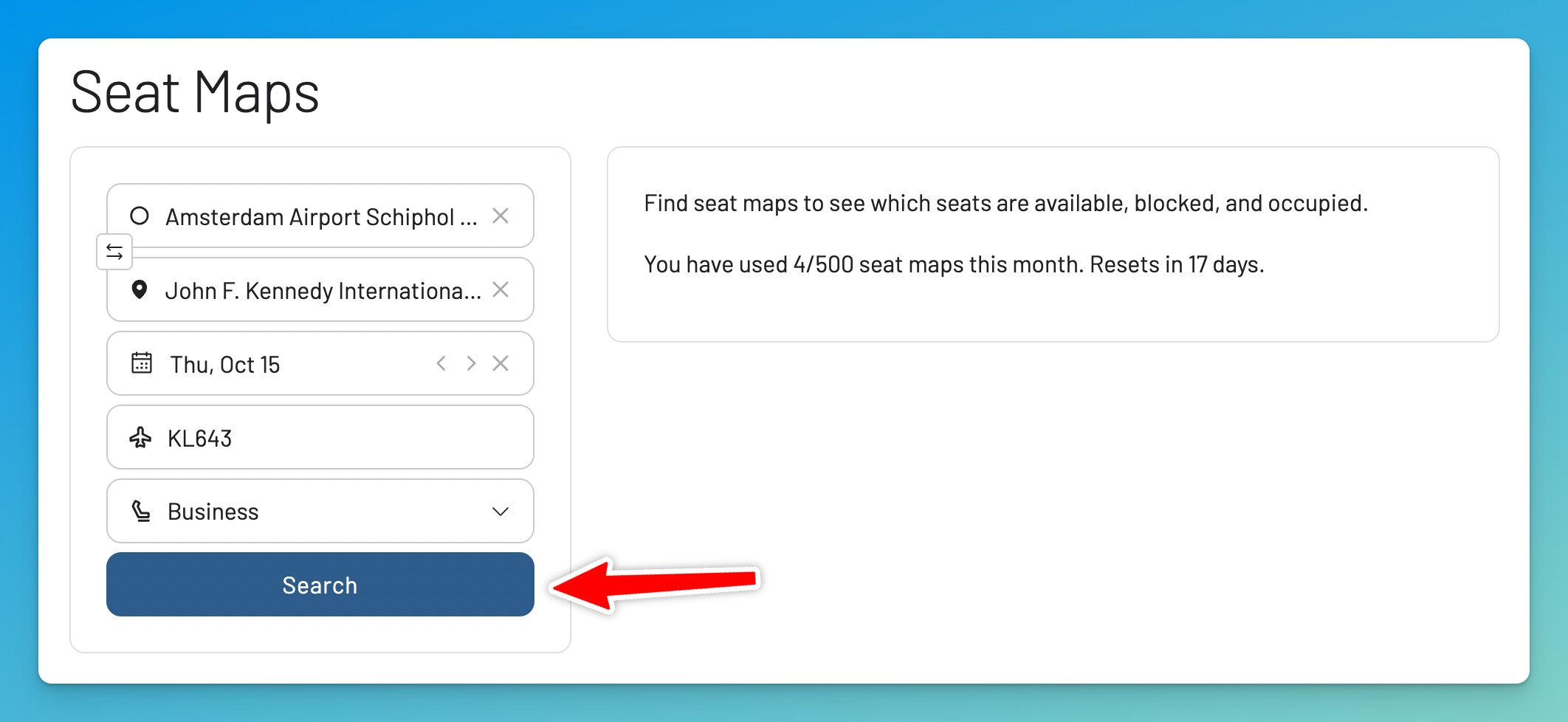
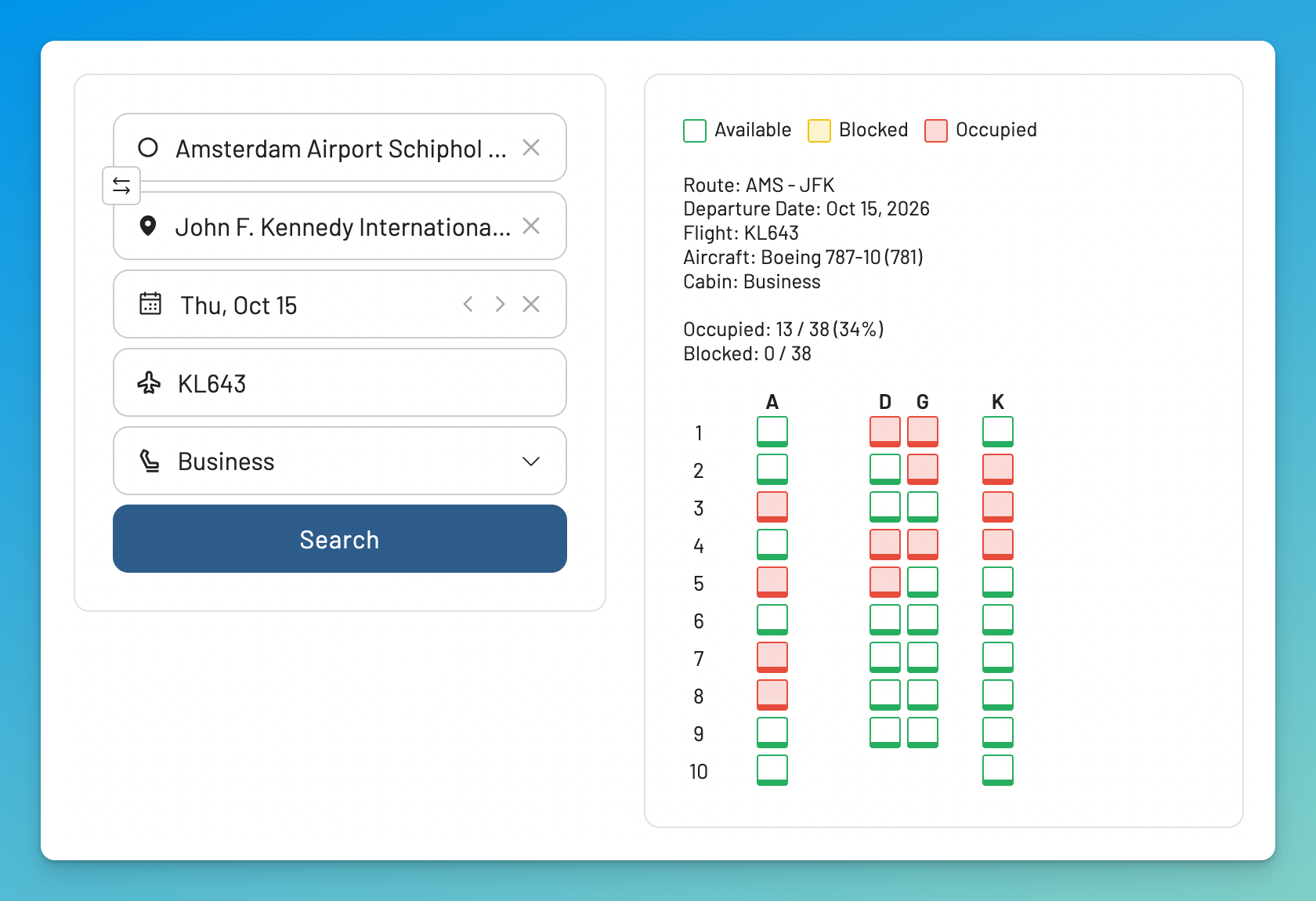
You can hit Search to see the actual seat map for that specific flight and check which seats are available.
Get Started, and Stay Informed
The Flight Schedules tool is a powerful asset for any serious traveler who needs precise, detailed flight information. Whether you’re planning a complex itinerary, tracking a specific fare class, or a staff traveler looking for an edge, it provides the data you need at your fingertips.
With our Gold and Diamond tiers, you can access the Flight Schedules tool and other premium features like unlimited daily searches, alerts, seat maps, and more.
You can try AwardFares for free. We are rolling out new features and improvements regularly, so sign up for our monthly newsletter to stay on top of the latest news, announcements, and pro tips!
Read More
Our guides have all the information you need to be a pro travel hacker and explore the world on points. Here are some related posts you might enjoy:
Frequently Asked Questions
FAQ
What's the difference between a booking class and a cabin class?
Cabin Class is the broad category of service (e.g., Economy, Business, First). Booking Class (or Fare Class) is a more specific sub-category within that cabin, indicated by a single letter, which defines the price and rules of your ticket.
What does booking class Y mean on a flight?
Booking class Y almost universally means a full-fare Economy Class ticket. It is the most expensive and flexible type of Economy ticket, typically allowing for free changes and refunds, and it usually earns the maximum number of miles.
How can I find the booking class codes for a specific airline like United or American Airlines?
The best way is to use a tool like AwardFares’ Flight Schedules. It queries the live system and shows you the exact booking classes and seat counts for any flight you search. Alternatively, some advanced booking websites will show the fare class during the booking process.
Can I use this tool to check myidtravel seat availability?
You can’t check employee-specific availability, but you can use it as a powerful complementary tool. By checking the public seat count in each booking class (e.g., Y9, J9), you get a much more accurate picture of how full the flight is than the general indicators on myidtravel, helping you make a smarter decision about which flight to list for.
What does "9" seats available mean in the availability pane?
In airline Global Distribution Systems (GDS), availability displays are capped at 9, even if more seats are for sale. Seeing a ‘9’ in a booking class means the airline will sell at least 9 more seats in that fare category. A lower number (e.g., ‘4’) means it will currently sell up to 4. Remember these are sales buckets, not a physical seat count — several buckets can draw from the same seats.
What is an RBD?
RBD stands for Reservation Booking Designator — the industry’s official term for the booking class letter. When a fare rule, airline agent, or GDS display refers to your RBD, it means the single-letter code (Y, J, W, etc.) covered in this guide.
What's the difference between a booking class and a fare basis code?
The booking class is the single letter (the RBD). The fare basis code is the longer string on your ticket (e.g., QLA7XSDN) whose first letter usually matches the booking class, followed by airline-specific shorthand for the fare’s season, advance-purchase, and change rules. Two tickets can share a booking class but have different fare bases with different restrictions.
What does booking class W mean?
On most international airlines, W is Premium Economy — it’s the most widely used code for that cabin. The main exception to know: on United, W is a standard Economy fare (United uses O, A, and R for its Premium Plus cabin). Check the airline’s own accrual chart if miles are at stake.
What does booking class Z mean?
Z is discounted Business Class on most carriers that use it, including Air India, United, and Lufthansa. It generally sits below J and C in the Business hierarchy, but the exact change rules and mileage earning depend on the fare and the loyalty program.
Find & Monitor Award Flight Availability
Use AwardFares to instantly search multiple frequent flyer programs. Find available award seats, set up alerts to monitor availability, check flight schedules, view seat maps, and more—all in one place.