 Aeromexico Rewards
 Air Canada Aeroplan
 American Airlines AAdvantage
 Atmos Rewards (Alaska/Hawaiian)
 Azul Fidelidade
 Delta SkyMiles
 Etihad Guest
 Finnair Plus
 Flying Blue (AF/KL)
 GOL Smiles
 Jetblue TrueBlue
 Qantas Frequent Flyer
 SAS EuroBonus
 Turkish Miles&Smiles
 United MileagePlus
 Virgin Atlantic Flying Club
 Virgin Australia Velocity
Our team at AwardFares has over 15 years of experience searching for and redeeming “free” flights across different frequent flyer programs and airlines, and it’s still a challenging game. That’s why we built AwardFares: the most advanced award flight search tool to help travelers like us find the best flight deals with points.
Award travel keeps changing, with more programs adopting dynamic award pricing or expanding it to additional flights. The miles you need can vary considerably between dates and programs, making it harder to know what a reasonable price looks like. Comparing your options matters more when there’s no fixed award chart to use as a reference.
In this guide, we’ll show you how to find cheap award flights with AwardFares, step by step. Follow along with your own trip or our example from New York to London. We’ll choose a program, compare flights, and check the details before booking. If nothing suitable turns up, we’ll show you how to set an alert.
Before You Start
Start with the points or miles you have and a trip you’d like to take. Think about your departure airport, destination, travel dates, preferred cabin, and how many people are traveling. These details help you narrow the search to flights you can actually use. If your plans are flexible, we’ll also show you how to explore other dates and airports.
If you’d like more background on award pricing and when airlines release seats, these guides are optional reading before you start.


What You Need to Follow Along
This walkthrough uses AwardFares Gold or Diamond to run Live Searches and compare award prices. With the free Basic plan, you can preview availability, but you can’t request a Live Search. New customers can try Gold or Diamond free for 24 hours.
How to Find Cheap Award Flights with AwardFares
1. Open AwardFares and Choose Your Program
Open AwardFares Search alongside this guide and sign in. If you don’t have an account yet, create one here.
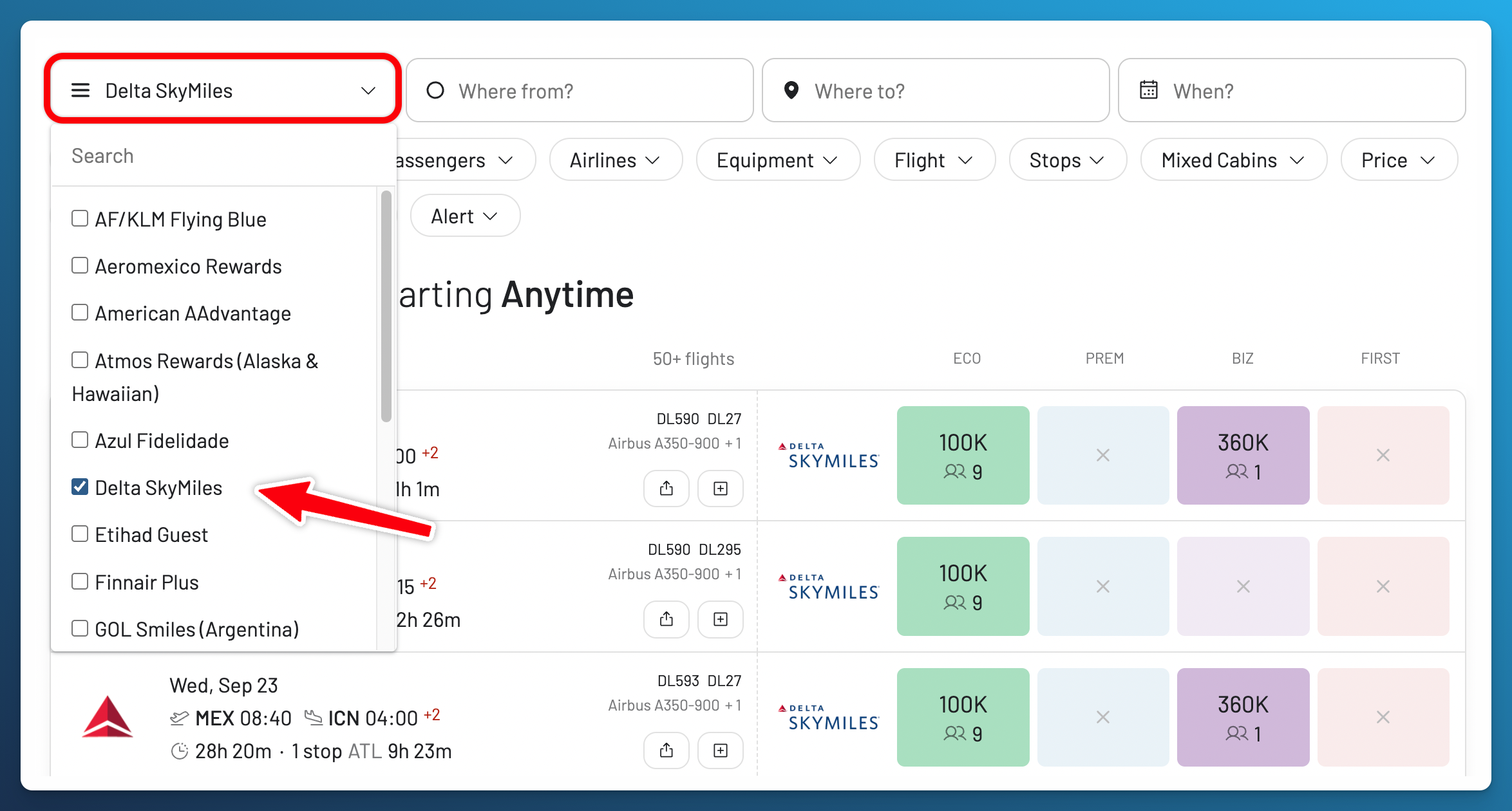
Open the loyalty program dropdown at the top left and select the program whose points or miles you want to use. In our example, we’ve selected Delta SkyMiles.
The loyalty program is where you spend your points and book your award. The operating airline is the airline actually flying the plane, which may be a partner of that program. With SkyMiles selected, your results can include eligible flights operated by Delta and its partners.
If you have bank or credit card points, check your issuer’s transfer partners for your card and country, then select a supported program you can transfer to. You don’t need to transfer points to start searching. Wait until you’ve found a suitable flight and confirmed availability with the booking program.
Start with one program. In step 5, we’ll add others to compare booking options for the same trip.
Don’t see your program? Check our supported programs. If it isn’t listed, search directly on that program’s website.
2. Enter Your Route
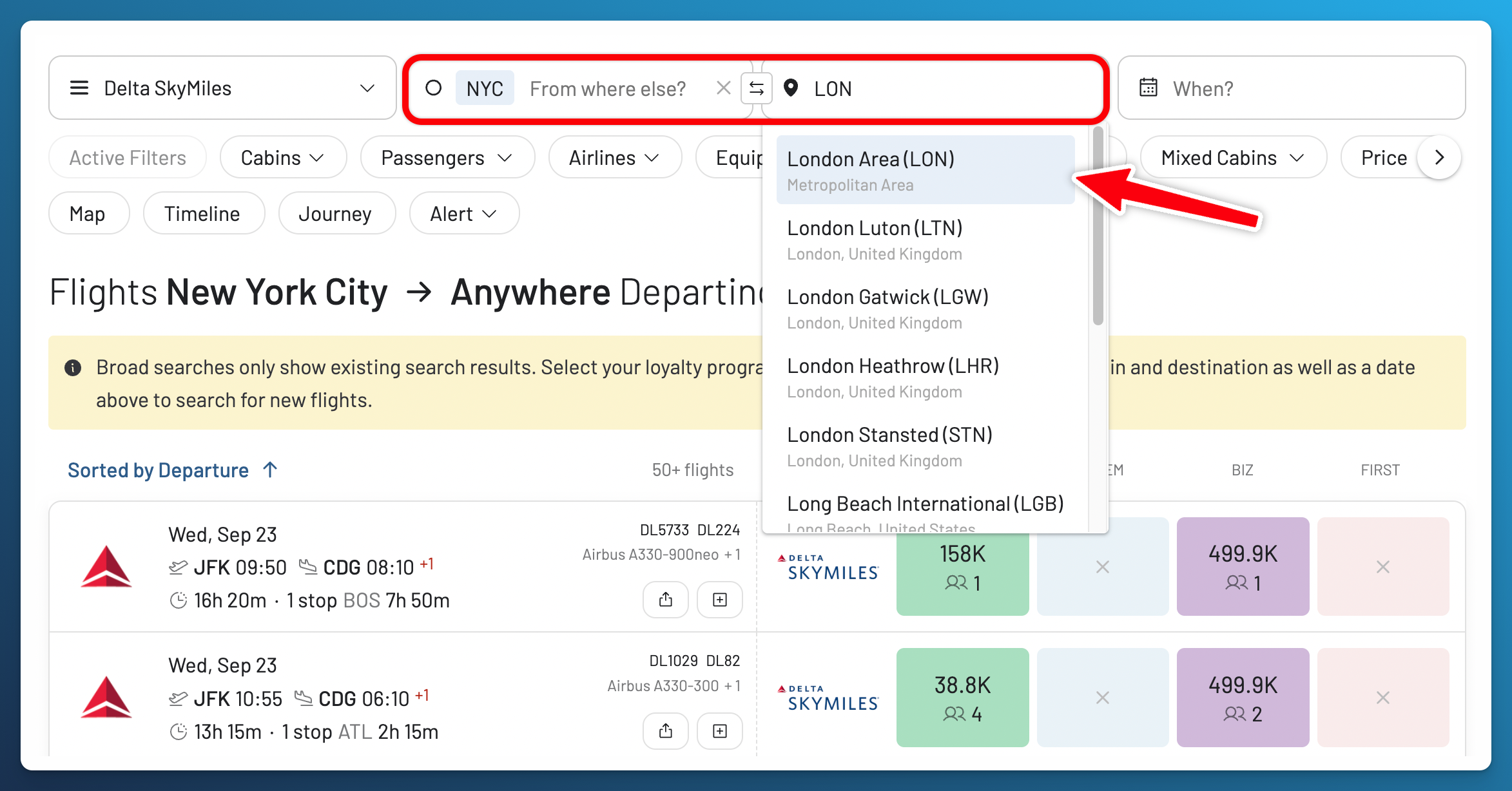
Enter your departure and destination in the search fields. You can search by city name or airport code, then choose an option from the dropdown.
For our example, select NYC as the departure and London Area (LON) as the destination. These metropolitan area options include multiple airports, so you can compare more possibilities without searching each airport pair separately. You can also open our search from New York to London using Delta SkyMiles and follow the steps with us.
If you need a particular airport, select it individually. For example, choose London Heathrow (LHR) to limit your arrival airport to Heathrow. When searching a whole metropolitan area, check the airports in each result and consider the time and cost of getting there.
3. Choose Your Dates
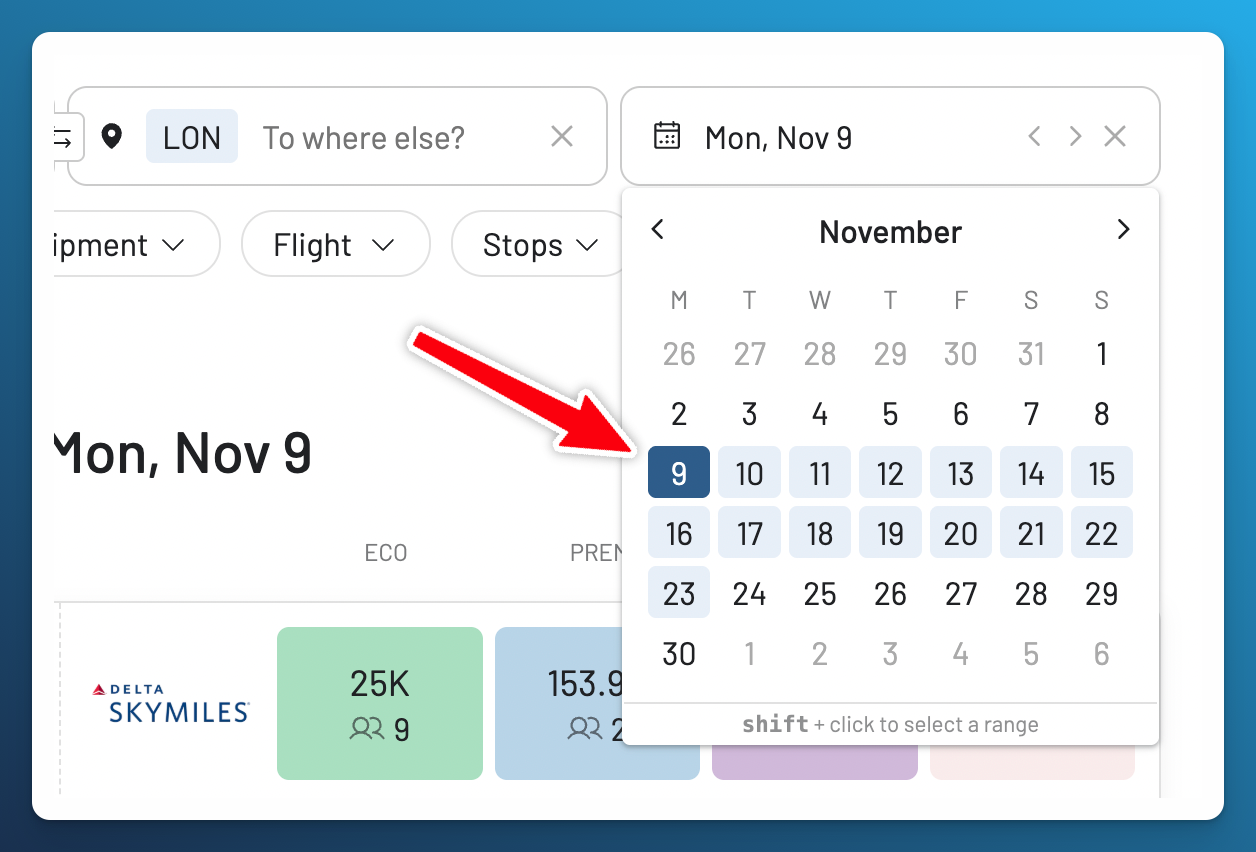
Click When? to open the calendar and select your travel date. We’ll start with November 9. If your plans are flexible, check nearby dates too. Moving your trip by a day or two may reveal a lower mileage price or more seats in the cabin you want. On a computer, hold Shift and click another date to select a range.
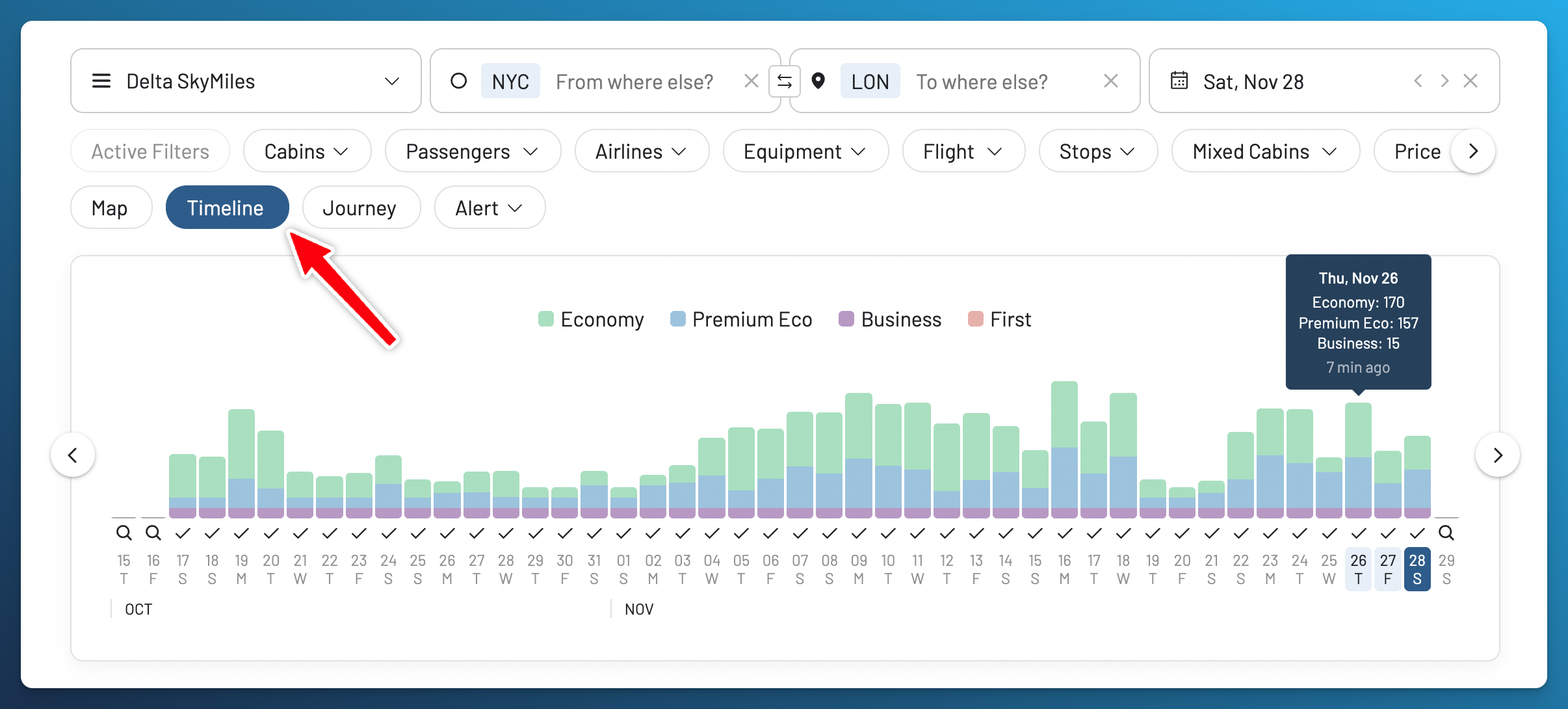
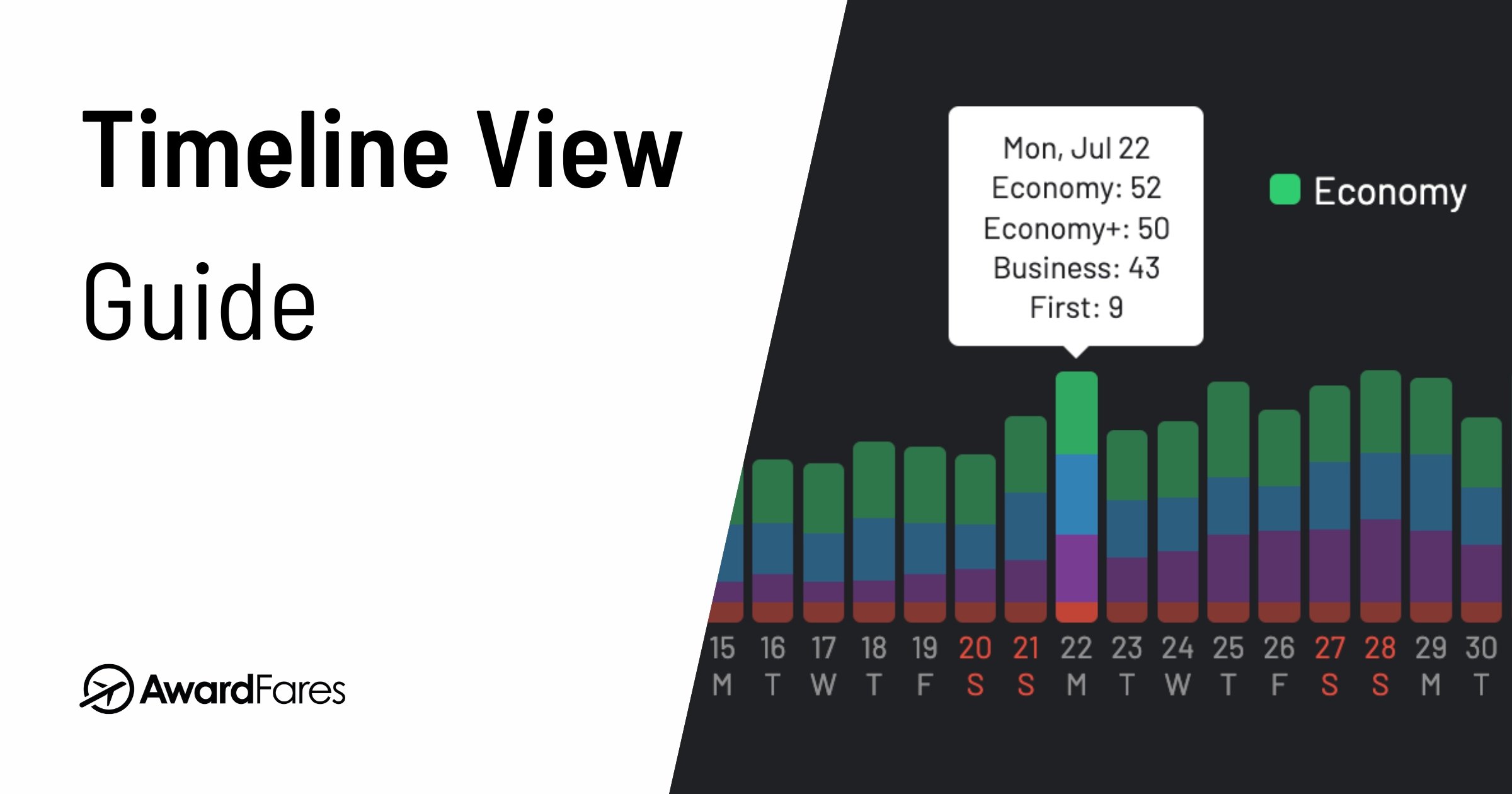
Click Timeline to explore availability across dates. Here, we’ve moved further into November. The colors distinguish Economy, Premium Economy, Business, and First Class. The bars show availability, so use them to identify dates worth checking, then compare mileage prices in the flight results below.
Click the magnifying glass beneath a date to request a Live Search. Previously found seats and prices can change, and a date with no displayed availability may still need to be searched.
More About Timeline View
4. Sort by Price in the Cabin You Want
Once you have results, click Eco, Prem, Biz, or First to sort by mileage price in that cabin. Make sure the lowest prices appear first.
For our example, we’ll start with Economy. Click Eco, then open a result to check the flight details. Look at the airports, connections, available seats, and any cash fees alongside the mileage price.
For the examples below, we’re comparing dates across October and November. To explore a wider range yourself, change your dates in the calendar before sorting again. On a computer, hold Shift and click another date to select a range.
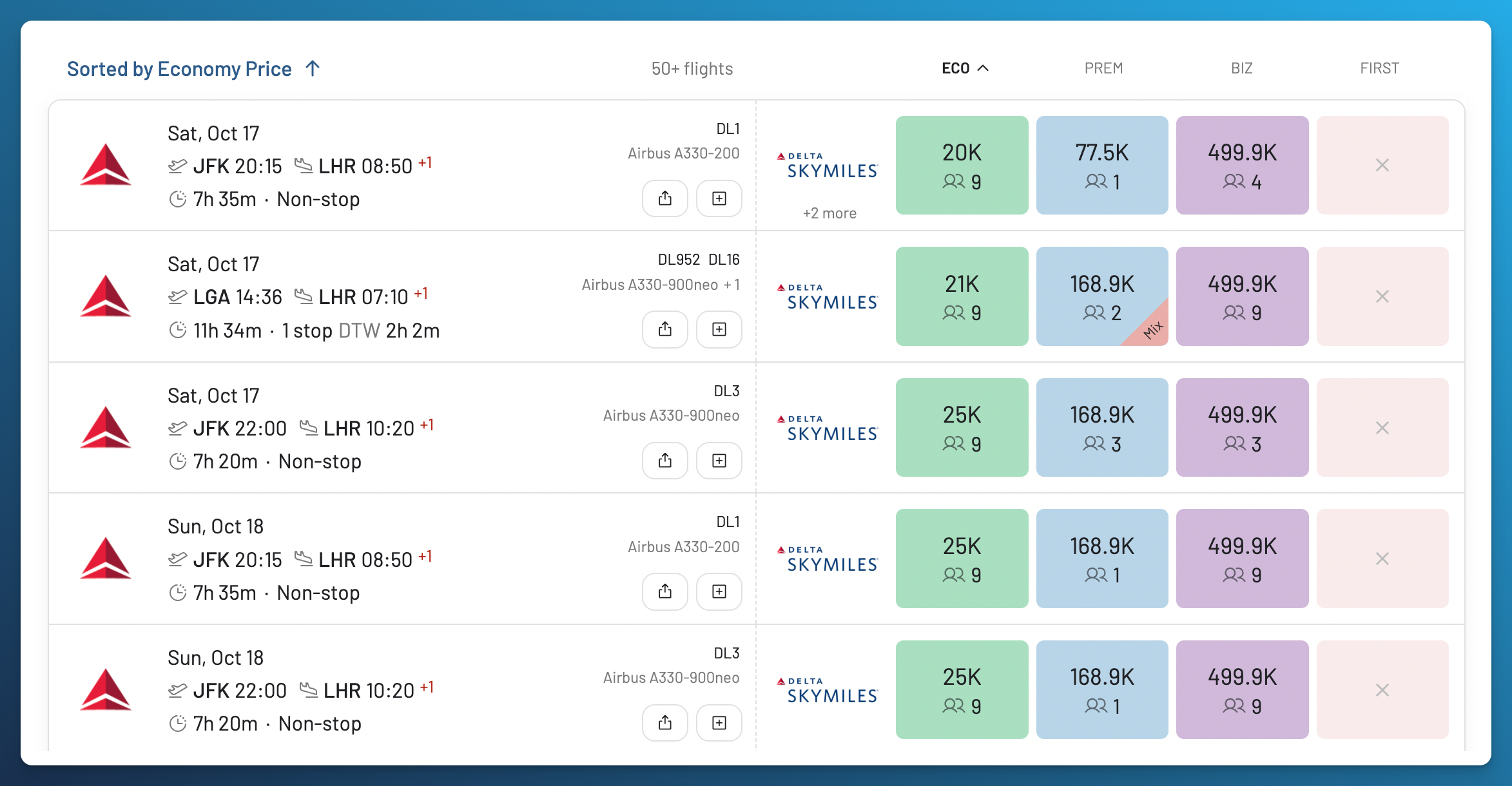
Click Biz to sort the same search results by Business Class price.
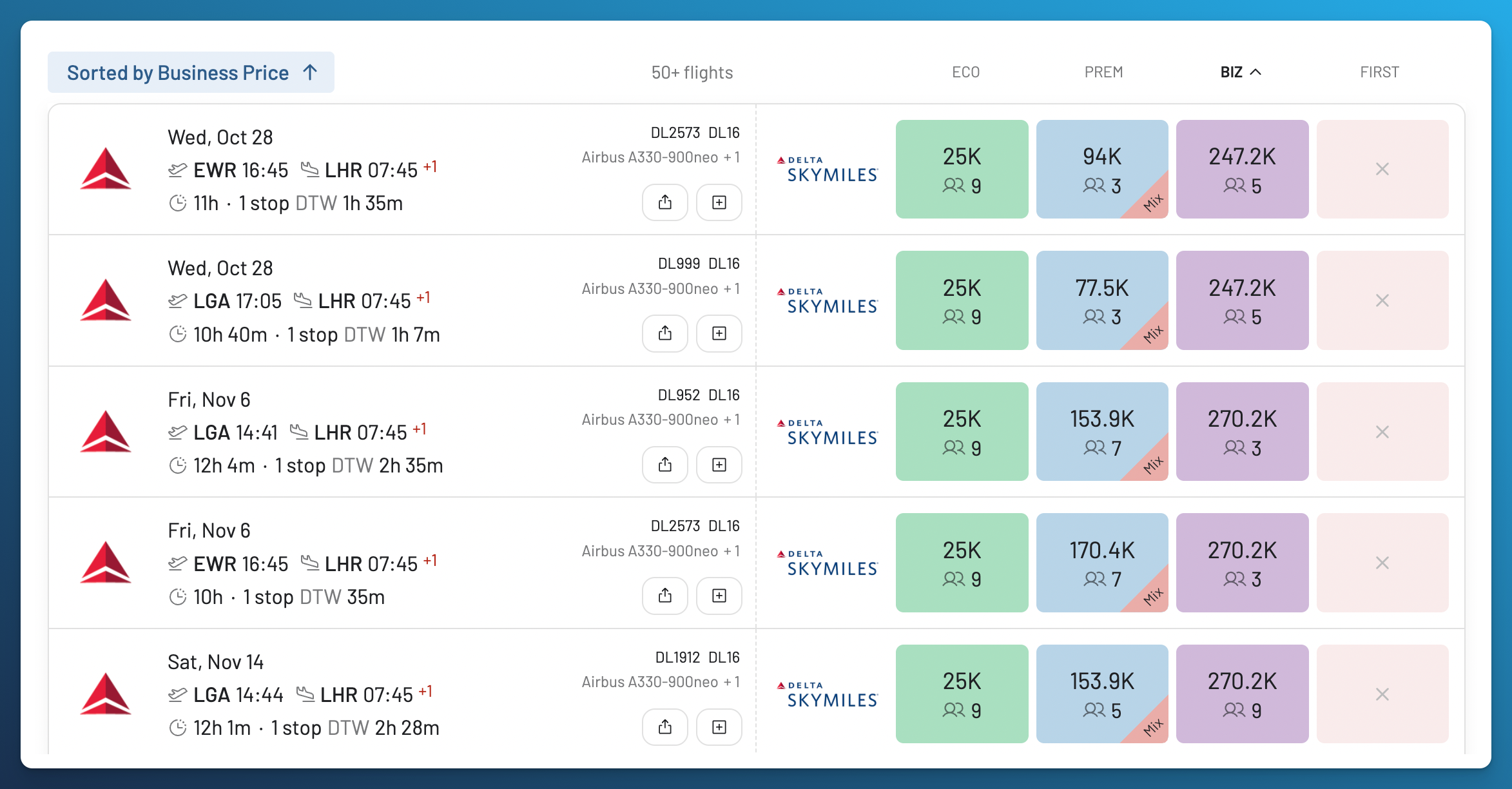
That’s a lot of miles. Sorting shows the lowest prices in your results, but that doesn’t automatically make them a good deal. If the prices are higher than you want to pay, compare another program you can use in step 5, or set an alert in step 7.
You can repeat this for Premium Economy or First Class. We’ll cover what to check in Economy, Premium Economy, Business, and First later in this guide.
Once you’ve sorted the results, you can review a flight that interests you or add other programs to compare more booking options.
5. Compare Programs and Read Flight Details
Comparing programs is optional. If you’re focused on one program, keep it selected and sort by price in your preferred cabin. You can skip the program comparison below and go straight to checking Flight Details. AwardFares lets you compare dates, flights, and cabins within one program, or prices across several programs, all from the same dashboard and results list.
Now let’s see what other programs offer from New York to London. Open the loyalty program dropdown again and add Flying Blue, SAS EuroBonus, and Finnair Plus. Flying Blue and EuroBonus give us more SkyTeam booking options, while Finnair Plus also lets us explore oneworld partners such as British Airways.
Gold lets you search two programs at a time, and Diamond supports up to five. With Gold, compare two, then change your selection to check others.
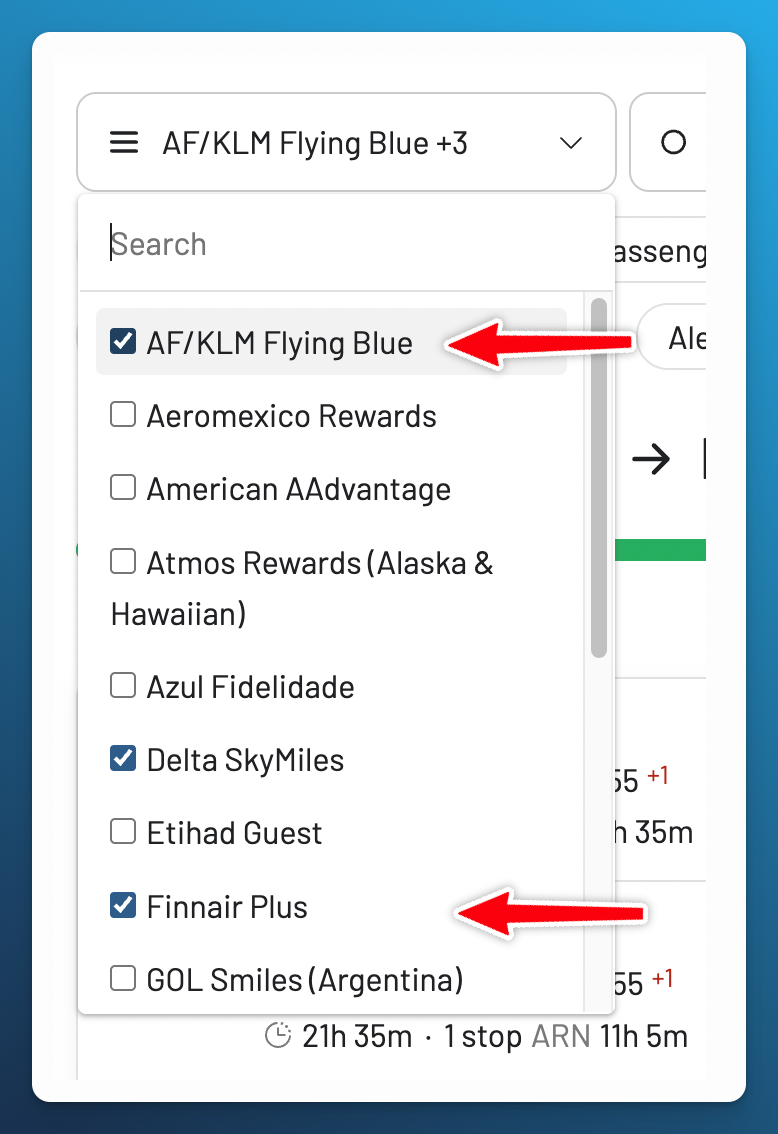
This is especially useful if you have transferable bank or credit card points, such as American Express Membership Rewards, Chase Ultimate Rewards, or Capital One miles. For example, eligible US Amex and Chase customers can transfer to Flying Blue or Virgin Atlantic Flying Club, while Capital One includes Flying Blue and Finnair Plus. Partners and transfer ratios depend on your card and country. Compare prices and confirm availability with the booking program before transferring points.
For this comparison, we’ve selected October 20 and sorted by duration to show shorter journeys first. British Airways BA178 appears at 27,500 Finnair Plus Avios in Economy, while Virgin Atlantic VS26 appears at 12,000 Virgin Points. Both fly from JFK to Heathrow, giving us two different flights to consider for the same trip.
Virgin Atlantic is the airline operating VS26, while Flying Club is its own loyalty program. You can also book eligible seats on that flight through partner programs.
What’s more, the same flight in the same cabin can cost different amounts through different programs. In this example, AwardFares shows four booking options for VS26 in Economy: Virgin Atlantic Flying Club and three partner programs.
| Program | Points or miles shown |
|---|---|
| Virgin Atlantic Flying Club | 12,000 points |
| Delta SkyMiles | 36,100 miles |
| Flying Blue | 23,000 miles |
| SAS EuroBonus | 42,000 points |
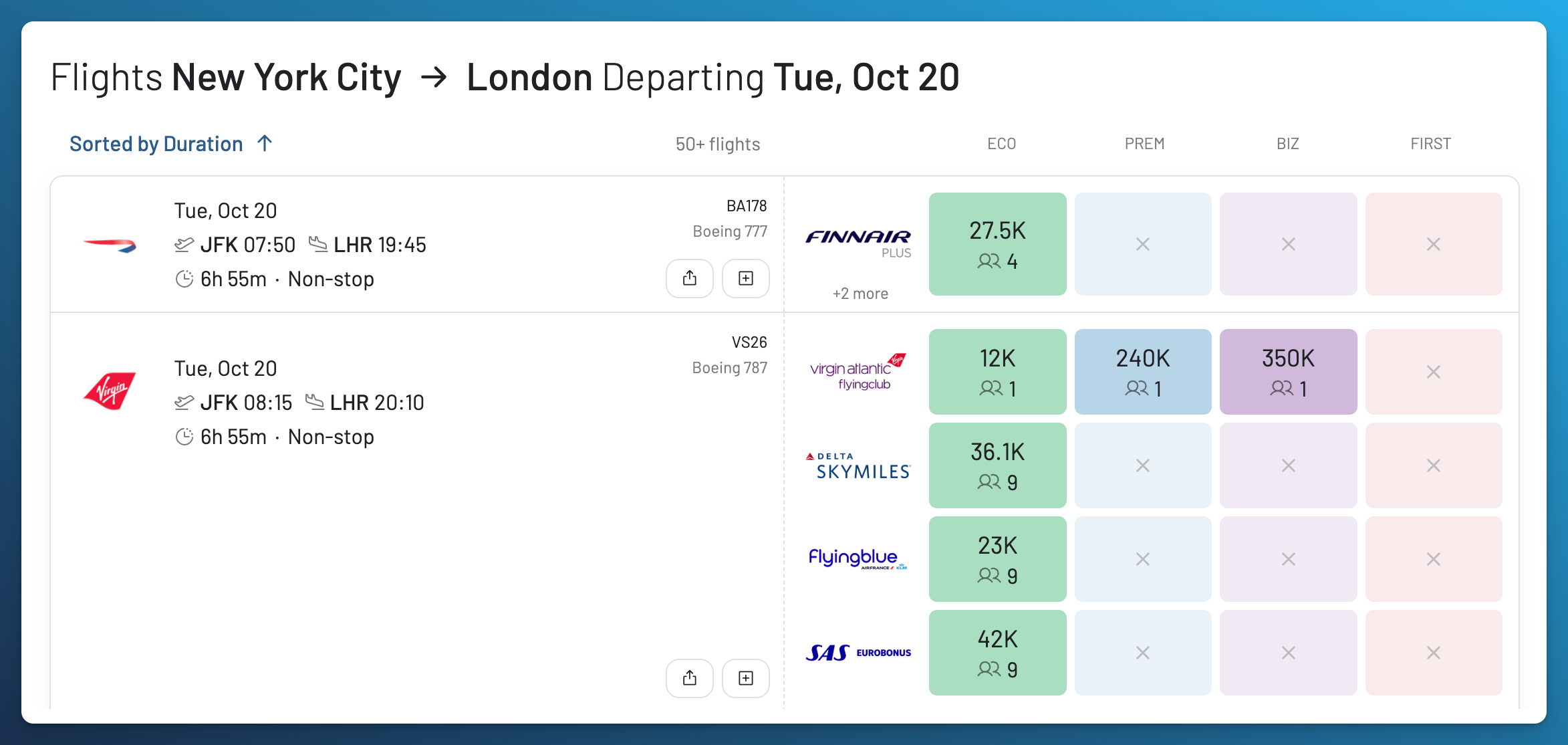
Open a result card or a price to see Flight Details. Choose your cabin and scroll through the booking options to compare the points or miles, cash charges, and available seats.
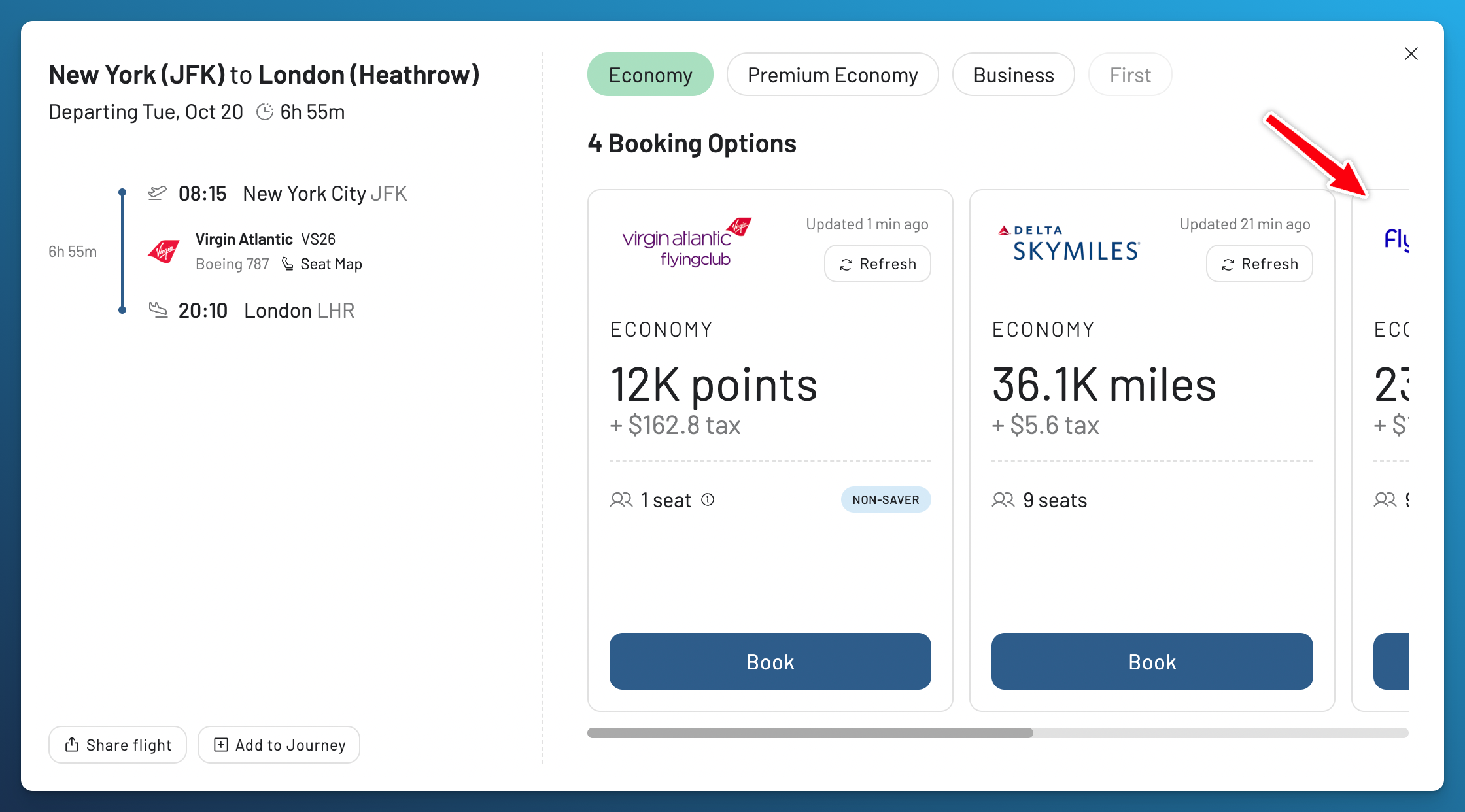
Here, Virgin shows 12,000 points plus $162.80, while Delta shows 36,100 miles plus $5.60. Virgin requires fewer points, but Delta has a lower cash charge. The seat counts matter too: Virgin shows one seat, while Delta shows nine. If you’re traveling with someone, check the price and availability for everyone through the program you plan to use.
Before choosing, check the cabin on each segment and the connection times. A Mix label means the itinerary includes different cabins. You can use the Stops and Mixed Cabins filters to narrow the results to flights that suit your trip.
These prices and seat counts are from our example search and can change. Check when each option was updated and use Refresh to check again within your plan’s limits. If a cash charge isn’t displayed, confirm it with the booking program before deciding.
6. Confirm the Flight and Book with the Airline
Once you’ve found a flight that works for your trip, click Book in Flight Details, or visit the website of the loyalty program you’ll use. For example, if you choose the Flying Blue price for a Virgin Atlantic flight, you’ll book through Flying Blue.
Check that the flight is available for everyone traveling and confirm the total points, taxes, and fees. Review the change and cancellation conditions too. If you need to transfer bank or credit card points, confirm availability first and check the transfer ratio and expected processing time. Availability can change while a transfer is processing.
AwardFares helps you find and compare flights, while the airline or loyalty program handles your booking. If the program’s website doesn’t show the flight, refresh the result and follow our guide to phantom award availability. Some complex itineraries may require calling the program, so have the flight numbers and dates ready.
7. Set an Alert for the Flight You Want
If you haven’t found a flight that works for your trip, set an alert so you don’t have to repeat the search yourself. Alerts are also useful when seats are available but the price is higher than you want to pay.
For this alert example, we’ve returned to Delta SkyMiles only and selected October 29 for our New York to London trip. For your own alert, choose the programs, route, and dates you want to track. Set your preferred cabin and number of passengers, then use the Price filter if you want to limit the points or miles required. Open Alert in the search controls and enable tracking.
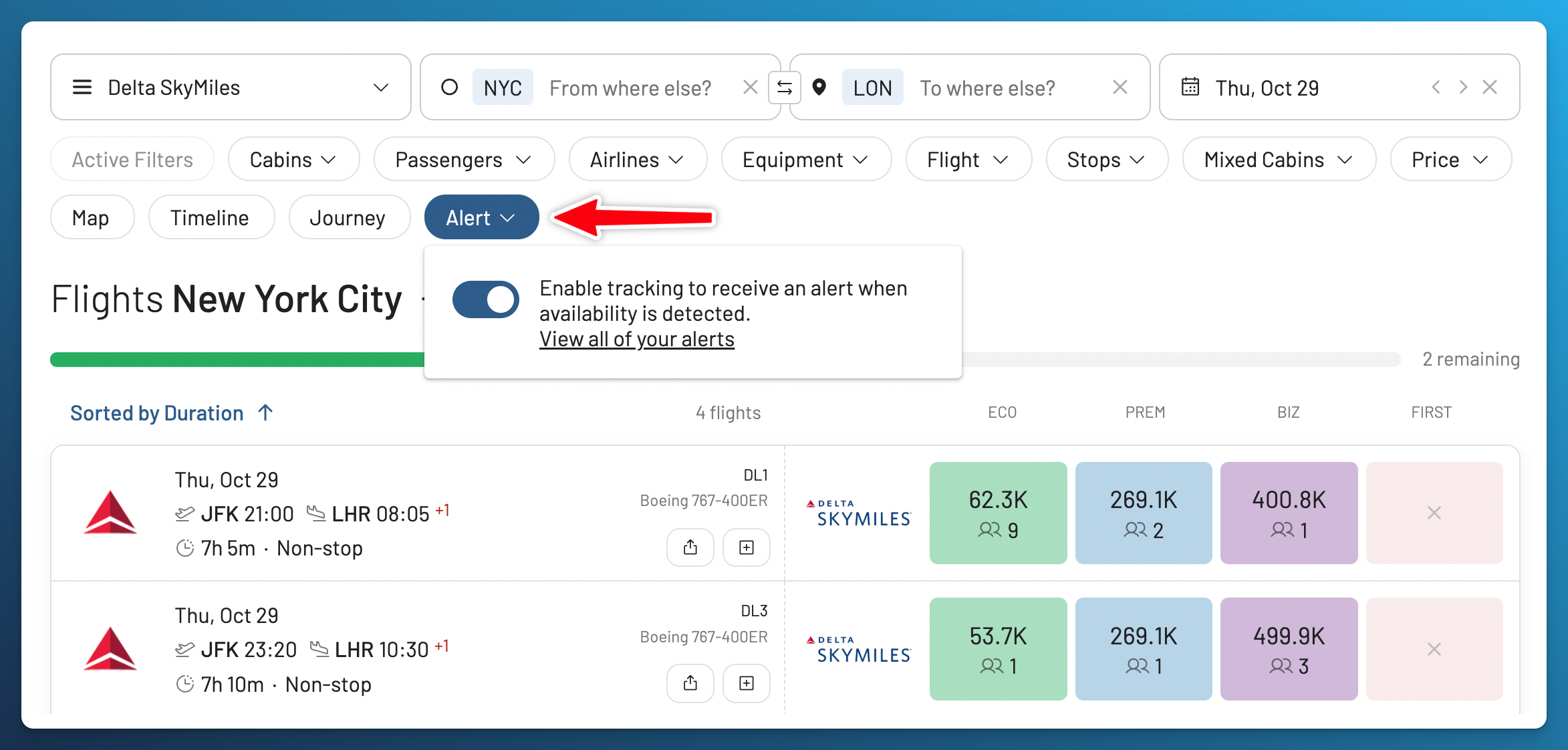
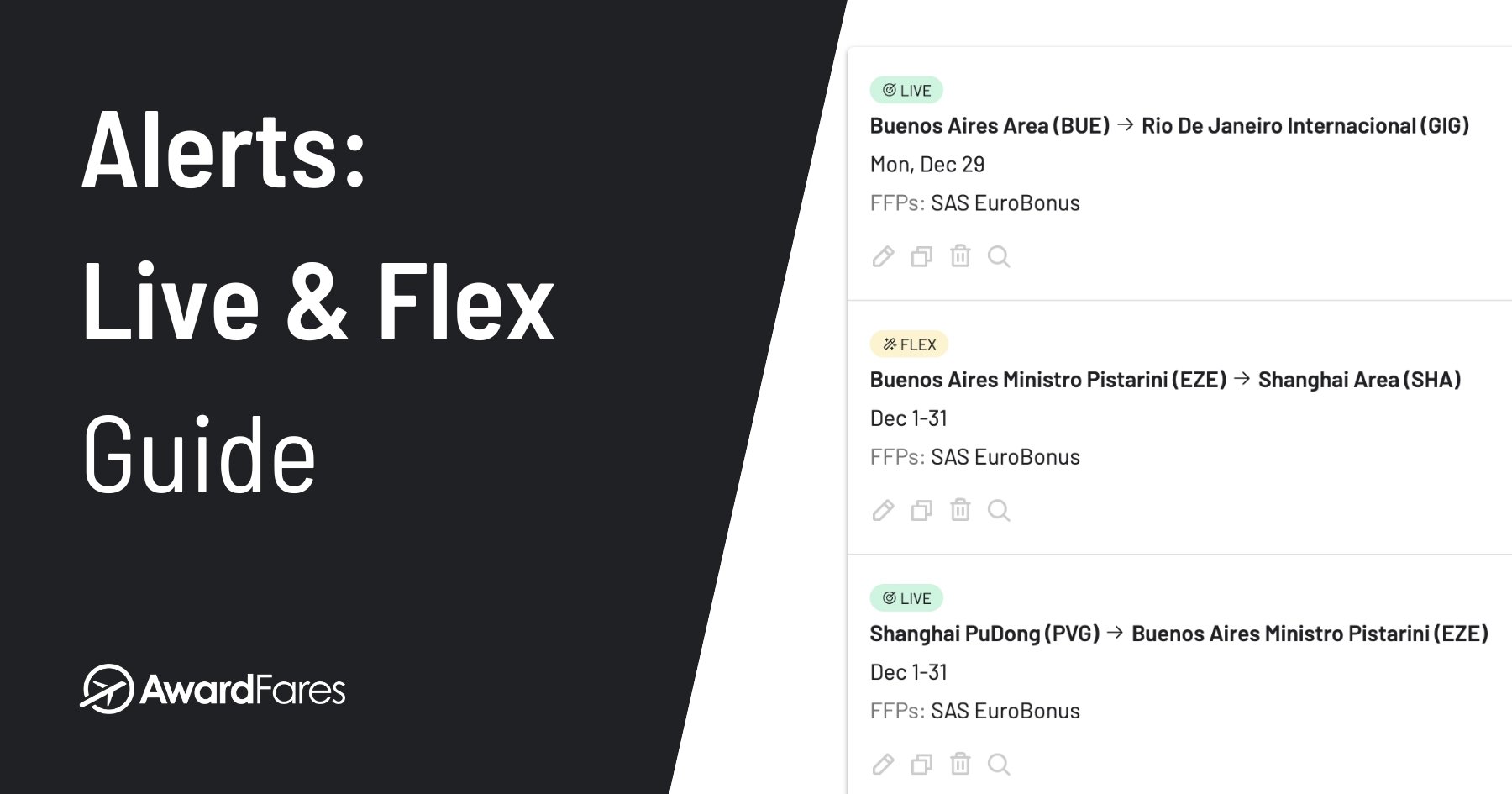
This creates a Live Alert, which regularly searches your selected route and dates. AwardFares sends matching results by email, with optional push notifications. You can review and manage your saved searches from the Alerts page.
If your plans are more flexible, you can create a Flex Alert from the Alerts page instead. Flex Alerts look for matches in availability detected through searches across AwardFares, including broader regions or dates. They send push notifications only.
When a notification arrives, open the result and confirm the price and availability with the booking program before transferring points or booking. An alert helps you find a seat; it doesn’t reserve it.
For the full setup, notification settings, and how each alert counts toward your plan’s allowance, see our guide below.
More About Alerts
Your first search is complete. If you found a suitable flight, finish the checks with the airline before booking. If you saved an alert, watch for a match and confirm it when notified.
The walkthrough ends here. Use the sections below when you need them: cabin advice, award basics, redemption value, or advanced search tips.
What to Check in Each Cabin
The search process is the same for every cabin, but a few details can make a difference when choosing your flight.
Economy Class
Compare the points price with the total travel time. A small saving may not be worth a long connection when a nonstop flight is available. If you’re traveling with others, check the price and availability for everyone through the program you’ll use.
Premium Economy
Check the cabin on each segment, especially the longest flight. A result with a Mix label includes different cabins, so part of the trip may be in Economy. Open Flight Details to see where you’ll actually travel in Premium Economy.
Business Class
Make sure the main flight is in Business Class, then compare the points and cash charges across programs you can use. The lowest price in your search isn’t automatically a saver award. We explain saver and dynamic awards below.
First Class
Check which flight offers First Class and look at the airline, aircraft, and cabin layout. A short domestic flight in First and an international First Class cabin can be very different experiences. These details help you decide whether the extra points are worth it for your trip.
Understanding Award Flights and Availability
What Are Award Flights?
Award flights, also called reward flights, use frequent flyer miles or points toward the ticket instead of a cash fare. You can earn those rewards through flying, eligible credit card spending, hotels, and other partners. Taxes and fees still apply, and they can be substantial.
Programs price awards in different ways:
- Fixed award charts set mileage prices by region, distance, cabin, or a combination of these.
- Dynamic pricing varies the miles required with factors such as demand, dates, and sometimes cash fares.
A program can use different models for its own flights and partner awards. Our award charts guide explains how to compare them.
What Is Award Availability?
Award availability means seats a loyalty program lets you book with miles or points. A flight with seats for sale may have no awards available through your program. Partner access can also differ by route and cabin.
Saver and Nonsaver Awards
Some programs distinguish between saver awards and other awards that require more points or miles. The names and rules vary by program, and the lowest price in your results isn’t automatically a saver award. Compare the points, cash charges, and flight details before deciding whether an option works for your trip.
Is This a Good Redemption?
Finding a low points price is a good start, but the flight also needs to work for you. Check the airports, travel time, cabin, and availability for everyone traveling. Saving a few thousand points may not be worth a long connection or an extra overnight stay.
Compare the total points and cash required with a cash ticket you would actually consider buying. Include taxes, fees, and any extra travel costs. If the cash fare is low, paying for the ticket and keeping your points for another trip may make more sense.
Your priorities matter too. A nonstop flight with your family or a comfortable seat on an overnight journey can be worth spending more points. There isn’t one mileage price or redemption value that makes a flight a good choice for everyone.
Advanced Tips for Finding Cheap Flights with Points
Try Other Departure and Arrival Airports
If you’re not finding any flights you like, try another airport. In our example, selecting New York City and London Area lets us search several airports at once. You can also check nearby cities if you’re happy to travel a little farther.
Before choosing, think about how you’ll get to and from each airport. Using fewer points may mean paying for a train, another flight, or a hotel. Add those costs before deciding whether it’s a better deal.
If you book a separate flight to get there, leave plenty of time between flights. You may need to collect your bags and check in again. If the first flight is delayed, the next airline may not be required to rebook you.
Metro Area Search helps you search airports around the same city. If you’re open to more destinations, Broad Search lets you explore flights across countries or continents using results already found in AwardFares. Check your chosen route and dates again before booking.
Explore More Airports and Destinations


Try Other Travel Dates
If your dates are flexible, check a few days before and after your preferred departure. You may find a flight that costs fewer points, has more seats, or gets you there without a connection. Use Timeline View to explore dates, then compare prices in the results list.
If you’re planning a trip around a holiday or school break, try dates outside that busy period too. Award prices can change a lot from one day to another, so compare the actual results instead of assuming a certain day of the week will always be cheaper.
Even a small change can help. If your dates are fixed, keep them selected and set an alert for the flight you want.
Start Looking Early and Keep Checking
Start looking when you know where and when you want to travel. If your dates aren’t available to search yet, check when your airline or loyalty program opens its booking calendar.
You can also check again closer to departure. More award seats may become available, but there’s no guarantee that the flight you want will appear or cost fewer points. Set an alert if you’re still looking.
If you find a flight that suits your plans and budget, you don’t need to wait for a supposedly perfect time to book.
When Do Airlines Release Award Seats?
Check Each Flight in a Connecting Trip
If your trip needs a connection and you’re not finding results, try searching for each flight separately. This can help you see which part of the trip has available seats and where you may need to try another date or airport.
Then check the complete trip with the program you’ll use to book. Finding seats on both flights doesn’t always mean you can book them together as one award. The program’s booking rules still apply.
Journey Planner helps you save the flights you’re considering and see how they fit together.
Plan the Whole Trip

Why Connections Can Change Availability
Sometimes, an airline offers an award seat only as part of a connecting trip. You might find it when searching for the whole journey, but not when searching for that flight on its own. This is called married segment logic.
That’s why it helps to check both the individual flights and the complete trip. If a seat only appears as part of a connection, don’t assume you can book that flight separately. Search for the trip you actually plan to take, and plan to fly every part of the booking.
More About Married Segments

Use Your Miles on Partner Airlines
Your miles may let you fly with more airlines than you think. In our example, we found a Virgin Atlantic flight priced in Delta SkyMiles. You don’t always need miles with the airline flying the plane.
This is useful even if you’re only using one loyalty program. Its partner airlines may give you more flights, routes, and cabins to choose from.
The options depend on your program and which award seats its partners make available. Check the programs supported by AwardFares or explore our Star Alliance, oneworld, and SkyTeam pages. The guides below explain how to find award flights with each alliance.
Search by Alliance



Check Seat Maps and Flight Details
If you’re choosing between flights that cost about the same, check the aircraft, cabin layout, and connection times. These details can help you decide which flight works better for you.
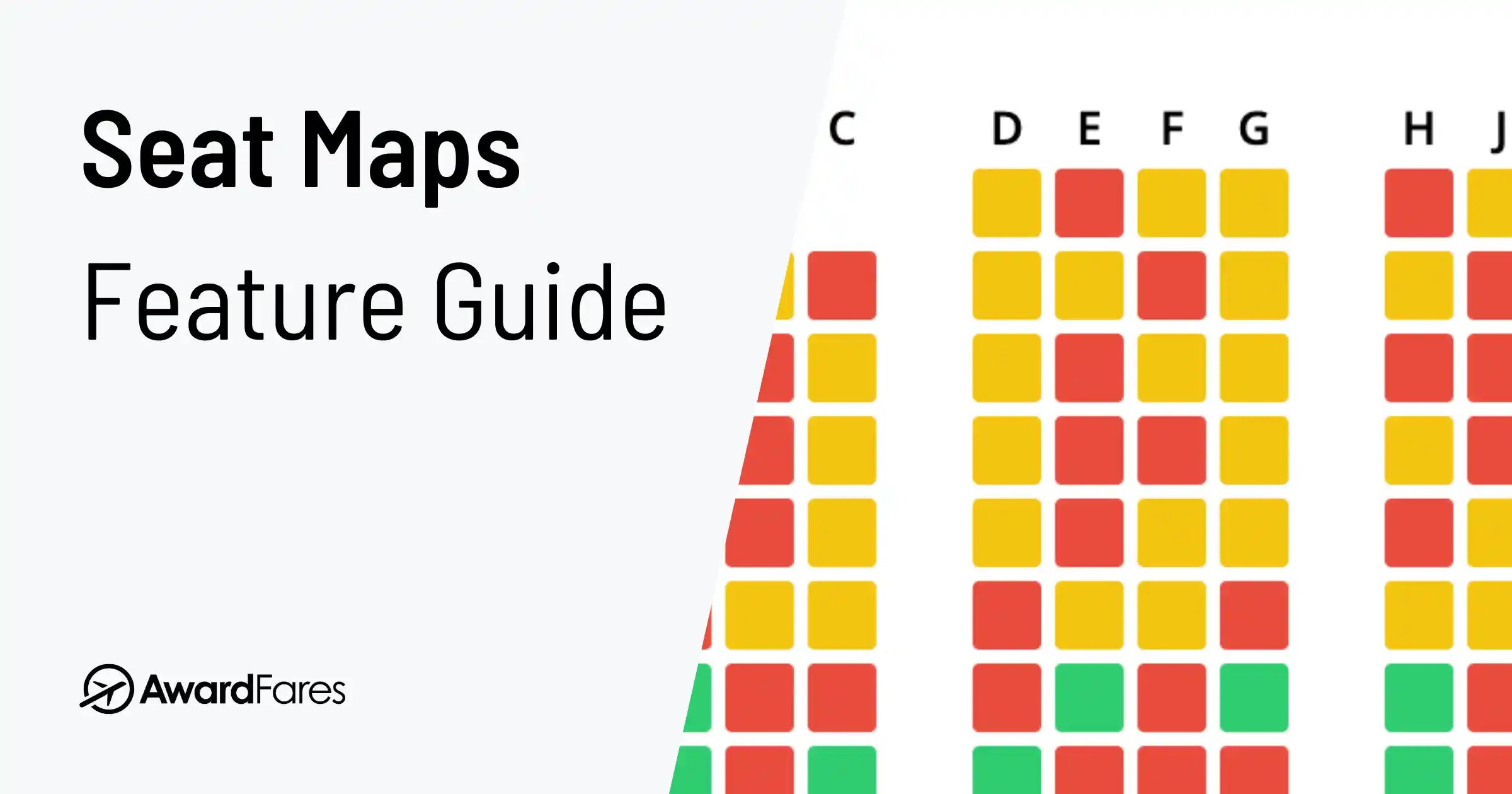
Open Flight Details and select Seat Map, when available. Our Live Seat Maps let you check the layout and seat assignments before you book, which is useful if you want a window seat or hope to sit together.
An empty seat on the map doesn’t necessarily mean you can book it with points. Use the award search results to check award availability, and confirm your seat selection options with the airline.
Explore Seat Maps
Frequently Asked Questions
Can I search award flights with AwardFares for free?
You can use the free Basic plan to preview award availability. To run Live Searches for your trip and set alerts, you’ll need Gold or Diamond. New customers can try either plan free for 24 hours. See our plans and pricing to compare what’s included.
Why can't I find award availability for my desired flight?
First, check your selected program, dates, cabin, and number of passengers. Remove any filters you don’t need, then run a Live Search.
Your program may not have award seats for that flight, or it may be too early to book your dates. If your plans are flexible, try nearby dates or airports. You can also check another program if you have points you can use there.
If you’re still not finding any flights you like, set an alert so AwardFares can notify you when matching availability is found.
Why does the airline show a different price or no seats?
Award prices and availability can change between searching and booking. Check that you’re using the same loyalty program, travel date, flights, cabin, and number of passengers on both websites.
Refresh the result in AwardFares, then check again on the website of the program you’ll use to book. Confirm the seats and total price there before transferring points.
How do I book Business Class with points?
Choose a program you have miles in, or one you can transfer points to. Search your route and dates, then click BIZ to sort by Business Class price, with the lowest prices first.
Open Flight Details to check the points required, cash charges, and available seats. If there’s a connection, check the cabin on every flight. A mixed cabin trip may include a flight in Economy.
Confirm availability with the program you’ll use to book before transferring any points, then complete your booking through that program.
How do I find the best flight deals with points?
Search with the program you plan to use and sort by price in your preferred cabin. If your dates are flexible, compare a few different days. If you have points you can use with other programs, compare their prices too.
Check the cash charges, travel time, and connections before choosing. The flight that costs the fewest points may not be the best choice for your trip.
What is the best time to book award flights?
Start looking as soon as you know your travel plans. If it’s too early to search your dates, check when your airline or loyalty program opens its booking calendar.
More award seats may become available closer to departure, but waiting doesn’t guarantee a better price. If you find a flight that works for your plans and budget, you don’t need to wait for a perfect time to book.
Are there blackout dates for award flights?
Some programs restrict award bookings on certain dates. Others have no blackout dates, but that doesn’t mean every flight will have seats you can book with points.
During busy travel periods, you may find fewer options or higher points prices. If your plans are flexible, check nearby dates too.
How do I know if I'm getting a saver award?
Check how the loyalty program labels the award and, if it publishes an award chart, compare the points required. Programs use different names and rules, so the cheapest result isn’t automatically a saver award.
A saver label also doesn’t guarantee the best deal for your trip. Check the cash charges, cabin, and travel time too.
Can I use my miles for connecting flights on partner airlines?
Yes, if your loyalty program offers award seats on those airlines and allows the connection. Search for the complete trip through the program whose miles you’ll use.
If you find seats by searching each flight separately, check whether the program can book them together. You may be able to do this online or by calling the program. Finding both flights separately doesn’t guarantee you can combine them into one award.
More Help with Your Search
Need help with your account or a search? Visit AwardFares Help for answers and instructions.
If you’re planning a more complicated trip, communities such as r/awardtravel can also be useful. Look for recent experiences with the program you’re using, and confirm booking rules with that program.
Compare Award Flight Search Tools

Try It With Your Own Trip
Open AwardFares, choose your program, and search for the trip you have in mind. Compare the options, check the flight details, and confirm availability with the program before booking.
If you’re not finding any flights you like, set an alert so we can notify you when matching availability is found.
For new features and tips on finding award flights, join our monthly newsletter.
Keep Planning
-
 Guide
GuideAwardFares 101: Getting Started
-
 Guide
GuideThe Ultimate Guide to Flight Availability Alerts for Award Travel
-
 Guide
GuideTimeline View: Search For Award Flights In Real Time Across Multiple Dates
-
 Guide
GuideJourney Planner: Building Perfect Award Trips To Difficult Destinations
-
 Guide
GuideAirline Seat Maps: Your Guide to Getting the Perfect Seat
Find & Monitor Award Flight Availability
Use AwardFares to instantly search multiple frequent flyer programs. Find available award seats, set up alerts to monitor availability, check flight schedules, view seat maps, and more—all in one place.