 Aeromexico Rewards
 Air Canada Aeroplan
 American Airlines AAdvantage
 Atmos Rewards (Alaska/Hawaiian)
 Azul Fidelidade
 Delta SkyMiles
 Etihad Guest
 Finnair Plus
 Flying Blue (AF/KL)
 GOL Smiles
 Jetblue TrueBlue
 Qantas Frequent Flyer
 SAS EuroBonus
 Turkish Miles&Smiles
 United MileagePlus
 Virgin Atlantic Flying Club
 Virgin Australia Velocity
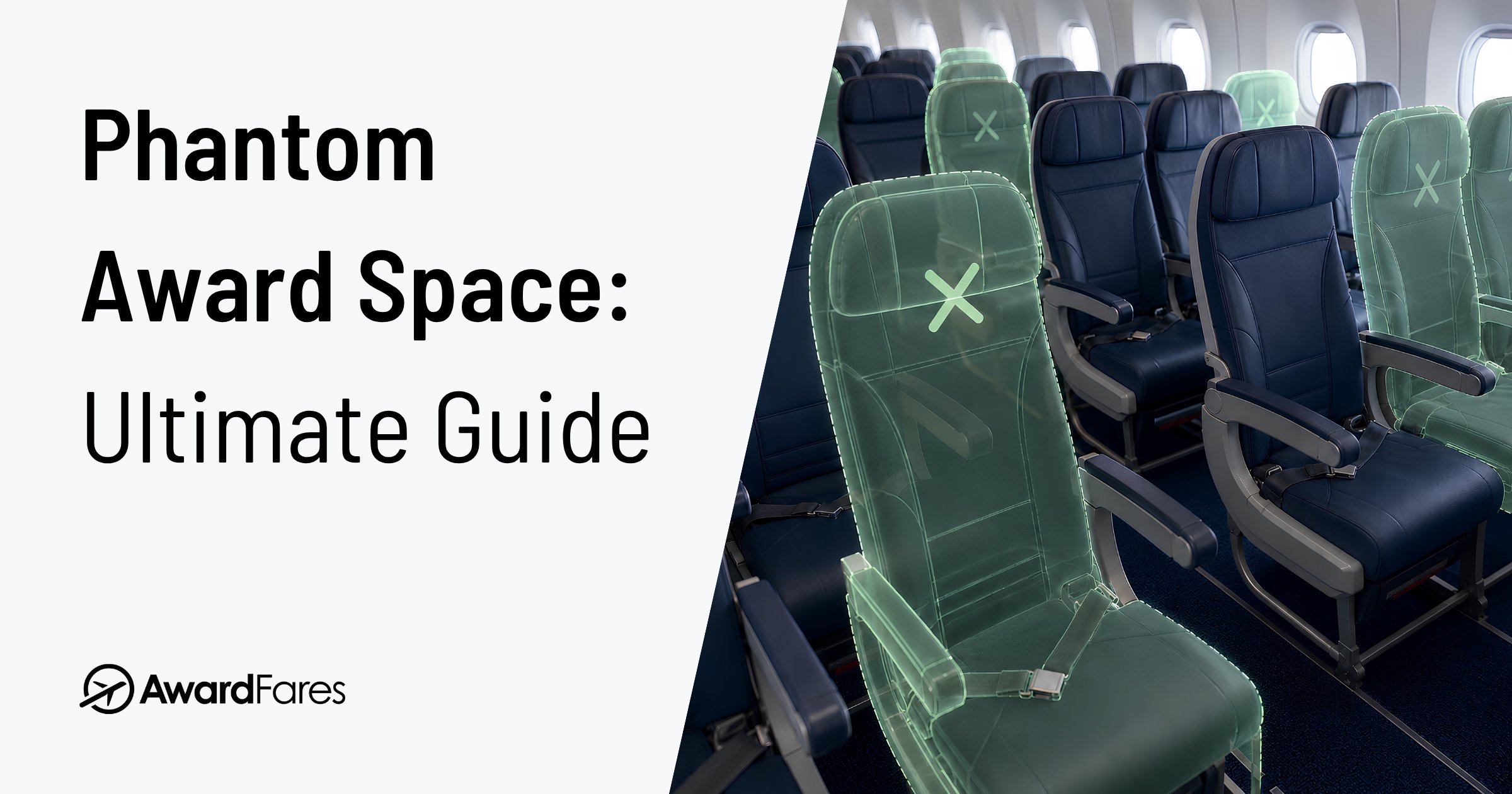
You find the perfect award seat. Business class, the right date, bookable with the miles you already have. You fill in the passenger details, hit confirm, and the page shows an error. You search again, and the seat is gone. It was never really there.
That seat was phantom award space: availability that shows as bookable but cannot actually be booked. Some people call it phantom availability, others ghost availability. Whatever you call it, the expensive part is not the error on screen. It is what happens next, especially transferring points you cannot get back for a seat that was never there.
Key Takeaways
- Phantom award space is availability that looks bookable but isn’t. The seat shows up in a search, then errors out or vanishes when you try to book it.
- Most cases come down to two things. Either the seat was never sellable to you, or the data you are looking at is stale.
- The real danger is transferring points. Most transfers are one way. Confirm the seat is genuinely bookable before you move miles into a program.
- You can learn to spot it. Suspiciously many premium seats, space only one partner can see, and deals that look too good are all red flags.
- We fight it hard at AwardFares: We cache far less than typical award tools and show exact seats per program, so the availability you see is far more likely to be availability you can actually book.
What Changed in 2025 and 2026
A few recent moves made phantom space worse, and a current guide has to account for them:
- United pushed almost all Polaris business saver into a member-only bucket in December 2025, so Star Alliance partners now rarely see bookable United business saver.
- American cut its award hold from five days to 24 hours in 2025.
- Lufthansa began opening its new Allegris First and Swiss’s new Senses First to its own Miles & More members in late 2025, but partners still cannot book either.
- SAS left Star Alliance for SkyTeam in September 2024, which retired the Ethiopian example below.
- Aeroplan moved several partners, including United, to dynamic pricing in 2025, adding “phantom pricing” to the mix.
What Is Phantom Award Space?
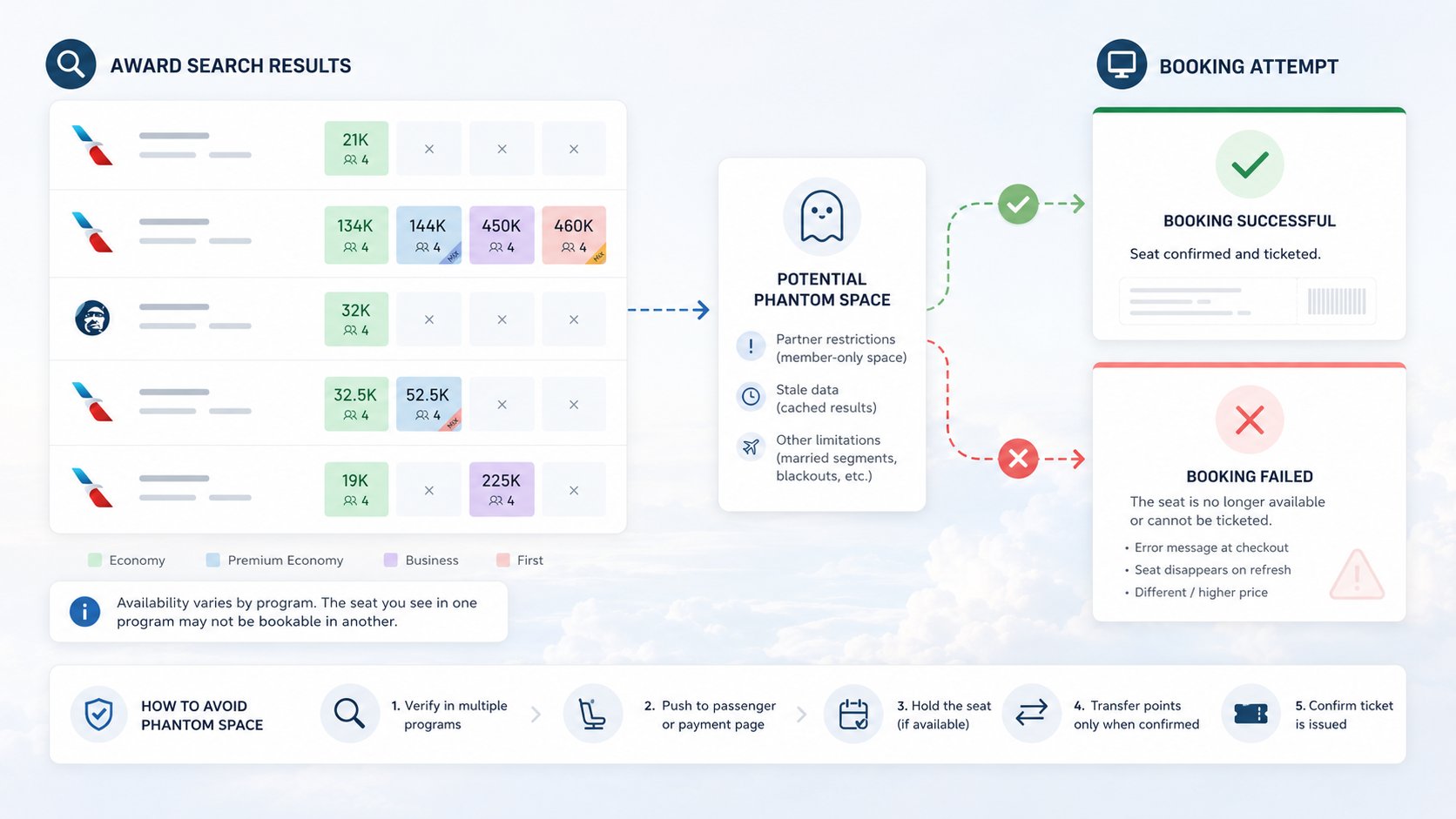
Phantom award space is award availability that appears bookable in a search but cannot actually be ticketed. You see the seat, you start the booking, and at some point the airline refuses it: an error at checkout, a price that suddenly jumps, or the seat simply disappearing on your next search.
The frequent flyer community uses a few names for the same thing:
- Phantom award space and phantom availability are the common ones.
- Ghost availability is an older synonym (we used it ourselves in the past).
- You will also see phantom flights, or ghost seats.
They all describe the same gap: a number on a screen that does not match what the airline will sell you.
The key distinction runs through this whole guide: a seat count in a search result is a lead, not a guarantee. It tells you where to look. Whether you can actually book it depends on a second layer of airline rules that most search tools never see.
For a broader explanation of live, cached, indexed, and recently found results, see our guide to award flight search tools.
Phantom Space vs. Phantom Price
These are two different failures, and they often get confused. Phantom space is a seat that will not book at all. Phantom price is a seat that books, but not at the number you expected, because a growing number of programs price partner awards dynamically. Aeroplan led the way, and now advertises “starting at” rates you often cannot actually find. This guide is mostly about phantom space, but the fix for both is the same: confirm the real, bookable price all the way to the final checkout page.
Reasons Why Phantom Space Exists
There are several reasons for why phantom space exists, but almost every case can come down to one of two things. Either the seat was never available, or the data you are looking at is out of date. Keeping these two families apart is the key to predicting when a seat is likely fake, and it is something most explanations skip entirely.
When the Seat Was Never Yours to Book
Airlines do not treat all award seats equally, and they do not share them equally. Several rules can put a seat in front of you that you were never allowed to book.
Married Segments
Married segments are the classic one. Airlines often sell connecting flights as a bundle, releasing award space for a full itinerary (say, New York to Amsterdam to Stockholm) that they will not release for the standalone leg (New York to Amsterdam).
A tool that probes the network one segment at a time can surface space that only exists as part of the married pair. Try to book the piece on its own and it errors out. We wrote a whole guide on how married segments work, because they work in both directions: sometimes they hide space, sometimes they create it.
Partner restrictions
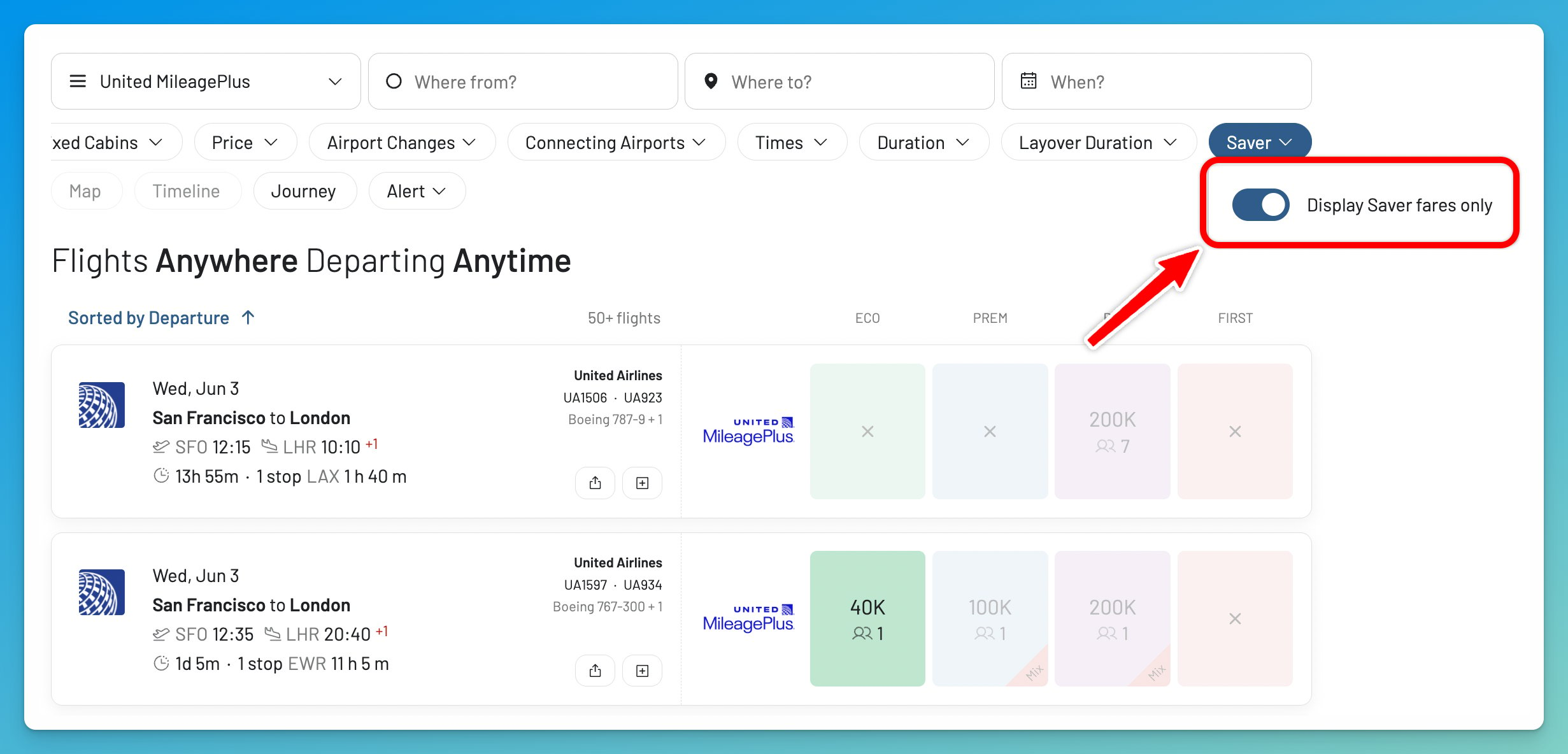
Partner restrictions are the next big one, and United is the cleanest example, especially after 2025. Star Alliance partners can traditionally book United saver space in the X bucket (Economy) and the I bucket (Business and First). United also files extra saver space as XN (Economy) and IN (Business and First), expanded buckets open to its co-branded cardholders and elite members. XN and IN are MileagePlus-only: no partner can book them, and you cannot either when searching logged out. That part is just a quirk.
But in December 2025 United pushed almost all of its Polaris business saver into that member-only IN bucket, so partners now rarely see bookable United business saver at all, even when united.com shows seats. Even standard X economy is increasingly withheld from partners on some routes, so always cross-check on the partner you actually plan to book.
Booking Portal, Point of Sale
This is also why the same flight can show different availability depending on which website you use and who you are logged in as.
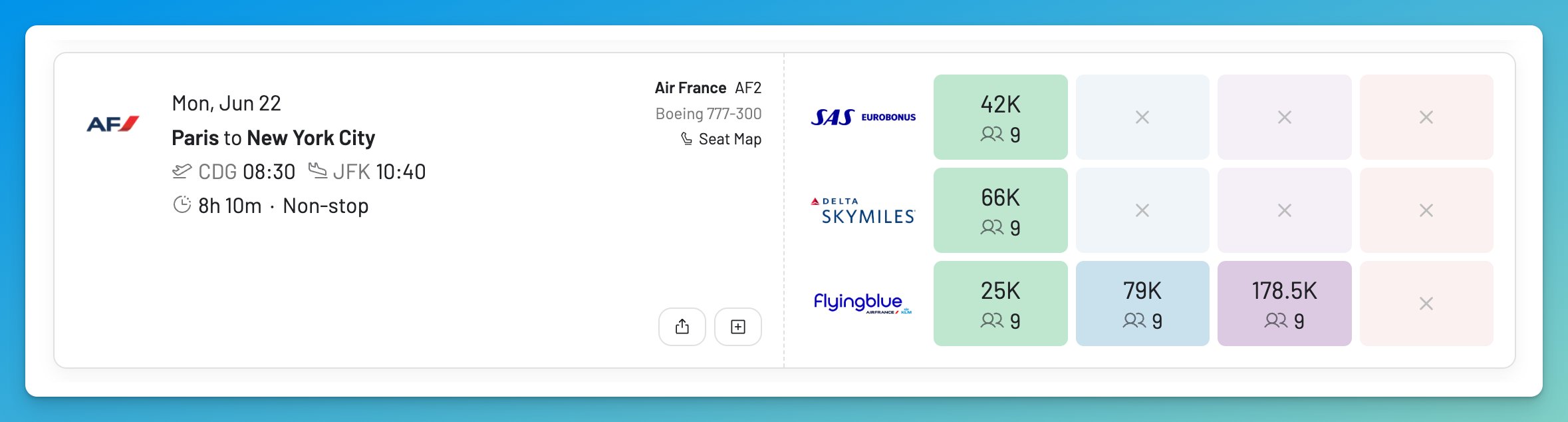
Flying Blue is a good example for those of us in Europe. Air France and KLM run the same program but separate booking portals, and in our own data the same flight can behave differently on each, so we routinely see space bookable through one portal but not the other. The same logic extends to your point of sale: the country your account or session resolves to can shift both availability and price for the identical flight. The standard advice is to check more than one source, and to never transfer into a program on the strength of a single portal.
Differences in Booking Calendars
Programs also open their booking calendars at different ranges, so a partner with a shorter window literally cannot see space the operating carrier has already loaded. American opens awards about 331 days out, Qantas about 353, British Airways about 355. If you spot space on one program for a date another has not opened yet, the gap is the calendar, not a glitch.
A handful of airlines simply withhold premium space from partners until close to departure. Lufthansa First Class is the clearest example. For years it released First to partner programs only about two weeks out. Since early 2024 it tightened that to roughly 48 to 72 hours before departure, and its new Allegris First Class is not bookable with partner miles at all.
So, if you see Lufthansa First Class seats two months out, bookable with partner miles, that is almost always phantom. Swiss First is stricter still and rarely opens to partners in any form. Knowing when partner space is actually due to open is its own skill, and we cover it in detail in our guide to award release dates.
Mixed-cabins & Other Reasons
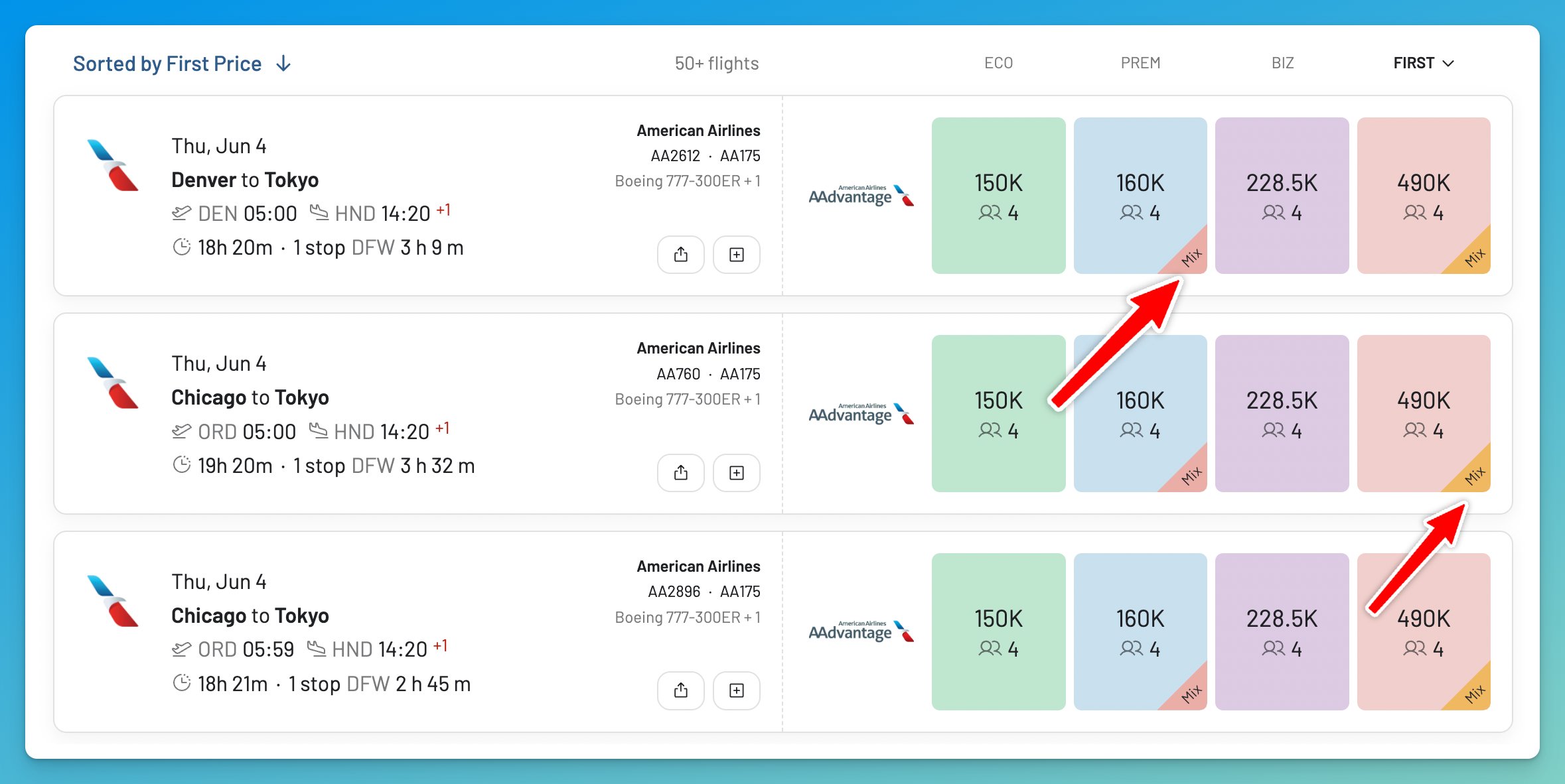
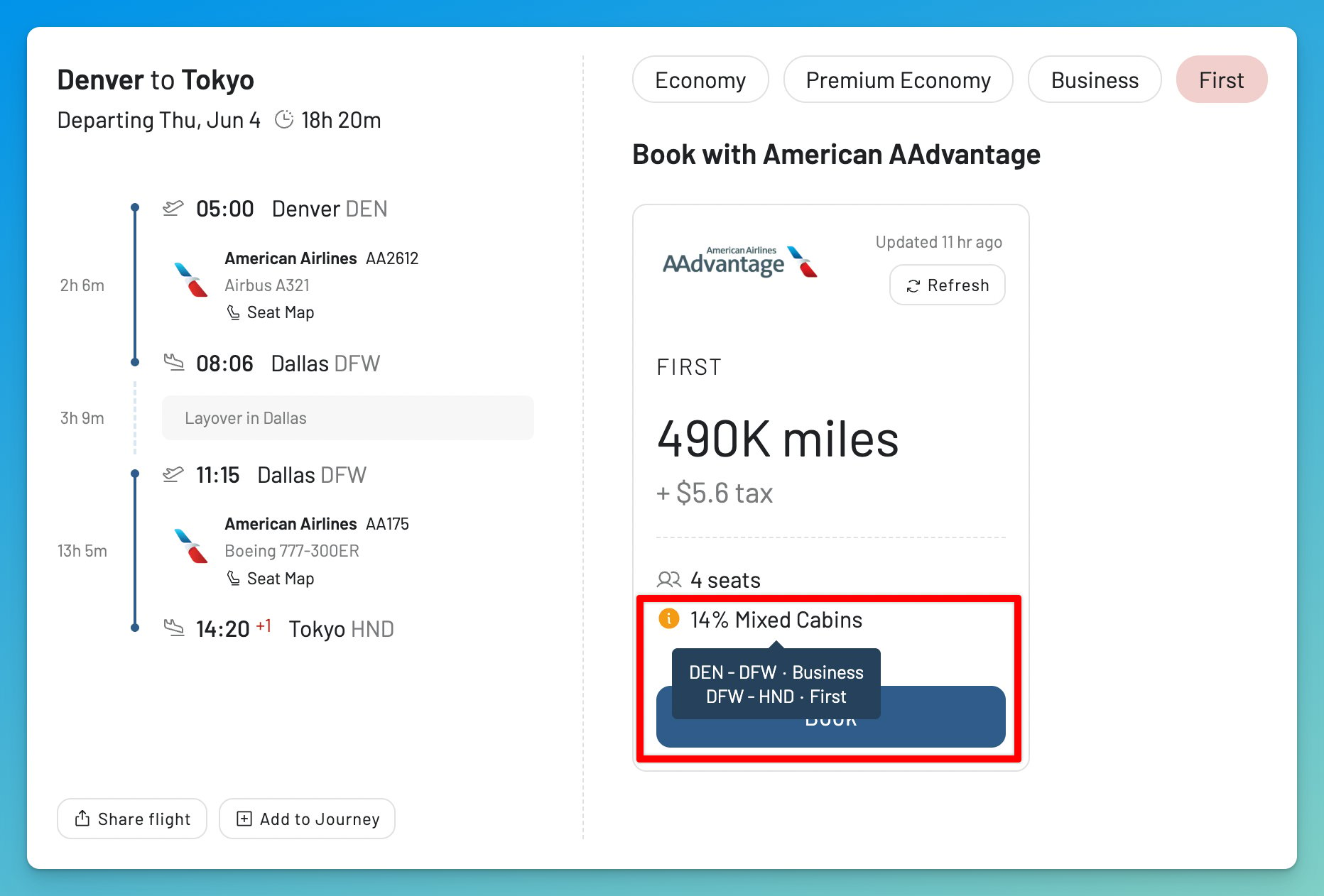
One close cousin is worth knowing: the mixed-cabin award. A trip sold as “Business Class” can fly Business on the long-haul and Economy on a connection, with the cabin breakdown hidden until checkout. The seat is real; it just is not the cabin you thought. Alaska Atmos Rewards (formerly Mileage Plan) is the most common example, so always check the cabin on every segment before you book.
Finally, some inventory is visible but not confirmable on the spot: waitlisted seats you can request but not instantly ticket, or space blocked for groups and tour operators. It shows up in some displays and refuses to sell.
When the Data Is Simply Stale
The other half of phantom space has nothing to do with restrictions. The seat was genuinely available a while ago. The data in front of you just has not caught up.
Caching
Caching is the biggest cause, and it is worth understanding because it is a choice that tools make. Searching airlines live, on demand, is slow and expensive, so most award search tools save (cache) the results of earlier searches and show you that saved snapshot.
That snapshot might be a few minutes old. It might be a day or two old. The longer it sits, the more likely the seat was booked by someone else in the meantime. When you click to book, you are hitting current inventory, and current inventory is empty. In our own experience this is the most common tool-side reason a seat shows when the airline no longer has it. (More on how we handle it below, because it is the core of why we built AwardFares the way we did.)
Updates to the Flights
Schedule changes and aircraft swaps leave outdated records behind. When an airline retimes a flight, cancels it, or swaps the aircraft, inventory gets reshuffled, and stale records can linger in partner systems for a few days before they get cleaned up. The seat you see references a version of the flight that no longer exists.
Back-end Failures
Then there are the back-end failures that bite at the worst possible moment. A fare class can be re-coded in a way that a partner’s computer misreads as bookable. Or a booking can get a confirmation number without ever being ticketed. This last one is the cruelest variant, because you think you succeeded. A confirmation number is not a ticket. Until the booking program issues a real ticket number and passes it to the operating airline, the seat can quietly be canceled without warning, so always confirm you hold a ticket number and that the operating carrier shows the reservation.
Here’s a quick summary:
| Mechanism | Why the seat won’t book |
|---|---|
| Married segments | Only sold as a connecting bundle; the standalone leg isn’t truly open |
| United XN and IN space | Expanded United-only buckets; partners book only X and I, and since Dec 2025 even those are thin in Polaris business |
| Airline release windows (Lufthansa First, Swiss First, KrisFlyer premium) | Held for the airline’s own members; partners get little or nothing until close to departure, and some, like Swiss First, almost never |
| Portal / login / point-of-sale | Different portals, accounts, and countries of sale see different pools of space and price |
| Booking-window mismatch | Your program’s calendar opens later than the operating carrier loaded the space |
| Mixed-cabin award | Only some segments are in the premium cabin; the rest is economy |
| Waitlist or blocked space | Visible in some displays, but not instantly confirmable |
| Caching / stale snapshot | The seat was booked by someone else after the snapshot was taken |
| Schedule change debris | Inventory was reshuffled; partner records haven’t caught up |
| Fare-class mis-mapping / not ticketed | The booking class isn’t really sellable, or the ticket never issued |
A Historical Case: Ethiopian’s “Two Seats” Phantom Space
The cleanest example we ever documented came from our own data, back when SAS was part of Star Alliance. (SAS has since moved to SkyTeam, so this exact redemption is no longer possible with EuroBonus, but the lesson still applies.)
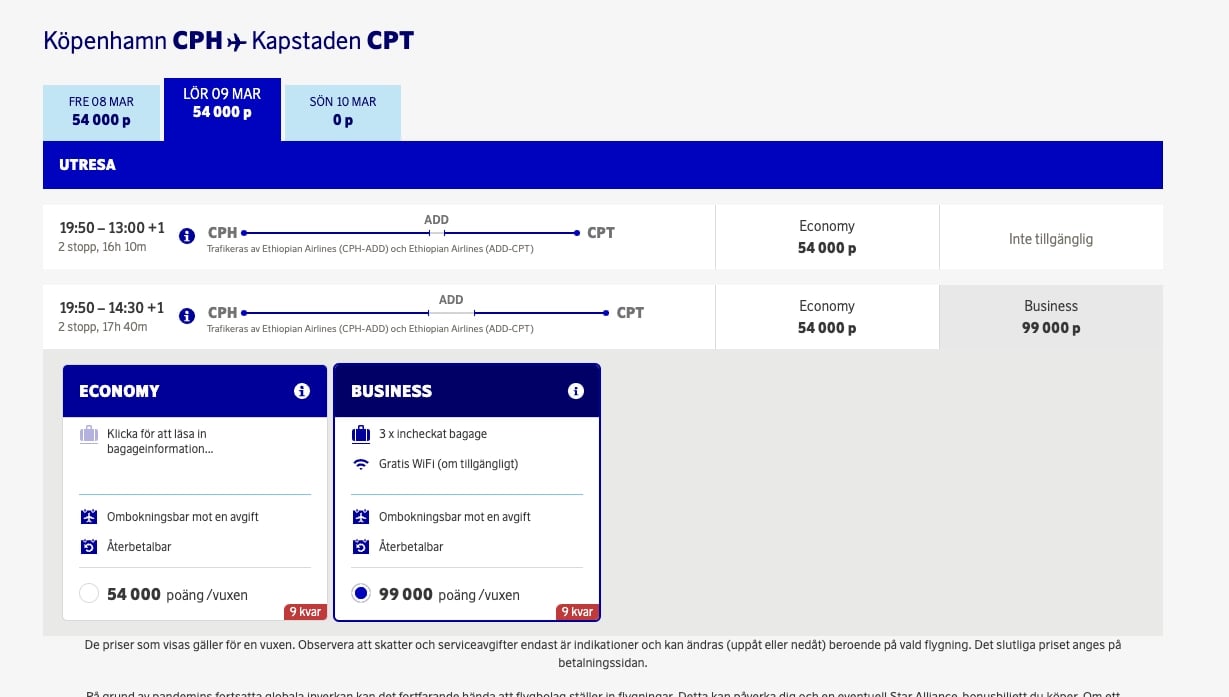
Members searching Ethiopian Airlines Business Class through SAS EuroBonus would see healthy availability, sometimes nine seats! They would select the flight, fill in passenger details, hit next to reach payment, and the SAS website would fail. Search again, and the seats were gone. After enough cases, we found the pattern: any Ethiopian result showing more than two Business seats was a ghost. Two was real. Nine was a mirage. So we filtered the ghosts out and showed our users only what was actually bookable.
I got caught by this one myself. In February 2024, I was trying to get home from Tokyo to Buenos Aires after a workshop with the AwardFares team, and Ethiopian Airlines was the tempting option, flying all the way to Buenos Aires (EZE) by way of its Addis Ababa (ADD) hub. I had a EuroBonus alert running, and it kept firing: Business Class space, right there, over and over.
Every time I tried to book it, the booking failed at checkout and the seats disappeared. After enough of those evenings, the pattern was impossible to ignore, and it is exactly what pushed us to identify the ghosts and filter them out so nobody else would chase the same mirage.
The program changed, but the behavior did not. Even now, travelers watch Ethiopian Business space appear and vanish through other Star Alliance programs. That “too many seats” instinct generalizes far beyond Ethiopian, and it is the first thing to check when you are trying to separate real space from phantom.
How to Tell Real Space From Phantom
You cannot make phantom space impossible to hit. You can make it rare. A few habits do most of the work.
1. Cross-reference at least two sources
If a seat is genuine partner space, it usually shows on more than one partner’s system. Spot Lufthansa business on one Star Alliance program, then confirm it on another (United’s website is a useful cross-check for Star Alliance, even when it is not the best place to actually book). If only one program in an alliance can see a seat, treat it with suspicion. That said, this is becoming more common.
2. Be skeptical of too much premium space
Real saver space in business and first is scarce, usually one or two seats. A search showing four, six, or nine premium award seats on a popular route is far more likely to be a fare-class quirk than a genuine release. Treat it as a red flag, not proof: airlines do sometimes release several premium seats at once, especially close to departure, after a schedule change, or on a low-demand route. It also helps to know how full the cabin is. Our live seat maps show which seats are already taken or blocked, a useful quick check (assigned seats are not a perfect read on award inventory, but a nearly full cabin and a big “award release” rarely go together).
None of this requires guesswork. AwardFares shows the per-program seat counts directly, so you usually do not need a second tool. And do not assume experience protects you. Seasoned travelers have transferred 100,000+ points (in one widely shared 2025 case, 189,000) for premium seats that errored at the final step and never came back.
3. Get as close to the operating airline as you can
The airline that actually flies the plane holds the most accurate inventory, so it is the best way to confirm the flight exists and the cabin really has space. Just remember it can hold seats it will not give to partners, so still confirm bookability inside the program whose miles you plan to use.
4. Push the booking to the edge
If you are unsure, walk it all the way to the passenger-details or payment page before you commit any miles. Phantom space tends to break exactly there. Far better to hit the error before you transfer points than after.
Before You Transfer Points
The single most expensive mistake in award travel is transferring points to pursue a seat that turns out to be phantom. Most transfers are one way. Confirm the seat is bookable in the program you are transferring to, ideally on the airline’s own site, before you move a single mile.
What to Do the Moment You Hit Phantom Space
Say the seat errored out, or you are staring at availability you are not sure about. Here are the steps, in order.
1. Start by confirming whether it is real at all
Cross-reference another partner and push the booking to the payment page. If it holds up and you already have the miles in that program, book it immediately. Real saver space, especially one or two premium seats, disappears quickly.
2. Place a hold (even at a small fee)
If you do not have the miles in the program yet, place a hold where you can, before transferring anything. The windows vary and most are phone-only and agent-dependent: American gives 24 hours online (cut from five days in 2025), Air France-KLM Flying Blue about three days by phone for a small fee, Lufthansa Miles & More about five days by phone, Turkish Miles&Smiles about two days, and Virgin Atlantic Flying Club about a day. A hold turns a risky transfer into a safe one, so confirm the current policy and get one if it’s available.
3. If transferring points, check the delay
Remember the transfer itself is a risk: points are not always instant, although this is getting much better lately. Bank programs (like Amex, Citi, and Bilt in the US) usually post immediately, but some partner transfers and airlines (like ANA, Qatar, BA), can take hours or even days, long enough for real space to disappear while you wait. Hold first if you can, and transfer only when you are confident.
4. Call the program
If the seat errors out, call the program before you give up. Ask the agent to long-sell the segment (sell it manually, bypassing the website’s availability check); phone agents sometimes see and ticket inventory the website cannot process, and they can occasionally hold the space while it gets sorted. Have a screenshot of the availability and price ready, you will need it. If the agent cannot help, try the operating airline directly, or a different partner program that flies the same plane. And sometimes the right move is simply to wait and re-check: if the cause was a stale feed or a schedule change, genuine space can reappear once the systems catch up.
One thing not to count on: transfer reversals. Programs occasionally reverse a mistaken points transfer, but it is rare and entirely at their discretion. Plan as if a transfer is final, because it almost always is.
Phantom Availability by Program (2026)
Phantom space is not evenly distributed. Some programs and airlines do this more than others, each for its own reason. Here is where it shows up most, and how to verify before you commit.
| Program / Airline | Why phantom shows up | How to verify |
|---|---|---|
| United MileagePlus | Since Dec 2025, almost all Polaris business saver sits in a member-only bucket, so partners rarely get it; expanded XN and IN space is cardholder/elite-only; even some X economy is withheld | Log out or use Expert Mode to see what’s real, then cross-check on another Star Alliance program |
| American AAdvantage | Phantom partner space on some oneworld partners (JAL, Finnair) depending on route and date; website and phone can disagree | Cross-check on British Airways or Qantas; a 24-hour online hold can give you time |
| Aeroplan | Long history of displaying partner space (ANA, Lufthansa Group) it cannot always ticket; results differ across web, app, and phone; partner awards now dynamically priced | Cross-check on the operating carrier; confirm the real price before transferring |
| Alaska Atmos Rewards (formerly Mileage Plan) | Phantom partner space (notably JAL and Fiji Airways) and mixed-cabin awards shown as premium | Verify on another partner and check the cabin on every segment |
| Flying Blue (Air France / KLM) | Two booking portals for one program; the same flight can show differently on Air France vs KLM | Check both portals; call to confirm partner space |
| Lufthansa First Class | Released to partners only about 48 to 72 hours out (was ~15 days before 2024); the new Allegris First is not partner-bookable at all, so far-out space is phantom | Verify inside the few-day window; assume Allegris First shown earlier is phantom |
| Swiss First Class | Rarely released to partners at all; the new Senses First is bookable only by Miles & More top tiers, by phone | Do not assume partner bookability; this is Swiss First only, Swiss business does open to partners |
| ANA | Waitlisted space can display as confirmable; transfers into ANA can lag a day or more | Confirm it is instant, not waitlist; consider searching via a partner; hold before transferring |
| Turkish Miles&Smiles | Erratic on-off availability and an unreliable booking system; partner space (e.g., Air India) can display but refuse to ticket online | Cross-reference elsewhere; some space only tickets by phone |
| Singapore KrisFlyer | Rarely releases long-haul premium space to partners, though partner displays can still show it | Assume long-haul premium is KrisFlyer-only unless confirmed |
| Avianca LifeMiles | Online and phone inventory frequently disagree; multi-stop itineraries misbehave online | Call or try the app; expect online and phone to differ |
A few more deserve extra caution: Cathay Pacific and Qantas First, and Etihad, EVA Air, and Qatar premium, all restrict or withhold partner space and are common phantom sources.
Rules Change Often
Award programs change these rules constantly. Release windows tighten, partners get added or dropped, co-brand perks shift, and more programs move to dynamic pricing every year. Treat this table as a starting point, and always verify on the operating airline close to the time you book.
How AwardFares Minimizes Phantom Space
We cannot make phantom space disappear from the world. No tool can, because the root causes live inside airline systems. What we can do is refuse to add to the problem, and give you the information that makes phantom space easy to avoid. It is why we built AwardFares the way we did.
Start with freshness. Most award search tools rely on cached data, showing you a snapshot from minutes, hours, or even days ago. That saves them money and makes searches feel instant, but it is exactly how a tool ends up showing a seat that is already gone.
We rely on caching far less than most tools.
Paid searches are real-time, our Diamond tier refreshes availability every minute, and even our free results rely on recently seen data rather than stale archives. When enough time has passed on a result, we re-fetch it instead of showing you something old. We would rather be the ones to tell you a seat is gone than show you a seat that is not there.
How our data actually works, limits included
On Gold and Diamond, every search fetches live availability. The free Basic tier shows recently seen results, which are usually fresh but can lag. The one thing no tool can promise is the airline’s own data: if an airline displays space it will not ticket, that error can still reach you. We minimize phantom space. We do not pretend to eliminate it.
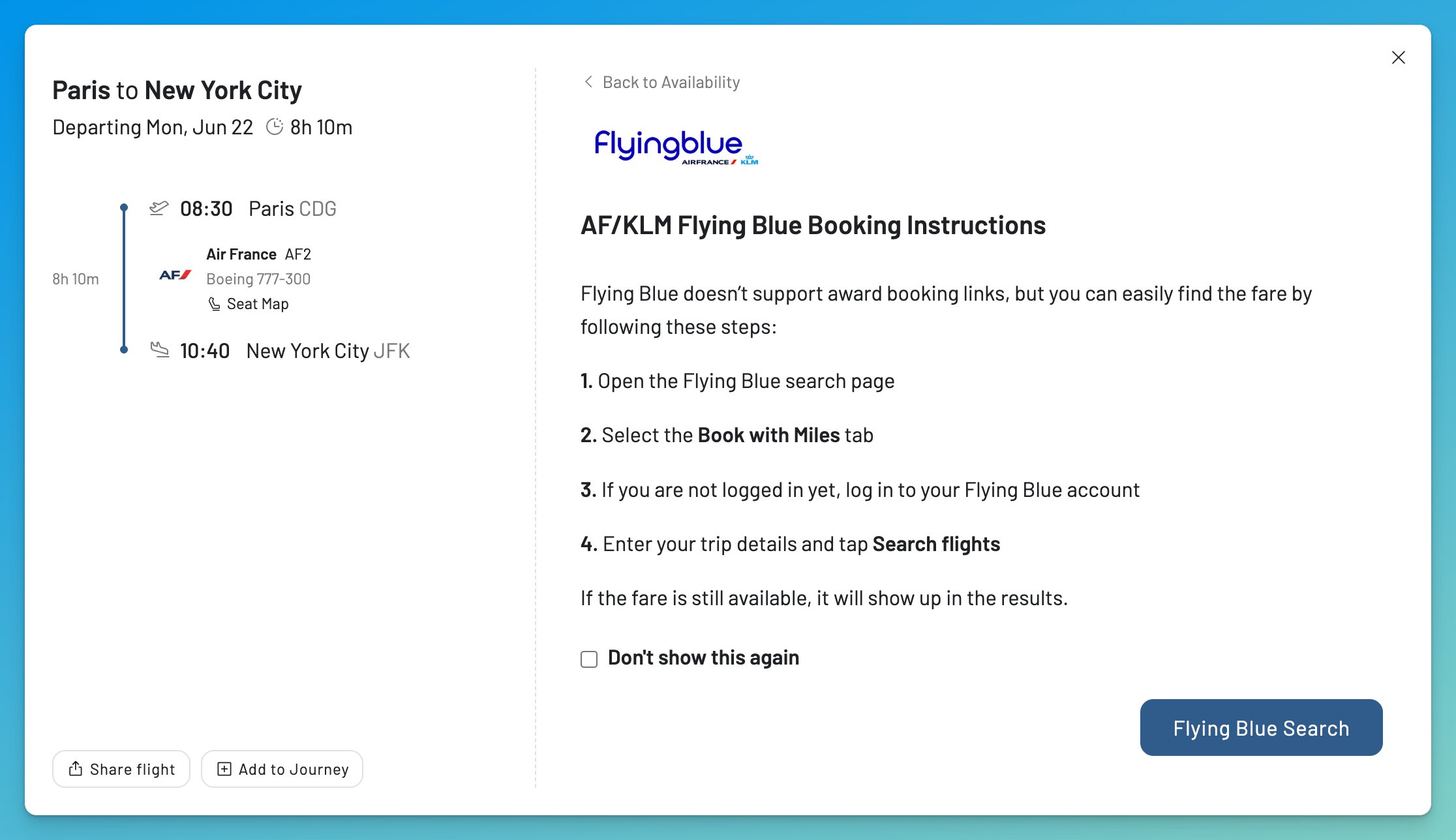
And there is source clarity. For a program split across booking portals, like Flying Blue across Air France and KLM, we surface the availability and tell you which portal a seat is actually bookable through. You are not left guessing which website to trust. It is the reason 150,000+ travelers use AwardFares to check availability before they commit miles.
And when the space you want is not there yet, our alerts watch for it around the clock and tell you the moment real availability opens, so you can book it while it is fresh. That is the best defense against phantom space there is.
Why Accuracy Pays for Itself
A single alert that fires at the right moment can catch a Business Class seat worth $2,000 to $5,000 in cash, for the price of a month or two of subscription. Accuracy is not a luxury here. It is the difference between booking the seat and transferring miles into a dead end.
AwardFares’ Take on Phantom Space
Phantom award space is not a glitch you can eliminate. It is a permanent feature of how airlines manage and share inventory, and in 2026 it is getting more common, not less, as more programs gate space to their own members and some price partners dynamically. But there are ways to detect it. Once you know the reasons it happens, learn to distrust too-good seat counts, and confirm before you transfer, it goes from a recurring frustration to a minor annoyance you can avoid.
The closer your data is to the airline, the less often it costs you. That is the whole idea behind AwardFares: real-time search, exact seats per program, and alerts that catch real availability the moment it opens.
You can try AwardFares for free. We are rolling out new features and improvements regularly, so sign up for our monthly newsletter to stay on top of the latest news, announcements, and pro tips.
Before you transfer points, run the route in AwardFares, filter to the program you plan to use, confirm the seat count, then click through to the airline to book. That single habit, available on our Gold and Diamond tiers with real-time search and per-program availability, is what helps you avoid phantom space.
Helpful Guides
Frequently Asked Questions
What is phantom award space?
Phantom award space is award availability that shows as bookable in a search but cannot actually be ticketed. You see the seat, start the booking, and the airline refuses it, with an error, a sudden price change, or the seat disappearing. It is also called phantom availability or, in older usage, ghost availability.
Why do award seats disappear when I try to book them?
Usually one of two reasons. Either the seat was never sellable to you (it was reserved for the airline’s own members, gated to certain credit-card holders, or only released as part of a connecting itinerary), or the data was stale (a cached search result, or inventory left over from a schedule change). In both cases the seat looked real, but the airline would not sell it.
Is ghost availability the same as phantom availability?
Yes. Ghost availability is an older name for the same thing. The community has mostly settled on “phantom award space” or “phantom availability,” but they all describe an award seat that looks bookable but is not.
Why does United show award space I can't book with partner miles?
United files extra saver space in fare classes XN and IN that only its cardholders and elites can see, and that no Star Alliance partner can book. As of December 2025 it pushed almost all Polaris business saver into the member-only IN bucket, so partners now rarely get United business saver at all, even when united.com shows seats. Logging out, or using United’s Expert Mode, helps you see what is genuinely partner-bookable, but always cross-check on the partner you plan to use.
Does phantom availability mean I'll lose my miles?
Not if you are careful. The real risk is transferring points from a flexible currency (Amex, Chase, Capital One, Bilt) into an airline program to book a phantom seat, because most transfers cannot be reversed. If you confirm the seat is genuinely bookable before you transfer, ideally on the airline’s own website, you avoid the trap entirely.
Can I get my points back after a failed award booking?
Usually not. Most transfers from a flexible currency into an airline program are one way, and programs reverse a mistaken transfer only rarely and at their discretion. That is exactly why the rule is to confirm a seat is genuinely bookable before you transfer, not after.
Why did the award price jump when I tried to book?
Many programs now price partner awards dynamically, so the “starting at” or cached price a tool showed may not be the price that actually tickets. The seat can be real while the cheap price is not. Always confirm the live price in the program you will use before transferring points.
Why does my business class award have an economy leg?
Some awards are mixed-cabin: the long-haul flies in business while a connection is in economy, and the breakdown is often hidden until checkout. Always check the cabin on every segment. Alaska Atmos Rewards is a frequent source of this.
Can I lose a seat while my points are transferring?
Yes. Transfers are not always instant. Amex, Citi, and Bilt usually post immediately, but some Chase and Capital One partner transfers, and transfers into ANA, can take hours or days, long enough for real space to vanish. Place a hold first whenever you can.
How can I check if award space is real before transferring points?
Cross-reference the seat on at least one other partner program, be skeptical of unusually high premium-cabin seat counts, and walk the booking to the payment page before committing. Better still, use a tool that shows live, per-program availability so you know exactly which program can book the seat. AwardFares shows real-time seats broken down by program for precisely this reason.
Which programs have the most phantom award space?
The most common ones are United.com (partner saver that partners cannot book), American with Finnair, Singapore KrisFlyer long-haul premium, Avianca LifeMiles, Aeroplan with Lufthansa Group and ANA, and Lufthansa and Swiss First close to departure. None are bad programs; they just display space that is gated, dynamically priced, or stale.
Can AwardFares prevent phantom award space entirely?
No tool can, because the causes live inside airline systems. What AwardFares does is minimize it: we cache far less than most tools, refresh availability in real time on paid searches, and show exact seats per program, so the availability you see is far more likely to be availability you can book. We would rather tell you a seat is gone than show you one that is not there.
Why do Air France and KLM show different award space for the same flight?
Air France and KLM share the Flying Blue program but run separate booking portals, and the same flight can display or price differently on each. It is worth checking both before you book, and before you transfer points into Flying Blue. AwardFares surfaces the availability and tells you which portal a seat is actually bookable through.
How We Researched This
This guide draws on AwardFares’ own search and availability data across 17+ loyalty programs, the award bookings our team makes ourselves, and current reporting and community discussion from across the frequent flyer world, from FlyerTalk and r/awardtravel to the major points blogs and tools like ExpertFlyer. Where a claim comes from our own data, we say so; where it reflects community experience or a program’s published policy, we treat it accordingly. Airline rules here change fast, partner-release windows, co-brand perks, and dynamic pricing most of all, so we review and update this guide regularly.
Find & Monitor Award Flight Availability
Use AwardFares to instantly search multiple frequent flyer programs. Find available award seats, set up alerts to monitor availability, check flight schedules, view seat maps, and more—all in one place.