 Aeromexico Rewards
 Air Canada Aeroplan
 American Airlines AAdvantage
 Atmos Rewards (Alaska/Hawaiian)
 Azul Fidelidade
 Delta SkyMiles
 Etihad Guest
 Finnair Plus
 Flying Blue (AF/KL)
 GOL Smiles
 Jetblue TrueBlue
 Qantas Frequent Flyer
 SAS EuroBonus
 Turkish Miles&Smiles
 United MileagePlus
 Virgin Atlantic Flying Club
 Virgin Australia Velocity
Ever wondered how full your flight is? Whether you’re hoping for an empty middle seat, trying to avoid a packed cabin, or strategically planning your upgrade, our free Flight Seat Availability Checker is your first and best stop. It provides instant, live seat maps for any flight.
But this is more than just a tool. This guide will walk you through every method, from simple visual checks to pro-level techniques, to determine just how busy your flight will be, whether the seat next to you will be empty, and how to secure the best possible seat.
Even the pros use this approach: Condé Nast Traveler’s guide to checking flight fullness (updated June 2026) features AwardFares’ live seat map and quotes this guide’s advice on timing your checks.
Key Information
- Use our free tool (below) for an instant, visual check of the live seat map for any flight.
- A seat map is a strong indicator, but not a 100% guarantee of flight fullness. The most accurate picture emerges within 24 hours of departure.
- Check at different times: before booking, at the 24-hour check-in window, and right before boarding to make strategic seat choices.
- Advanced Method: Use the AwardFares Flight Schedules tool to see how many seats the airline is still selling in each fare class — the most precise public signal of availability.
- Blocked (yellow) seats are often reserved for elite status flyers or operational reasons, giving you clues about the flight’s passenger makeup.
- Southwest flyers: Southwest now assigns seats at booking (as of January 2026). You can check live seat availability just like any other airline — see our Southwest-specific tips below.
Method 1: Check How Full a Flight Is (Instant Seat Availability Tool)
For a quick, visual answer, this is the fastest method. Unlike “fullness predictor” sites that estimate from historical load factors, our flight fullness checker pulls the actual, live seat map from the airline’s reservation system. Enter your flight details below to see it.
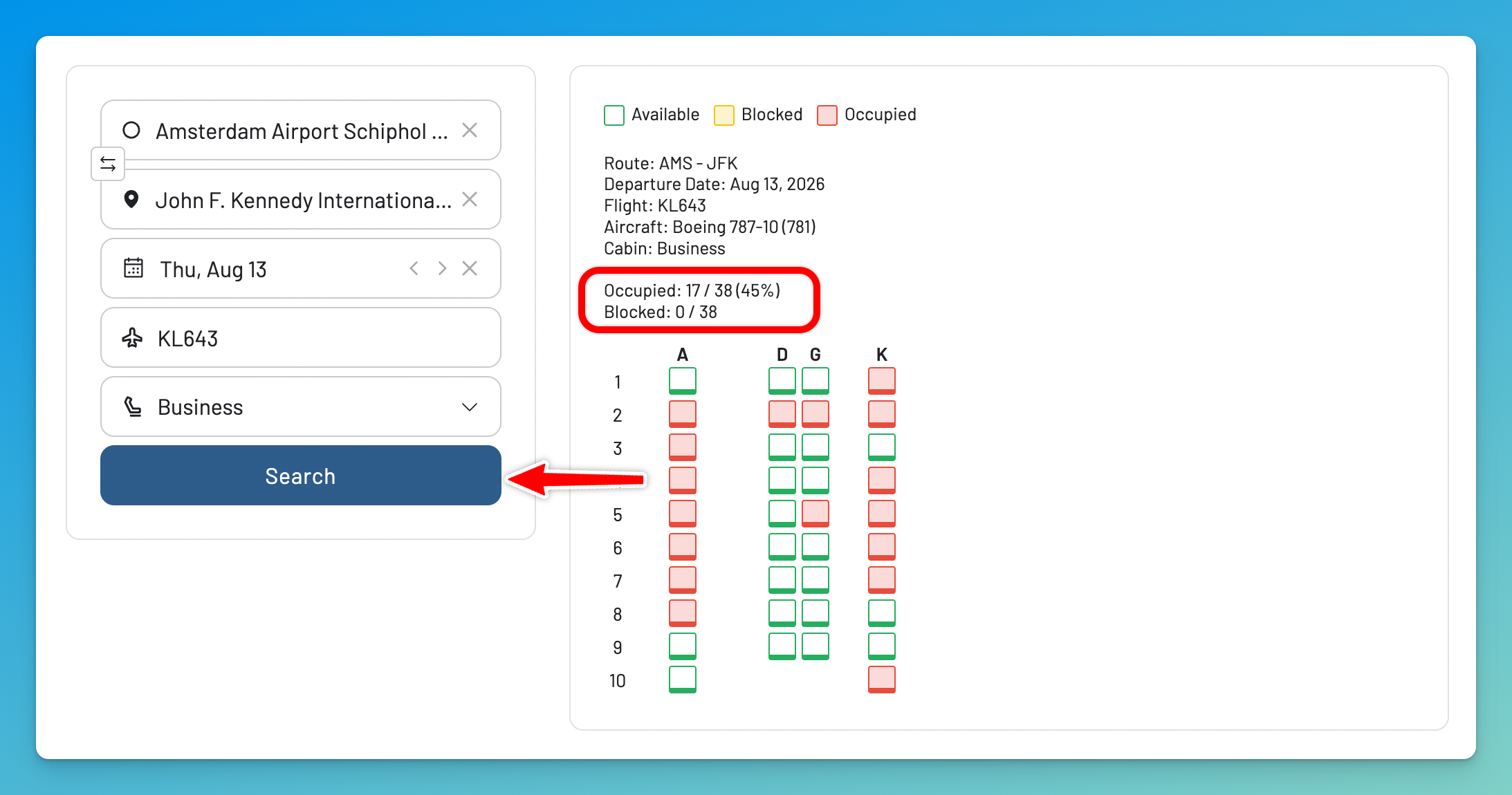
How To Use the Flight Seat Availability Checker
- Enter your flight details (Origin, Destination, Flight number, Departure date, Cabin).
- Tap on Search.
- Instantly see the live seat map with live data.
- Check the Occupied counter above the map (e.g.
Occupied: 17/38 (45%)) for an instant read on how full the flight is, then use the color codes to spot where the empty seats are. Hover over each seat for more details.
Our airline seat availability checker works with most major carriers worldwide, including United, Delta, American, Southwest, Lufthansa, British Airways, Emirates, and dozens more.
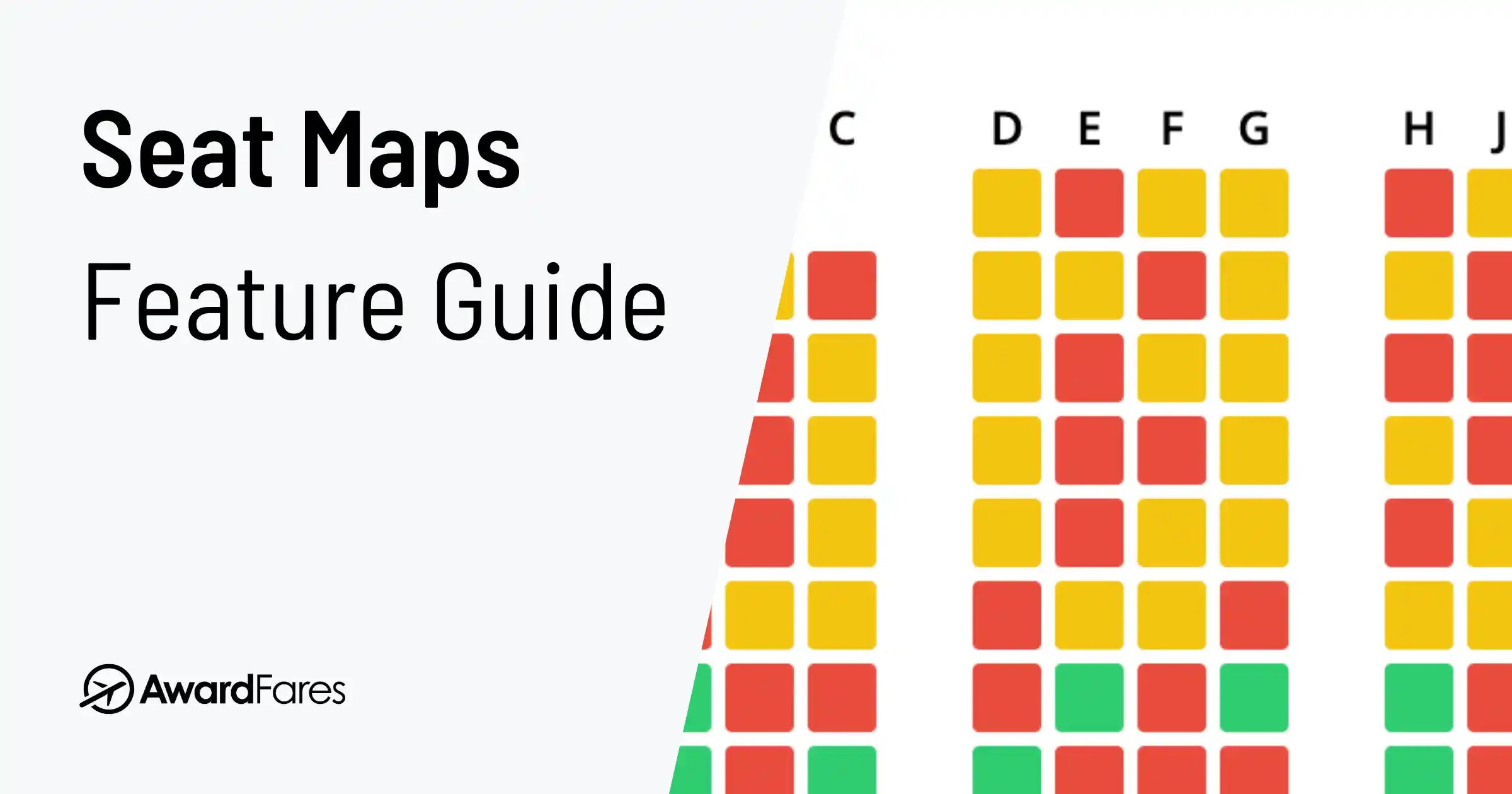
What the Seat Map Colors Mean
| Color | Meaning | What It Tells You |
|---|---|---|
| Green / Empty | Available Seats: These seats are open for selection. | A high number of green seats suggests a less crowded flight. |
| Red / Filled | Occupied Seats: These seats have been selected by other passengers. | A sea of red means the flight is filling up fast. |
| Yellow / Blocked | Blocked by Airline: Reserved for elites, families, or operational needs. | Lots of yellow seats can indicate many frequent flyers are on board, or the airline is holding seats for airport assignment. |
| Blue / Special | Premium Seats: Often seats with extra legroom or preferred locations available for a fee. | These are the seats you might want to upgrade to if they become available. |
When Is the Best Time To Check Seat Availability?
The timing of your check is crucial. A flight can look empty a month out and be completely full on the day of departure. The calendar matters too: flights around holidays, summer weekends, and Monday-morning or Friday-evening business routes reliably run the fullest.
1. Before Booking
Before you buy your ticket, check the seat map to see if your preferred seats (like aisle, window, or exit row) are available. This is the easiest way to see what seats are available on a flight before booking — no dummy reservation needed. On long-haul flights, good seats go fast, and a quick check can help you decide if that flight is the right one for you.
2. 24 hours Before Departure: The “Seat Block” Check
This is when the most accurate picture emerges. As passengers check-in, the map fills up rapidly. Some carriers also offer “seat blocks” to elite status passengers. For example, SAS might automatically block the middle seat next to a Gold member. Use the seat map checker to see if you got lucky with a block.
3. Just Before Boarding
It’s not over ‘til it’s over! Last-minute cancellations or no-shows happen. Gate agents may release premium blocked seats. Keep our tool open on your phone. A quick refresh before you board might reveal an open exit row or a pair of seats to yourself.
Why Check the Seat Map Before You Book?
The seat you choose shapes the whole flight, and a 30-second look at the map is usually all it takes to avoid the bad ones.
Key Reasons to Check Before You Book
- Secure Personal Comfort: Find seats with more legroom and avoid narrower ones.
- Avoid Undesirable Seats: Steer clear of seats near high-traffic lavatories, noisy galleys, or those with limited recline.
- Travel with Companions: It’s the only way to ensure you can get seats together.
- Understand the Real Seat Configuration: In premium cabins, a 1-2-1 layout means every seat has aisle access. A 2-2-2 layout means someone will be climbing over their seatmate. The map tells you the truth.
Why Do Airlines Hide Seat Maps?
Ever noticed an airline won’t show you the map until after you’ve paid? They do this to encourage you to pay for a seat assignment, to maintain flexibility for blocking seats, or to nudge you toward a more expensive cabin. Our tools bypass these roadblocks, giving you full transparency.
How To Get an Empty Seat Next to You
The holy grail of economy travel is an empty middle seat. Here’s the strategic approach using our seat map tool:
Use the Window-Aisle Strategy:
Look for rows where only the window OR aisle seat is already taken, then select the opposite end. Solo travelers avoid middle seats, so a row with window and aisle occupied often keeps the middle empty until the end.
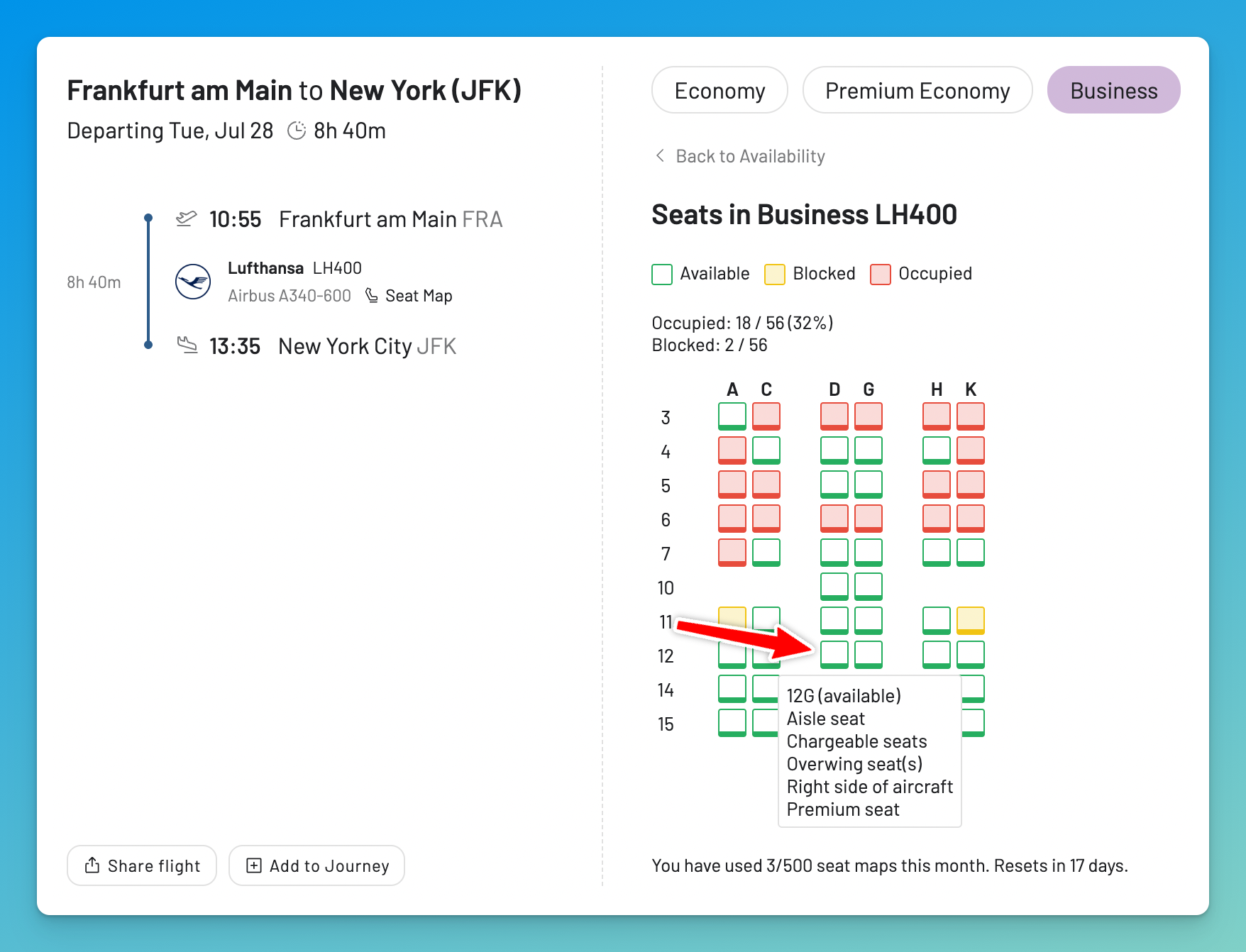
Monitor the seat map at key moments:
- Check at 48 hours out to identify promising rows
- Check again at 24 hours when check-in opens: this is when the map changes most
- Check one final time before boarding for last-minute cancellations
Understand what “blocked” seats really mean:
Yellow or blocked seats (especially near the front) often indicate elite status passengers who receive automatic seat blocks from the airline. If you have frequent flyer status, check if your program offers this perk, it’s one of the most underrated elite benefits.
Sit toward the back:
Airline reservation systems typically fill planes front-to-back. The last few rows are often the emptiest, though you’ll board last and may have less overhead bin space.
More Ways to Check How Full a Flight Is
While our tool is the fastest, there are other methods savvy travelers use to get the full picture.
Looking for a SeatGuru replacement? Since SeatGuru shut down in November 2025, many travelers have switched to AwardFares for live seat maps. See our complete guide to the 10 best SeatGuru alternatives in 2026 for all your options, including new tools like SeatMap.app and SeatCompare.ai.
Method 2: Check the Airline’s Website or App
Airlines provide seat maps through their own platforms. Here’s how to use them:
- Manage My Booking: If you’ve already booked, log in to your reservation on the airline’s website or app. Go to the “Change/Select Seat” section. You’ll see the most current seat map without having to commit to a change.
- Dummy Booking: If you haven’t booked, start a new booking for the exact flight. Proceed to the seat selection step to see what’s available. This shows you the state of the flight before you commit to buying.
- The Group-Size Trick: On the airline’s booking page, try searching your flight for 8 or 9 passengers. If the site refuses, the airline has fewer than that many seats left to sell in that fare class. Lower the passenger count until the search succeeds and you have a rough floor for the remaining inventory. It’s cruder than checking fare buckets (below), but it works on any airline website without an account.
Method 3: Advanced Techniques for Power Users
Want to go deeper? These expert-level tricks give you the most accurate insights.
A. Stalk the Upgrade and Standby Lists
Within 24 hours of departure, many airlines (like United and Delta) show the upgrade and standby lists in their apps.
- Upgrade List: Shows how many elite members are waiting for an upgrade and how many premium seats are left. If there are 15 people on the list and only 2 First Class seats available, you know Economy will likely be packed.
- Standby List: Shows how many people are trying to get on the flight who don’t have a confirmed seat. A long standby list is a sure sign of a 100% full or oversold flight.
B. See Exactly How Many Seats Are Left on a Flight (Fare Class Availability)
Beyond the visual seat map, the closest you can get to the airline’s own numbers is the booking class codes, or “fare buckets.” These single-letter codes represent different types of fares, and each one shows how many seats the airline is still willing to sell at that fare level.
Our Flight Schedules tool (available in our Gold and Diamond tiers) lets you see this data in real-time.
A Quick Guide to Fare Codes:
| Cabin Class | Common Codes | General Meaning & Characteristics |
|---|---|---|
| First Class | F, A, P | F is full-fare First. A/P are often discounted/award seats. |
| Business Class | J, C, D, I, Z | J/C are full-fare Business. D/I/Z are discounted/award. |
| Premium Economy | W, R, G | W is the most common code for Premium Economy. |
| Economy | Y, B, M… S, T, L | Y is full-fare flexible Economy. The other letters represent various levels of discounted fares. |
How to Check with AwardFares Flight Schedules:
- In your AwardFares account, go to Tools > Flight Schedules.
- Enter your Origin, Destination, and Date.
- In the results, find your flight and click Availability.
- You will see a list of letters and numbers (e.g.,
J9 Y9 W4 G0). This means the airline is selling at least 9 seats in Business (J) and Economy (Y), up to 4 in Premium Economy (W), and none in the G-fare bucket.
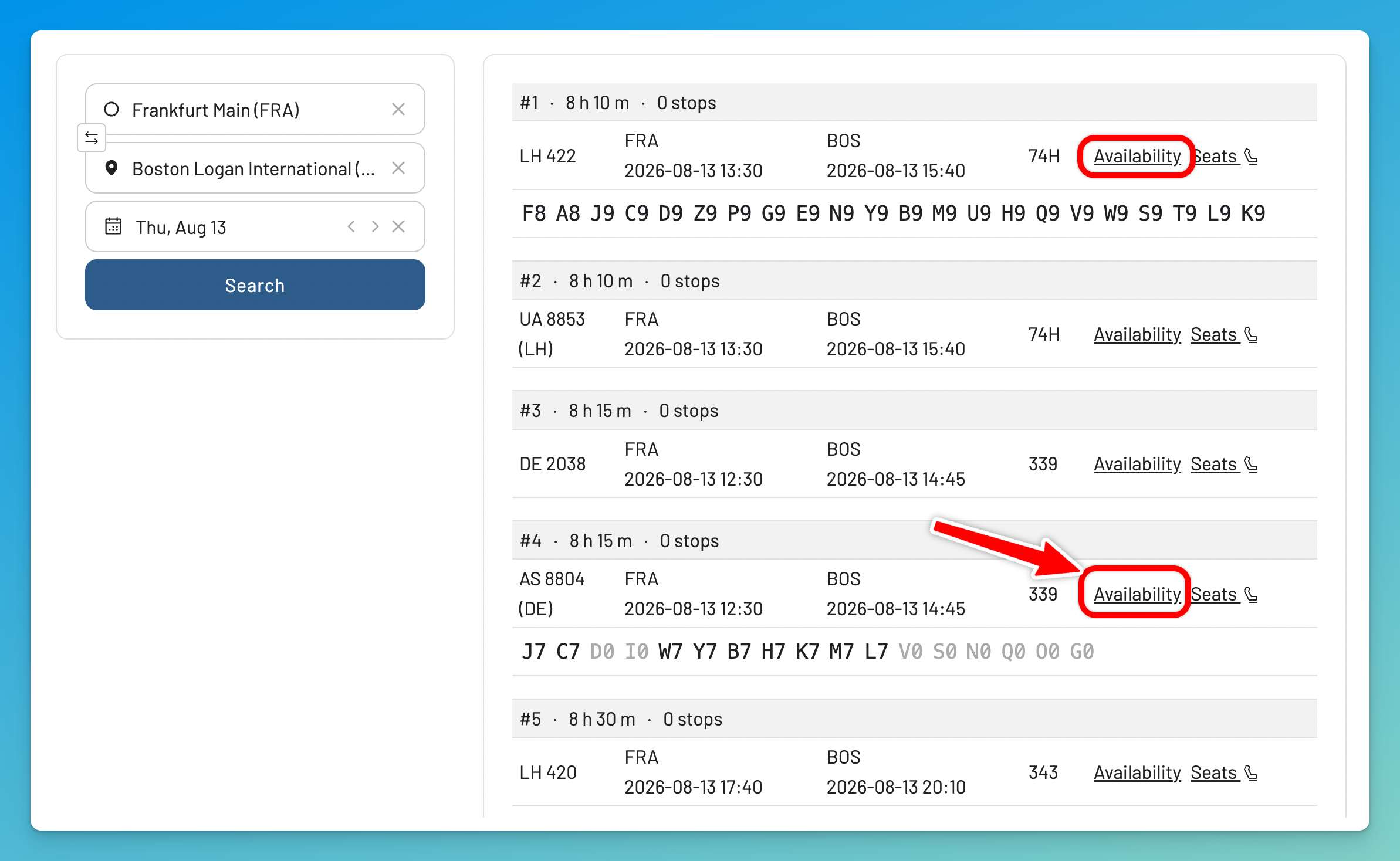
A flight showing J9 C9 D9 Y9 B9 M9 is wide open. A flight showing J1 C0 D0 Y1 B0 M0 is nearly sold out. One caveat: these are sales buckets that share the same physical seats, so the numbers can’t be added together — but as a signal of how much the airline still expects to sell, it’s a much truer picture than the seat map alone. For the full A-to-Z breakdown of what each letter means, see our booking class codes guide.
Method 4: Ask a Human
Sometimes the fastest source is a person with the reservation system in front of them:
- Phone or chat agents can usually tell you how heavily booked a flight is if you ask politely — “I’m hoping for a quiet flight, does it look full?” works better than demanding passenger counts.
- Check-in and gate agents see the actual booked figure, including passengers who haven’t selected seats. Close to departure, this is the most accurate answer available anywhere.
- Flight attendants are told the expected load before boarding. If you’re hoping to move to an empty row, asking a crew member once boarding slows down is the time-honored method.
The caveat: any number you’re quoted can still change. Standby passengers, misconnects, and last-minute bookings shift the count right up until the door closes.
Learn More in Our Full Guides
Bookmark Your Flight for Future Checks
Pro Tip
You can bookmark your seat map search for easy re-checking later. The search is saved in the URL, so you can revisit it anytime without re-entering the flight details. To take full advantage of this feature, log in to your AwardFares account and keep an eye on seat availability as your flight date approaches.
Understanding the Nuances: How Full Is My Flight, Really?
Important Consideration
Checking the seat map for a flight can be a good indicator of how full a flight is, but when to check is key. Remember that just because there are many available seats, it doesn’t mean the flight isn’t full - especially when you check the seat map before the check-in time has started. Many travelers may not have had the chance to select their seat, for example, because of how they bought their ticket or because the airline charges for it. Therefore, those passengers may have their seats allocated at check-in time.
Airlines measure fullness as the load factor: the percentage of seats actually filled on departure. On popular routes in peak season, it’s normal for flights to leave with nearly every seat taken, so a half-empty seat map a week out says more about seat-selection habits than about how full the plane will be. The fare buckets from Method 3 are the closest public proxy to the load an airline is actually expecting.
Find Award Flights Like A Pro
Knowing your flight’s capacity is just one part of traveling smarter. With our Gold and Diamond tiers, you can access premium features like the Flight Schedules tool, unlimited daily searches, award flight alerts, detailed seat maps, and more.
You can try AwardFares for free. We are rolling out new features and improvements regularly, so sign up for our monthly newsletter to stay on top of the latest news, announcements, and pro tips.
Related Articles
Frequently Asked Questions (FAQs)
Your Questions Answered
1. How accurate is the seat map tool?
The seat map tool shows real-time data directly from the airline’s reservation system, so it’s very accurate at any given moment. However, remember that seat maps are dynamic and can change frequently.
2. Can I truly see how full my flight is using the seat map?
The seat map gives you a strong indication of selected seats. To estimate total fullness, you must consider that many passengers haven’t selected seats yet. For the most accurate data, use a tool that shows fare class availability, like our Flight Schedules tool.
3. Why are some seats marked as blocked (yellow)?
Seats are blocked for various reasons: they may be reserved for frequent flyers, held for families with infants (e.g., bulkhead rows with bassinets), or kept for operational reasons to be assigned by gate agents.
4. Can I check how full my Southwest flight is?
Yes. Southwest switched to assigned seating on January 27, 2026, ending its 54-year open-seating policy. This means you can now use our seat map tool to check live seat availability on Southwest flights just like United, Delta, or any other carrier.
Southwest now offers three seat categories: Standard (rear of cabin, included in fare), Preferred (nearer the front), and Extra Legroom (exit rows, 3–5 extra inches of legroom). Use our tool to see which seats are taken and which are still open before you pick yours.
A few things to keep in mind:
-
Early Bird Check-In and Upgraded Boarding have been retired under the new system.
-
Southwest still operates an all-737 fleet, so seat layouts are consistent across most flights.
-
If “Wanna Get Away” fares are still available for your flight, that’s a good sign it isn’t packed.
5. How can I tell if the seat next to me will be empty?
Use our seat map tool to check at the 24-hour mark before departure, this is when the picture becomes clearest. Look for your row: if the middle seat is still unassigned (green) at this point, there’s a good chance it stays empty. However, remember that some passengers are assigned seats at the gate, so it’s never guaranteed until boarding is complete. For the best odds, choose rows where only one other seat is taken and check the map again right before boarding for any last-minute changes.
6. What's the best way to choose a seat on a plane?
First, view the seat map to understand the layout. Aim for seats further from lavatories and galleys to avoid noise and traffic. Exit rows offer more legroom but may have restrictions and may not recline. Use the seat map to avoid middle seats whenever possible.
7. Can I use this for staff travel or non-rev availability (myidtravel)?
While our tools don’t show employee-specific loads, the Flight Schedules tool is an invaluable companion to services like myidtravel. By checking the public fare class availability (e.g., seeing Y9 J9), you get a much more accurate picture of how many seats are for sale than the general “smiley face” indicators, helping you make a smarter decision about which flight to list for.
8. Does a full seat map mean my flight is fully booked or overbooked?
Not necessarily. A full seat map means all available seats are currently assigned — the flight may well be fully booked, but the map alone can’t confirm it. A flight is only overbooked when the airline has sold more tickets than there are physical seats. You can get a clue about this by checking the length of the standby list in the airline’s app.
9. Why does my flight show few available seats, but the flight doesn't feel full?
This can happen due to last-minute cancellations or no-shows. It’s also possible that many “blocked” seats were never released. A full map indicates a fully sold flight, but reality can sometimes be a pleasant surprise!
10. Can I reserve or change seats through this tool?
No, our tool is a “read-only” availability checker. To reserve, select, or change your seat, you must go directly to the airline’s website or app with your booking reference.
11. Is there a free flight load checker I can use?
Yes, our seat map tool above is completely free to use and shows you the live seat map for any flight. For even more detailed data, including how many seats the airline is still selling in each fare class (the most precise public signal of flight load), you can use the AwardFares Flight Schedules tool, available with our Gold and Diamond memberships. Unlike the visual seat map, fare class data shows you the airline’s own sales inventory.
12. What's the difference between a booking class and a cabin class?
Cabin Class is the broad category of service (e.g., Economy, Business, First). Booking Class (or Fare Class) is a more specific sub-category within that cabin, indicated by a single letter, which defines the price and rules of your ticket.
13. How can I see how many seats are left on a flight?
The seat map above gives you a visual count of unassigned seats, which is the quickest approximation. For the airline’s own sales numbers, check the fare class availability with the Flight Schedules tool: a code like Y9 B4 M0 tells you the airline is still selling at least 9 seats in Y, up to 4 in B, and none in M. That’s the same inventory data airline agents see, and it’s a far better signal than counting green seats on a map.
Find & Monitor Award Flight Availability
Use AwardFares to instantly search multiple frequent flyer programs. Find available award seats, set up alerts to monitor availability, check flight schedules, view seat maps, and more—all in one place.