 Aeromexico Rewards
 Air Canada Aeroplan
 American Airlines AAdvantage
 Atmos Rewards (Alaska/Hawaiian)
 Azul Fidelidade
 Delta SkyMiles
 Etihad Guest
 Finnair Plus
 Flying Blue (AF/KL)
 GOL Smiles
 Jetblue TrueBlue
 Qantas Frequent Flyer
 SAS EuroBonus
 Turkish Miles&Smiles
 United MileagePlus
 Virgin Atlantic Flying Club
 Virgin Australia Velocity
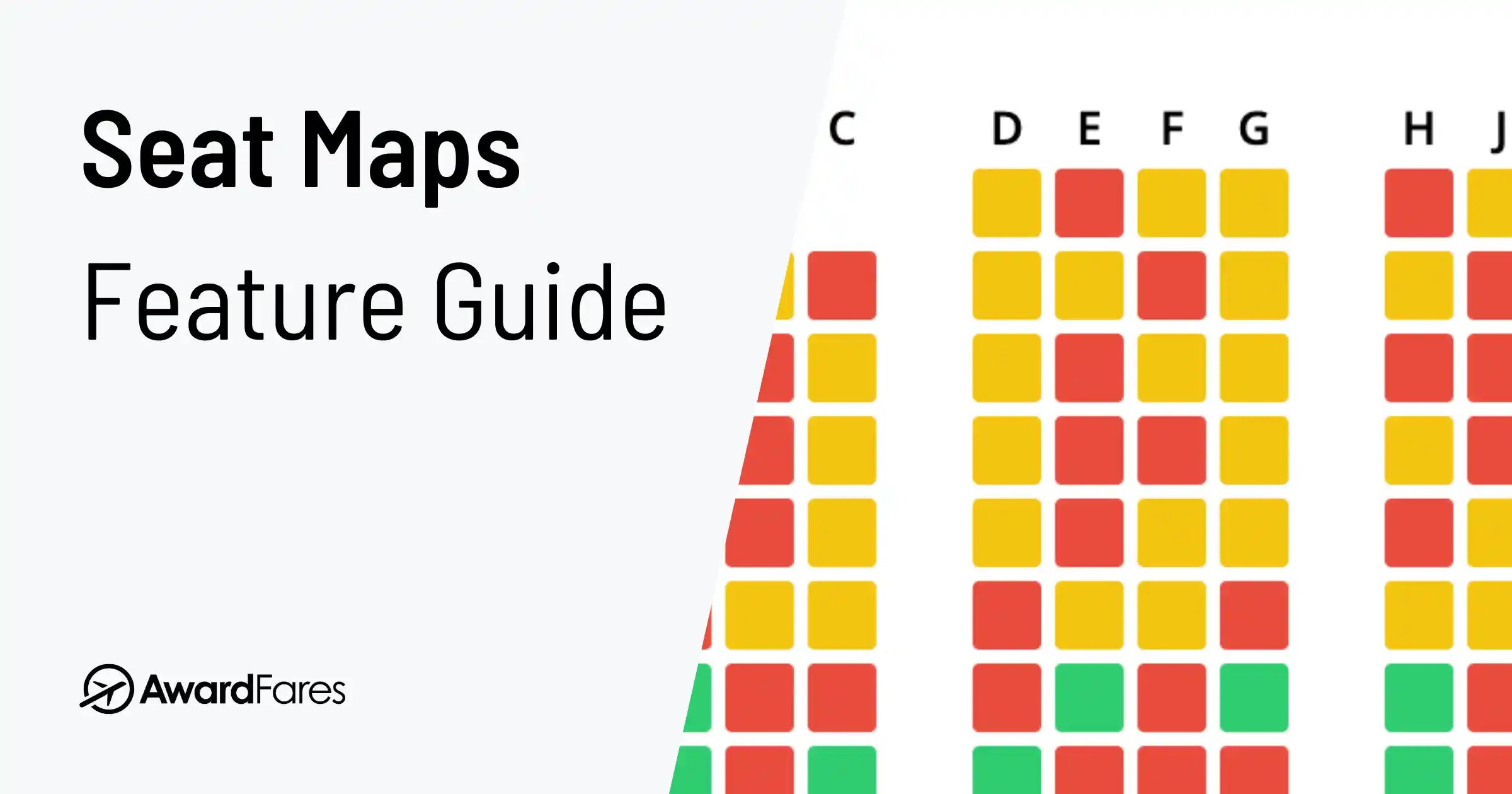
Most people know AwardFares as an award search tool, but our Seat Maps feature is one of its most underused parts: a live seat map or seating chart for virtually any airline and flight.
Checking the available seats on a flight before you book can be the difference between a pleasant journey and a never-ending ordeal. In this official tutorial, we show you how to view any flight’s seat layout, understand what the colors and blocked seats mean, and pick the best seat before you commit.
If you are replacing a discontinued tool or comparing static and live maps, see our guide to the best SeatGuru alternatives.
Key Steps to Find the Perfect Seat
- View Live Seat Maps: Get an interactive, real-time view of the seating configuration for the exact flight you’re considering.
- Check Availability Before Booking: See which seats are available, occupied, or blocked by the airline.
- Avoid Undesirable Seats: Easily identify and steer clear of seats near lavatories, galleys, or those with limited recline.
- Access Hidden Maps: See the seat layout even when airlines hide it on their own websites before you purchase a ticket.
- Two Ways to Use: Access seat maps directly from your award search results or use the standalone tool to check a seat map by flight number.
What is the AwardFares Seat Maps Feature?
AwardFares Seat Maps is an interactive representation of the real-time seating configuration of the flight you’re considering. It doesn’t just show a static diagram; it displays live data on seat availability. You get a vivid picture of the seat layout by cabin class (e.g., Economy, Business, First) and can see exactly which seats are free.
This allows you to make informed decisions about your seat selection before committing to a booking, which is especially crucial on long-haul flights where comfort is paramount.
Why You Should Always Check the Seat Map BEFORE Booking
Seats on the same plane can offer very different experiences. A quick look at the seat map helps you avoid the usual suspects: smells from the lavatories, poor storage, noise from the galley, or a seat with compromised recline.
Here are the main reasons to use a seat map viewer before finalizing a booking:
- Personal Comfort: Not all seats are created equal. Some offer more legroom, while others are narrower. A seat map helps you find the most comfortable option.
- Avoiding Undesirable Seats: Steer clear of seats that don’t recline (often in front of an exit row), are adjacent to high-traffic areas, or are the dreaded middle seat.
- Understanding Seat Configuration: The aircraft type determines the layout. In premium cabins, a seat map reveals whether you’ll get a private suite or be climbing over a seatmate.
- Traveling with Companions: It’s the only way to check if you can get seats next to each other.
- Window vs. Aisle Preference: Secure your preferred spot instead of leaving it to chance.
- Accessibility and Health Needs: Preview the layout to pick a suitable location, like one near a restroom or with extra legroom.
- Overhead Storage Space: Seats at the front of the cabin often have more bin space available on full flights.
- Equipment Changes: Airlines sometimes swap aircraft, which can change your seat assignment. Regularly checking the map helps you stay ahead.
Why Do Airlines Hide Seat Maps? (And How AwardFares Helps)
Sometimes, the airline’s own website won’t show you the seat map until after you’ve paid. This is where AwardFares gives you a competitive edge by always showing the live seat availability.
Airlines often hide maps for several strategic reasons:
- To Sell Seat Assignments: By creating uncertainty, they encourage you to pay extra for a specific seat after booking.
- To Maintain Flexibility: It allows them to block seats for operational reasons (like weight and balance) or for elite flyers without setting passenger expectations.
- To Encourage Upgrades: Hiding a crowded Economy map might nudge you towards buying a more expensive Premium Economy ticket.
AwardFares bypasses these roadblocks, giving you the transparent information you need to choose wisely.
How to Use AwardFares’ Seat Maps: A Step-by-Step Guide
There are two convenient ways to view a flight’s seat map using AwardFares.
Method 1: From the Award Search Results
This is the most common workflow when you’re searching for award flights.
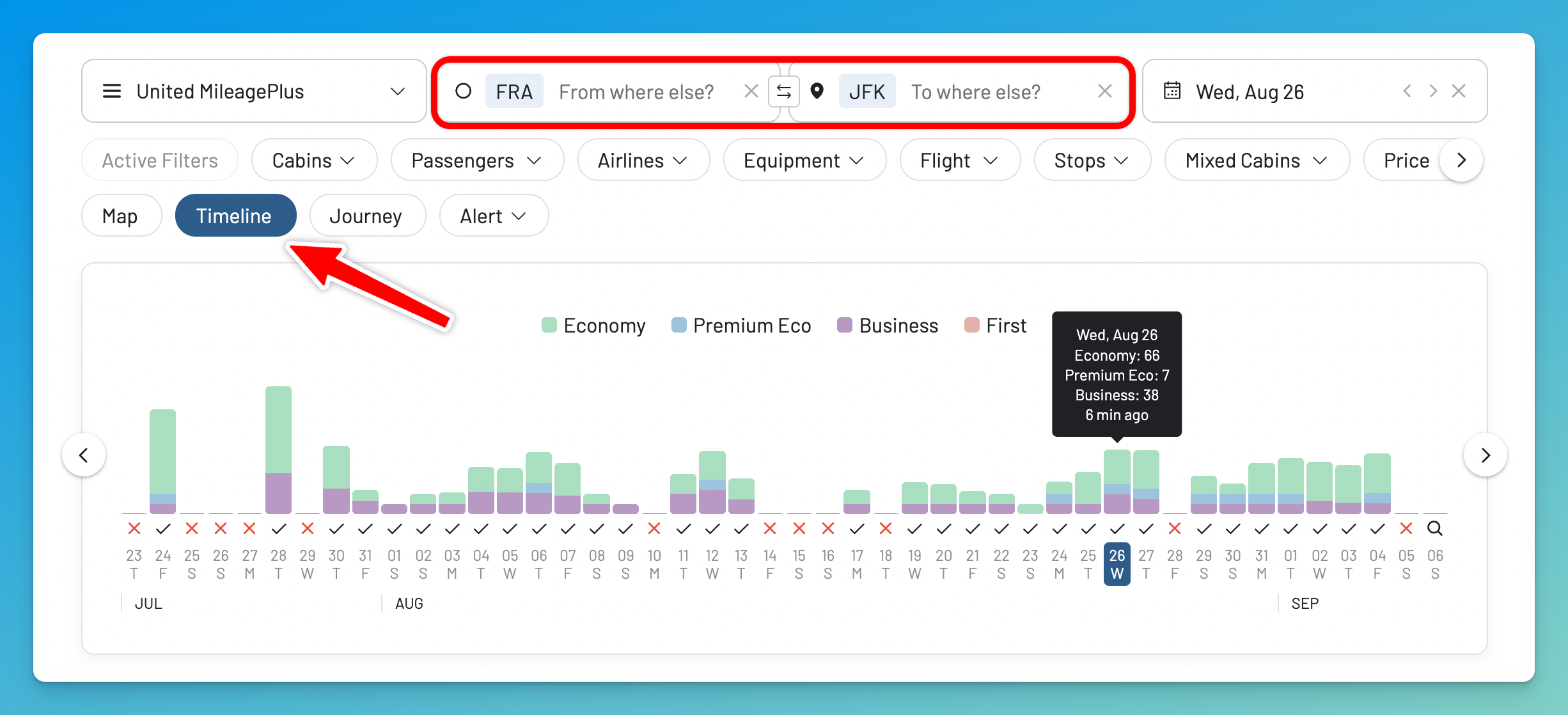
1. Perform a search
Log in to your AwardFares account and run an award search with your desired program, route, and date.
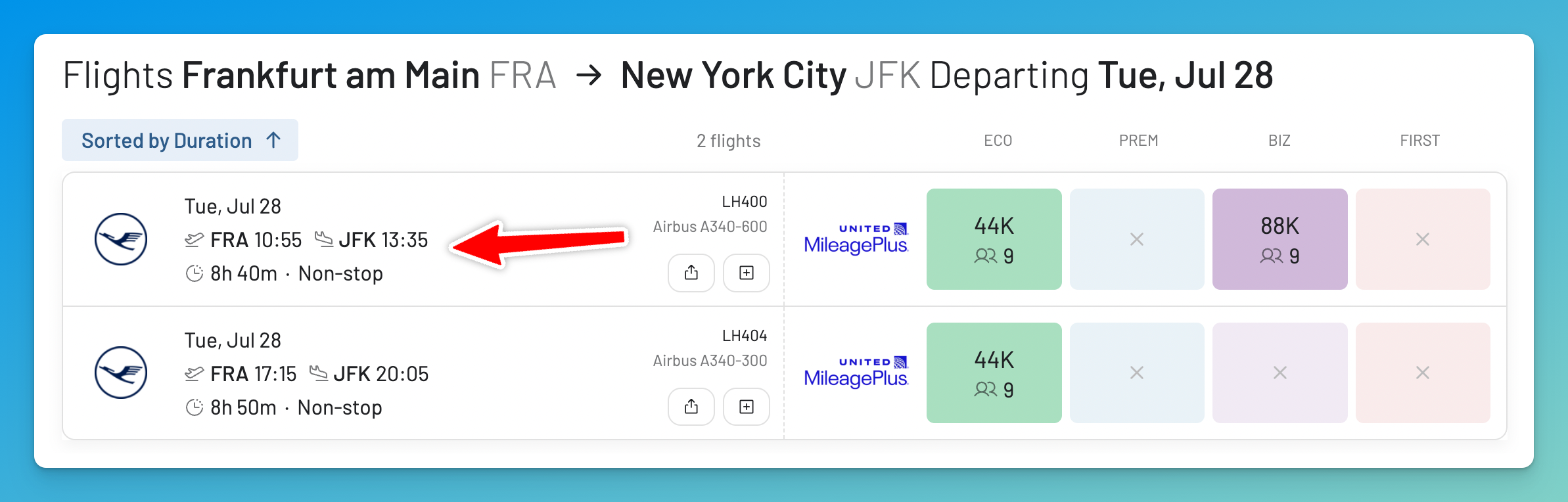
2. Select a flight
From the results list, choose a flight by tapping on it.
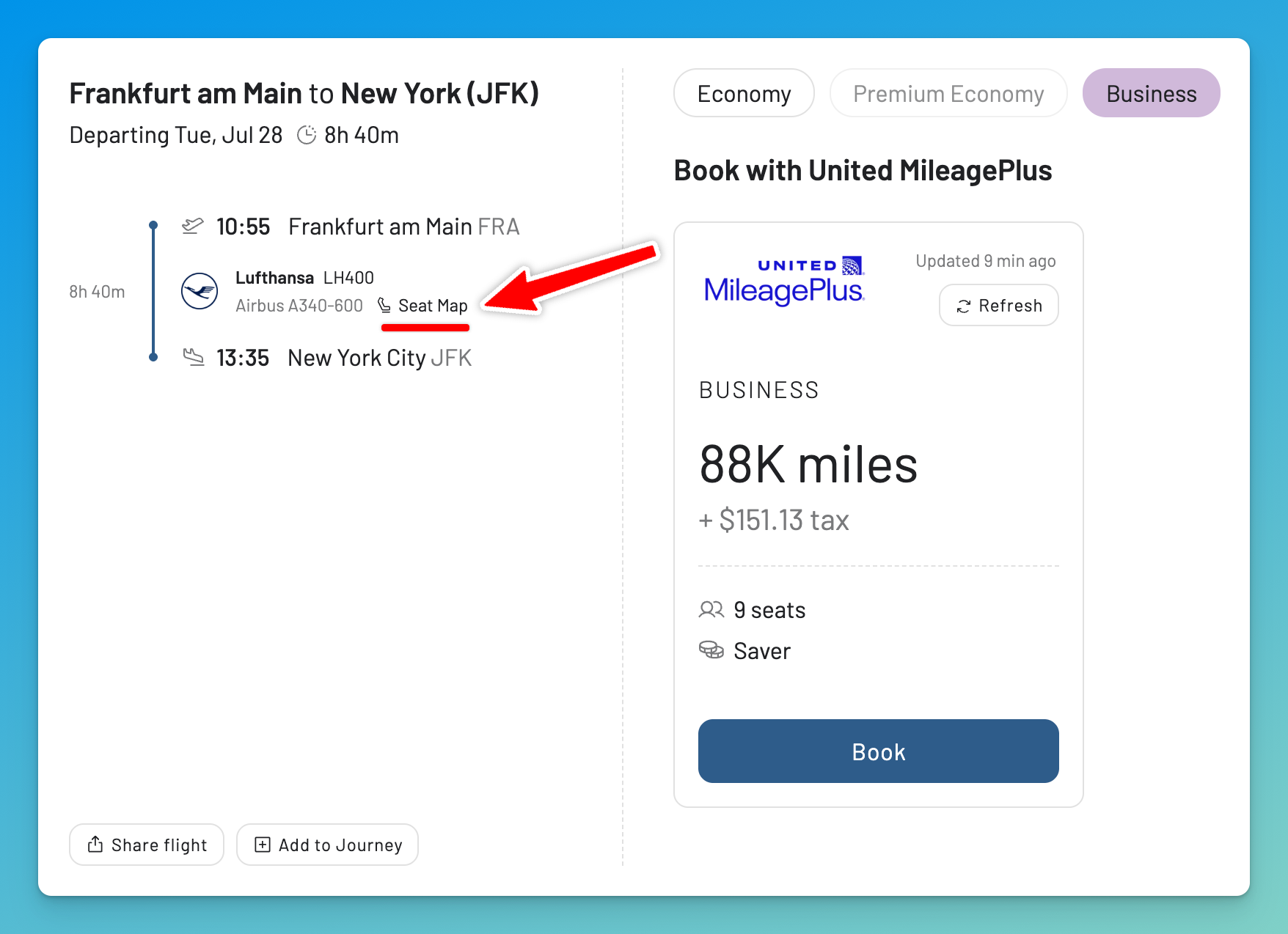
3. Tap on “Seat Map”
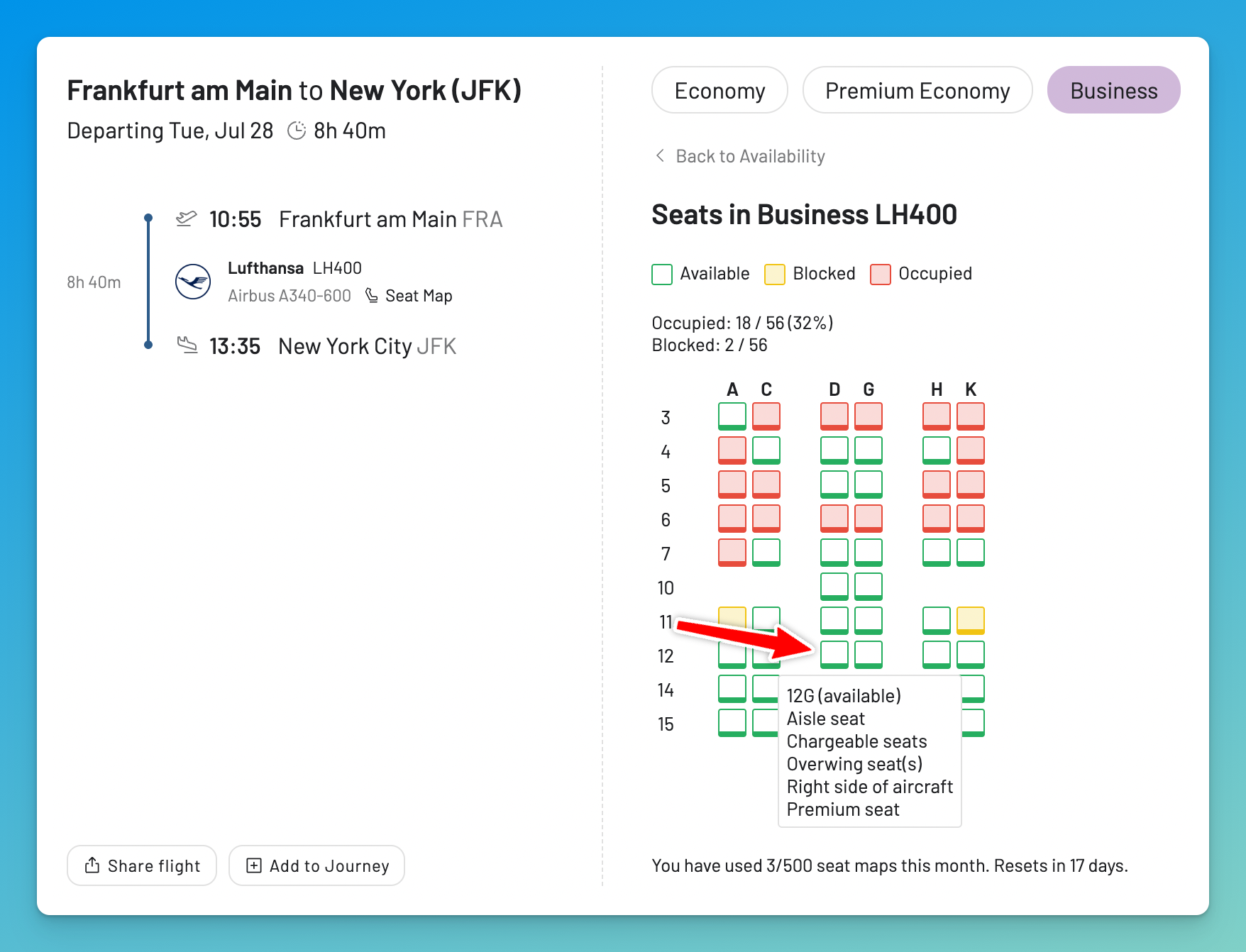
Once you open a flight or redemption in the results list, you’ll see all its details in a modal. Right next to the flight number and equipment, click the Seat Map icon. The seat map will load on the right of the modal.
4. Explore the Seat Map
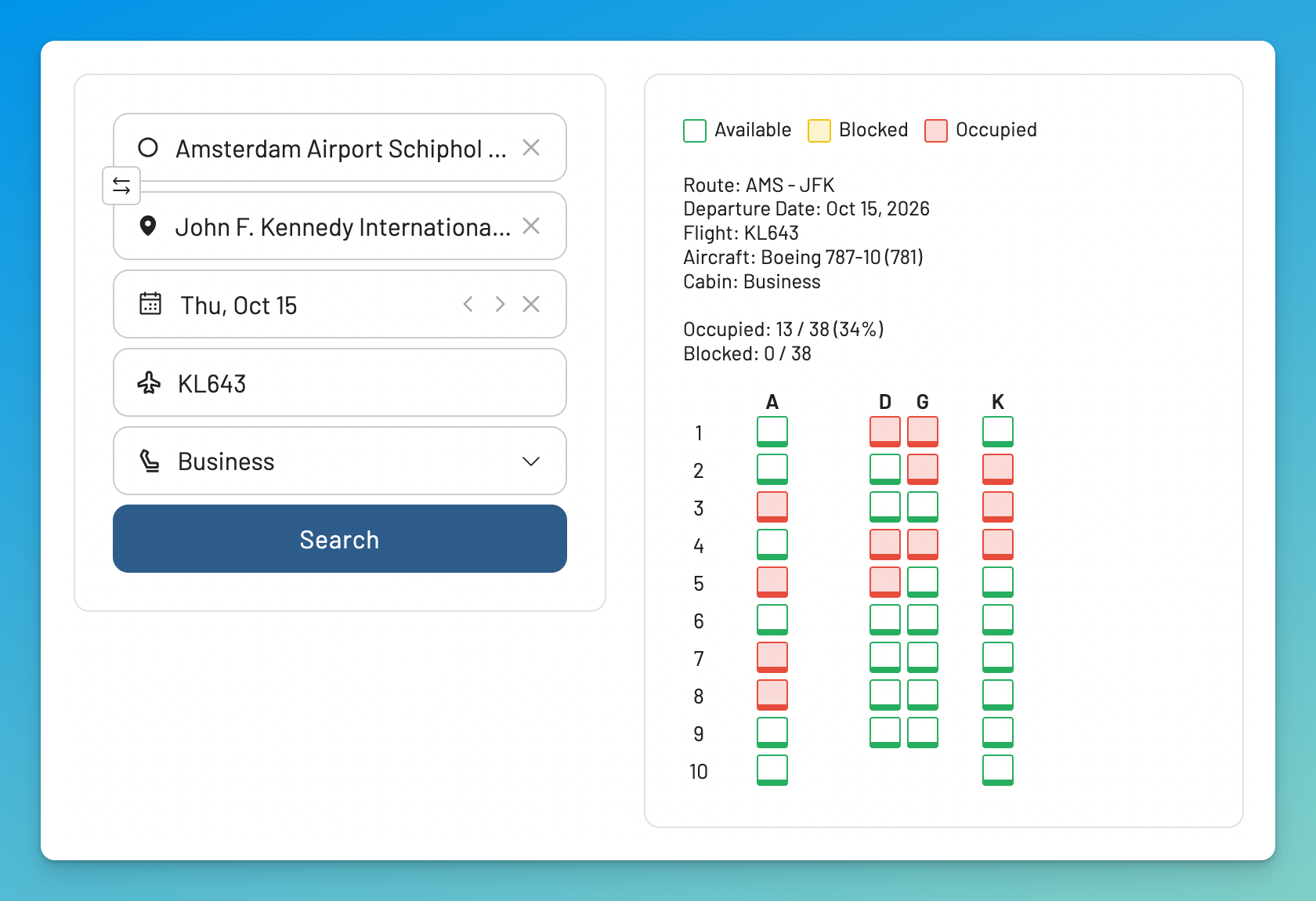
The map uses a clear color code:
- Available (Green/Empty)
- Occupied (Red/Filled)
- Blocked (Yellow/Filled) - These are seats held by the airline.
Above the map, you’ll see the occupancy stats — how many seats are occupied or blocked out of the total (e.g. Occupied: 18/56 (32%)). Hover over any seat for details like seat type and extra fees.
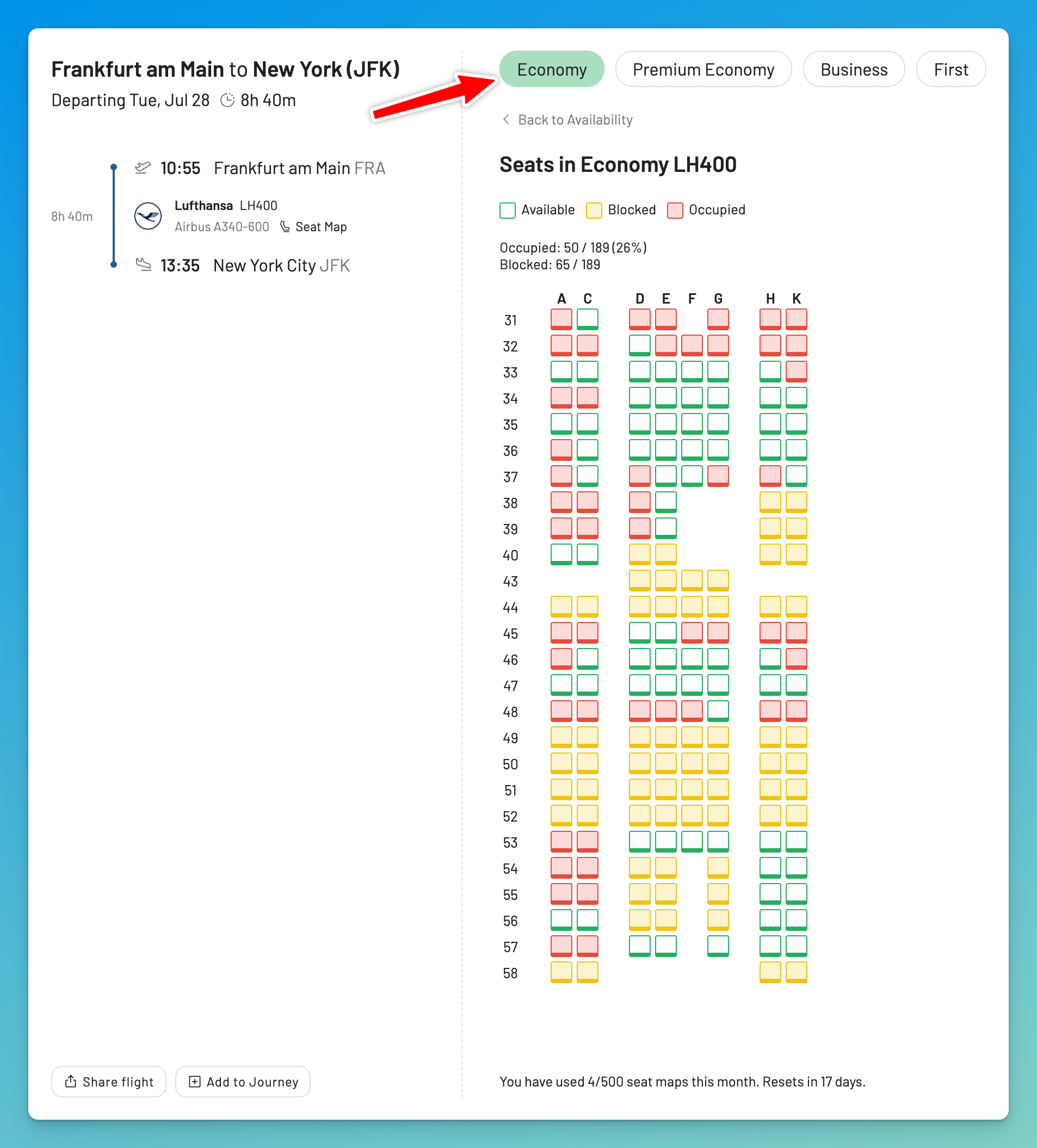
You can use the buttons at the top to switch between cabin classes.
Method 2: Check by Flight Number using the Standalone Tool
This is perfect when you already know your flight details and just want to see the seat map.
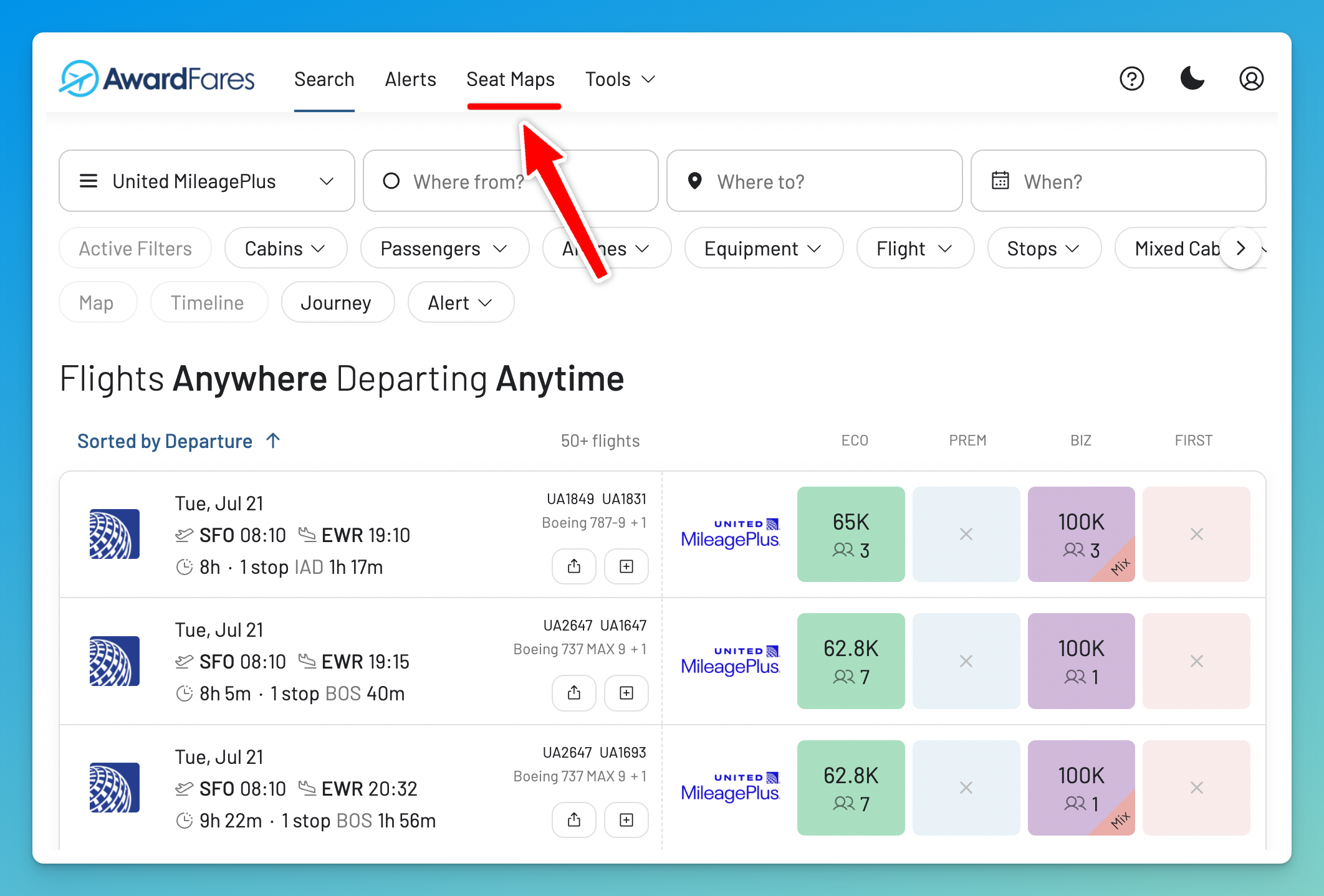
1. On the top bar, tap on Seat Maps
2. Fill in your flight information
Enter the Origin, Destination (3-letter airport codes), Flight Number, and Date. Hit Search.
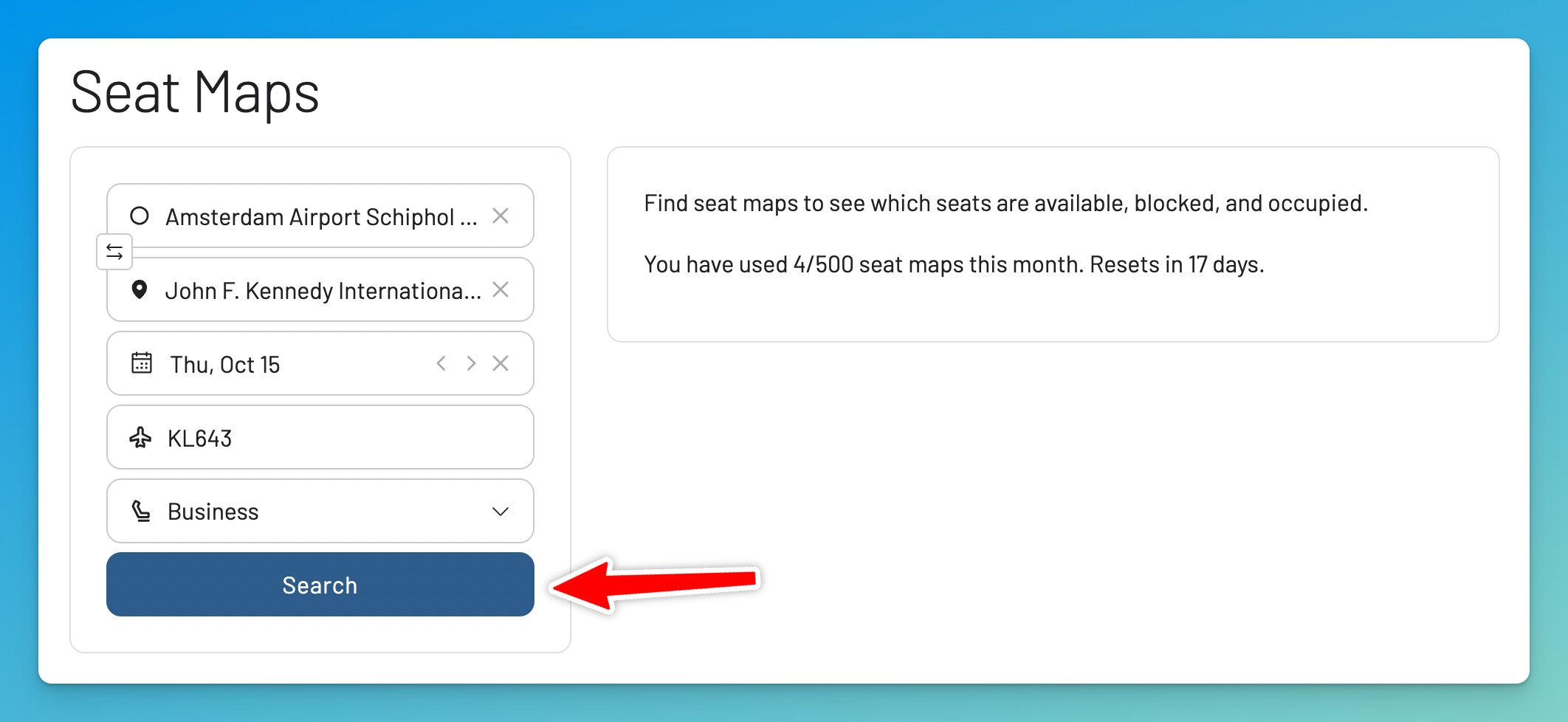
3. Explore the Seat Map
The seat map will appear on the right. You can easily check other cabins by changing the Cabin field and searching again.
What is a Blocked Seat?
If you see a “blocked” seat on the map, you won’t be able to select it when you book. A blocked seat is one that the airline has made unavailable for general passenger selection.
Common reasons a seat might be blocked include:
- Reserved for Crew or Elite Flyers: Airlines hold seats for their staff or top-tier frequent flyers.
- Emergency Exit Row: These seats have special requirements and are often assigned at the gate.
- Weight and Balance: Seats may be blocked to ensure the aircraft is balanced for safe flight.
- Maintenance: The seat may be broken or inoperative.
- For Sale as an Upgrade: Seats with extra legroom are often blocked to be sold for an additional fee.
Upgrade for More
The full Seat Map feature is integrated in our Gold and Diamond packages. You can try them for free for 24 hours.
We also offer a free standalone version of our Seat Map Checker on this page. Daily limits may apply compared to the full version.
FREE Seat Map Checker
Related Articles
Frequently Asked Questions
FAQ
How do I check a flight seat map or see what seats are available?
The easiest way is to use a dedicated tool like the AwardFares Seat Map Checker. You can search by route or, more specifically, by flight number and date to see a live, interactive map of the airplane seating arrangement, including which seats are available, occupied, or blocked.
Can I see available seats on a flight _before_ I book it?
Yes. While many airlines hide this information on their websites, tools like AwardFares are designed specifically to show you the real-time flight seat map and availability before you commit to purchasing a ticket. This allows you to check for good seats first.
What does a 'blocked seat' on an airplane seat map mean?
A blocked seat (often shown in yellow) is a seat that the airline has restricted from general selection. You cannot choose it during the normal booking process. Airlines do this to hold seats for elite frequent flyers, for crew rest, for passengers with special needs (like bassinets), to manage the aircraft’s weight and balance, or to sell them as extra-legroom seats at a later time.
How do I read the airplane seat letter layout?
While it can vary, a general rule for a standard 3-3 seat configuration (like on a Boeing 737) is:
-
A & F: Window seats
-
C & D: Aisle seats
-
B & E: Middle seats
On wide-body planes with two aisles, the aisle seats are typically C, D, G, and H.
What is the best way to choose a seat on a plane?
-
View the seat map to understand the aircraft’s layout and configuration.
-
Aim for the front of the cabin for a quieter ride and quicker deplaning.
-
Check for exit rows for extra legroom (but be aware they may not recline).
-
Avoid the last row as it often has limited recline and is close to the lavatories.
-
Avoid seats next to galleys and lavatories due to high traffic, noise, and light.
If you also want to know how crowded the flight itself will be, see our guide to checking how full a flight is.
Why is the seat map 'not available' on the airline's website?
Airlines often make seat maps unavailable before purchase for business reasons. They may want to encourage you to pay for a seat assignment later, maintain flexibility for operational changes, or nudge you toward buying a more expensive ticket in a higher cabin.
How can I find the seat map or seating chart for a specific airline like United, Delta, or American Airlines?
You can use a universal seat map tool like AwardFares. Instead of going to each airline’s site, our tool lets you look up the seating chart for any flight by flight number across most major airlines, all in one place. Just enter the flight details to get started.
What does the 'seat configuration' or 'seat layout' mean?
This refers to how seats are arranged on the plane. For example, ‘3-3’ means a single-aisle plane with three seats on each side. In Business Class, a ‘1-2-1’ configuration is highly desirable because every seat has direct aisle access. The seat map is the best way to visualize the exact configuration of your flight.
What is an 'occupied seat'?
An occupied seat (usually shown in red or with an ‘X’) is one that has already been selected by or assigned to another passenger. It is not available for you to choose.
How are seats numbered on a plane?
Seat numbers typically start with row 1 at the very front of the plane and increase as you move toward the back. The numbering is usually continuous from front to back, though some airlines may skip certain numbers (like row 13) or have gaps where galleys or emergency exits are located.
Can I check the flight seating information for Premium Economy or Business Class?
Yes. The AwardFares seat map tool allows you to toggle between different cabins. You can view the specific seat layout for Economy, Premium Economy, Business, and First Class to compare seat configurations and availability in each.
If a seat is blocked, can I still get it?
It’s possible, but not guaranteed. Blocked seats are sometimes released to all passengers 24 hours before the flight during check-in. You can also ask the gate agent at the airport if any of these seats (especially preferred seats or exit rows) have become available.
Find & Monitor Award Flight Availability
Use AwardFares to instantly search multiple frequent flyer programs. Find available award seats, set up alerts to monitor availability, check flight schedules, view seat maps, and more—all in one place.