 Aeromexico Rewards
 Air Canada Aeroplan
 American Airlines AAdvantage
 Atmos Rewards (Alaska/Hawaiian)
 Azul Fidelidade
 Delta SkyMiles
 Etihad Guest
 Finnair Plus
 Flying Blue (AF/KL)
 GOL Smiles
 Jetblue TrueBlue
 Qantas Frequent Flyer
 SAS EuroBonus
 Turkish Miles&Smiles
 United MileagePlus
 Virgin Atlantic Flying Club
 Virgin Australia Velocity

If you are looking for a seats.aero alternative, AwardFares is my first choice when I want to search several loyalty programs, compare flexible dates and airports, set alerts, and organize the flights I find. This is how I plan my own trips.
seats.aero is especially useful for scanning a large set of routes that it has already checked. Explore and most Search results use collected data. Pro can also run a live Search for supported programs when the query is narrow enough.
A collected result can be useful, but I still need to know which route was tracked, when it was checked, and what I can do with the flight next.
AwardFares vs. seats.aero: The Short Answer
- AwardFares covers the work after the first result: I can refresh the route, compare programs, monitor it, and keep the useful flights in the same trip.
- seats.aero has three relevant surfaces: Explore and most Search results use data collected earlier, while Pro can run live Search for supported programs when the query is narrow enough.
- seats.aero is strong at broad discovery: Explore can scan many routes quickly, but its coverage depends on the routes the product tracks.
- I prefer AwardFares for the complete trip: I can compare programs, refresh a search, set an alert, and save the flights in one place.
Disclosure
This comparison is written, reviewed, and published by AwardFares, one of the products compared.
What AwardFares Does
AwardFares award flight search can search several supported loyalty programs, dates, airports, and metro areas. A current result can show the itinerary, cabin, mileage price, taxes when supported, seat quantity when available, and the program through which the flight can be booked. This is especially useful when the same flight appears through several programs at different prices.
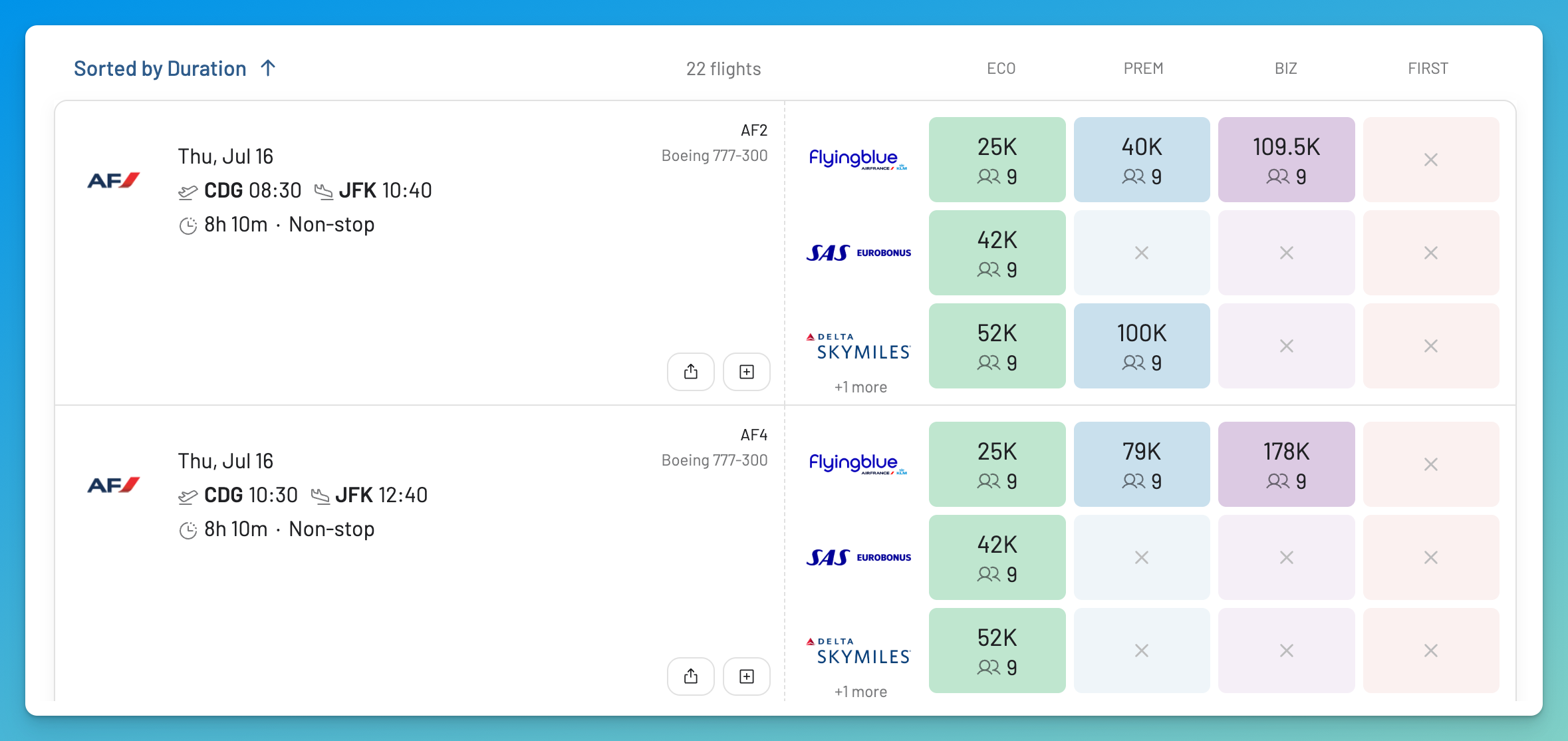
The same flight can have different mileage prices through different loyalty programs, so Search keeps the booking options together for comparison.
Search is only one part of the product:
- Timeline View places availability across multiple dates side by side. See the Timeline View guide for how current and previously collected entries are presented.
- Broad Search scans recently collected results by country, continent, or award zone. It is a discovery surface, not a new live query across an entire region.
- Live Alerts and Flex Alerts monitor specific or broader trip conditions in different ways.
- Journey Planner saves, arranges, and shares flights across multiple segments.
- Seat Maps add seat assignment and cabin context to a flight.
- Flight Schedules show operating schedules, aircraft information, and booking code availability where supported.
AwardFares currently lists 17 searchable loyalty programs, including Delta SkyMiles and Qantas Frequent Flyer. Because support changes, check the live program list rather than relying on an old comparison count. AwardFares does not claim to support the most programs.
Basic is a limited preview of existing availability. It does not run live Search and does not include Alerts, Journey Planner, or Flight Schedules. Gold and Diamond add live Search and the planning tools, with different limits listed on the current pricing page.
What seats.aero Does
seats.aero is an award availability search and alert service with three relevant search surfaces: Explore, collected Search, and supported live Search.
Explore
Explore is the broad discovery surface. It displays award data collected earlier across the routes tracked for each mileage program. This makes it possible to scan many routes and dates quickly. A route can still be missing because it is not part of the collected coverage, and availability can change after the result was collected.
Live Search is not available in Explore.
Cached Search
Collected data powers most seats.aero Search results. This coverage is limited to the routes listed for each mileage program. Search can filter by program or alliance, and the program remains an important part of each result. There is no single number that applies to every loyalty program.
seats.aero can display seat quantities when the source provides them. Some airlines only report general cabin availability, so a result may not prove that the full passenger count is bookable.
Live Search on Pro
For some supported loyalty programs, Pro members can run a live Search against current award inventory. This works in Search, not Explore, and a broad query may need to be narrowed. A supported live Search can return connections that do not appear in collected results for tracked routes.
That distinction matters: Pro includes live Search, but not every Pro result is live.
seats.aero also has alerts, searches across several airports or city codes, custom airport groups, availability history, Seat Maps, native iOS and Android apps, and a Chrome extension that adds award data to Google Flights. The iPhone app added live Search integration in January 2026. Specialist tools cover award release dates, upgrades, and premium cabin availability. Pro also includes rooms.aero for hotel award search and alerts.
Round trip and trips with several stops are currently handled as separate searches for each direction or leg.
AwardFares vs. seats.aero at a Glance
| Task | AwardFares | seats.aero |
|---|---|---|
| Broad discovery | Broad Search; collected regional results | Explore; collected tracked routes |
| Specific live check | Gold and Diamond live Search | Pro live Search for supported narrow queries |
| Program and price context | Program, price, tax, and quantity fields shown together | Program and source filters; quantities when supplied |
| Searchable loyalty programs | 17; check the current list | 25 on the current status page |
| Alerts | Live: email and optional push; Flex: push only | One time and Pro continuous; email, push, and supported SMS |
| Flexible airports and dates | Multiple inputs, metro areas, Timeline, and Broad Search | Multiple inputs, city or custom groups, and date ranges |
| Seat context | Seat assignment and cabin labels | Pro Seat Map Viewer |
| Planning | Journey Planner and Flight Schedules | Separate searches for each direction or leg |
| Mobile access | Installable web app | Web, iOS, Android, and Chrome extension; iOS lists live Search integration |
| Free access | Existing result preview and limited Seat Maps | Search and Explore without an account, with a Search window of up to 30 days |
From Collected Results to a Complete Trip
Finding a Flexible Destination or Date
seats.aero Explore is designed for a question such as “Where can I go with these miles?” It can cover a large collected route set without waiting for a new query for every combination. The result is useful for discovery, but its timestamp, tracked route coverage, and program still matter.
seats.aero Search also supports several airports, city codes, and custom airport groups. The same grouped codes can be used in Search and Alerts.
How I Search Flexible Dates With AwardFares
In AwardFares, I start with Search when I know the likely airports and programs. I can include several dates, airports, and metro areas, then compare the flights and prices. Timeline View helps when I know the route but can change the date.
If the destination is still open, Broad Search lets me scan recently collected results by country, continent, or award zone. When I find a promising option, I move back to an active Search rather than treating the broad discovery result as a current booking check.
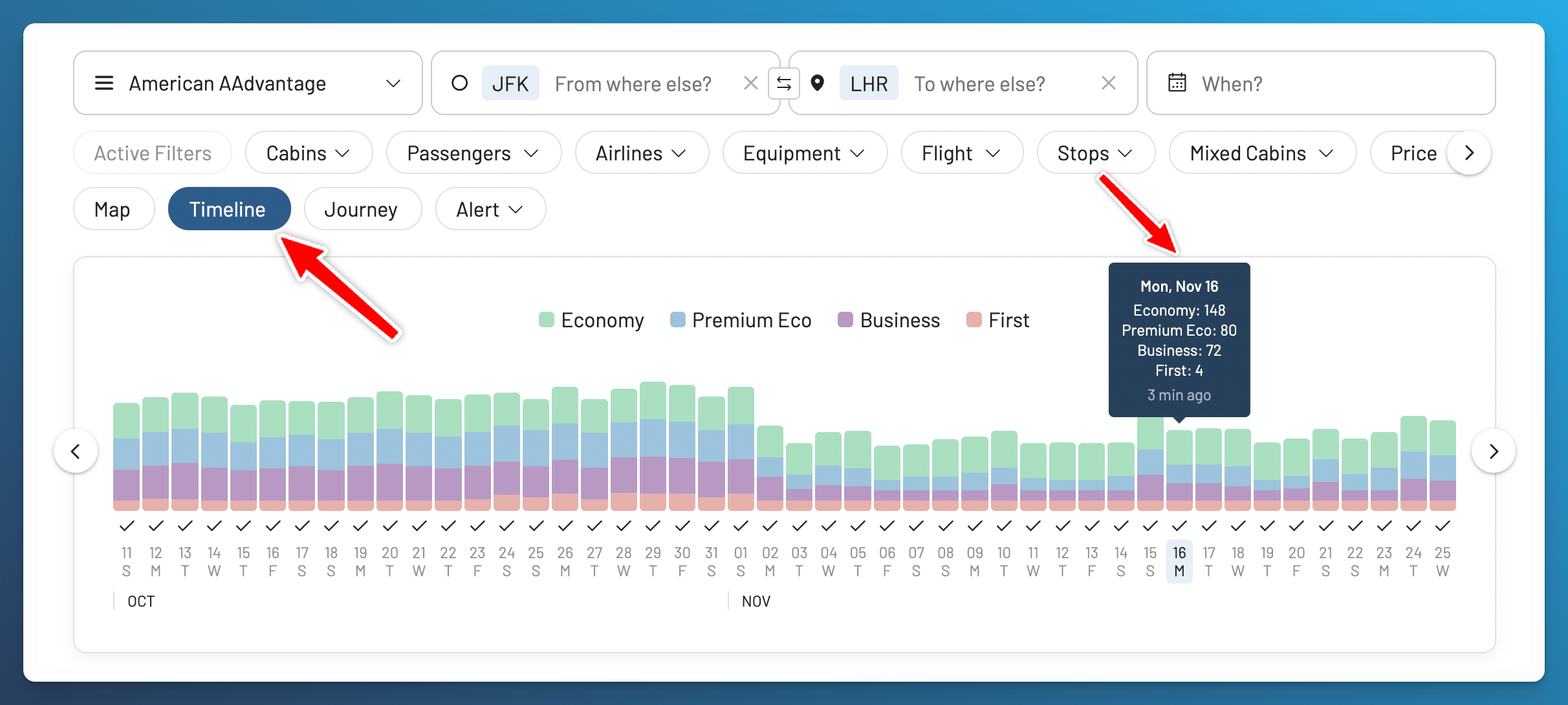
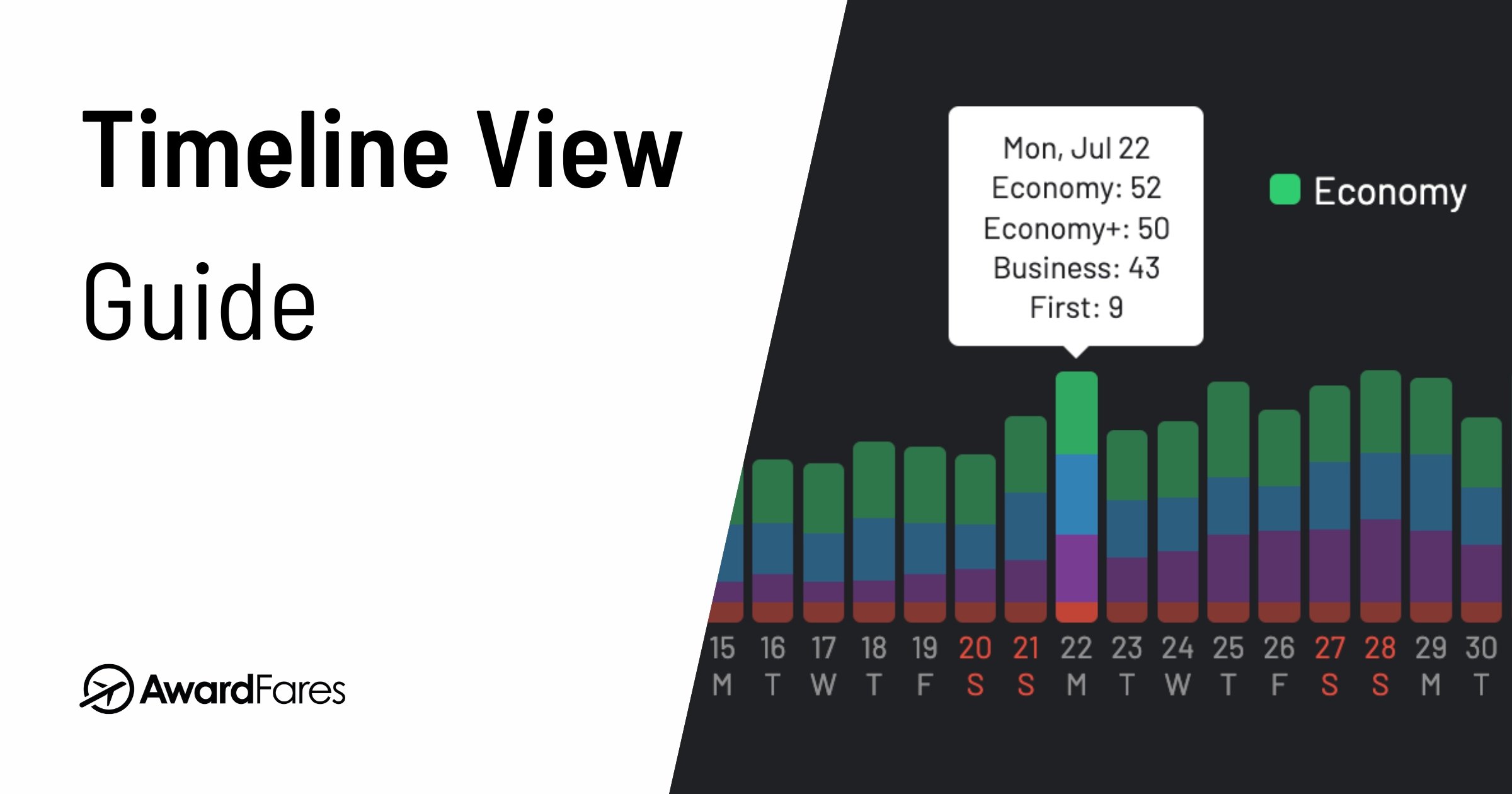
Timeline View places availability across several dates and cabins side by side. The Timeline View guide explains how to interpret current and previously collected results.
Refreshing One Route Across Programs
seats.aero Search can quickly show collected availability on tracked routes. Pro live Search can run a current query when the loyalty program supports it and the request is narrow enough. Program and alliance filters help identify the relevant source, and connections may appear in supported live searches.
Results can still differ from an airline website because availability changes, passenger count matters, elite members or cardholders may see expanded inventory, pricing can be dynamic, and partners may not receive the same seats.
Comparing the Same Flight Across Programs
AwardFares can search several supported programs in one active Search. The redesigned Flight List guide explains how the same flight’s program options, mileage prices, taxes, quantities, and freshness appear together.
This is useful when I can transfer points to more than one program and want to compare the options before I choose one. Our phantom availability guide explains why even a current result can fail.
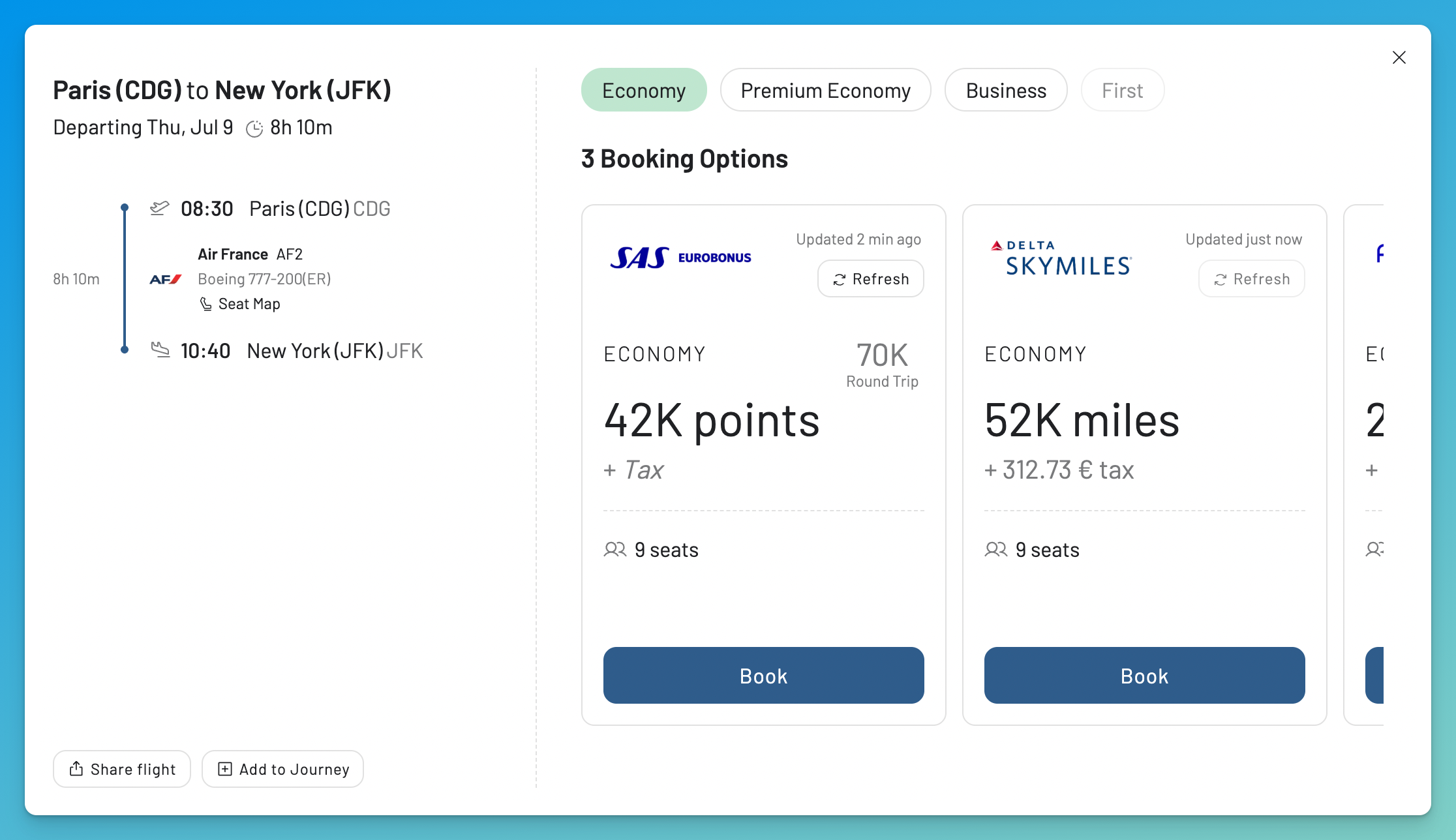
Flight Details keeps the itinerary, program options, mileage prices, taxes, seat quantities, and freshness together. The redesigned Flight List guide explains every field.
One of my simplest examples was a trip from Miami to Buenos Aires. I already knew the route and the program, so I did not need a large discovery map. I needed a current answer for two passengers. I searched with SAS EuroBonus, found two Copa Business Class seats, and booked them right away. The Copa Business Class trip report documents the search and the flight.

I found two Business Class seats from Miami to Buenos Aires and booked the Copa itinerary with EuroBonus points.
Waiting for Seats to Open
seats.aero has one time alerts and continuous alerts for Pro. Alerts can include a route, date or date range, cabin, mileage programs, and filters. Notifications can arrive by email, mobile push, and SMS for Pro where supported. They use the same award data shown in Search. Continuous alerts currently work only for nonstop routes tracked by seats.aero.
Pro includes unlimited alerts, advanced filters, upgrade alerts, and faster or more frequent refreshes.
Choosing Between a Live Alert and a Flex Alert
AwardFares Alerts separate two monitoring jobs:
- Live Alerts run a scheduled search for specific routes and dates. One alert can include several airports and date ranges.
- Flex Alerts monitor broader criteria, including flexible dates or regions, using availability found across AwardFares.
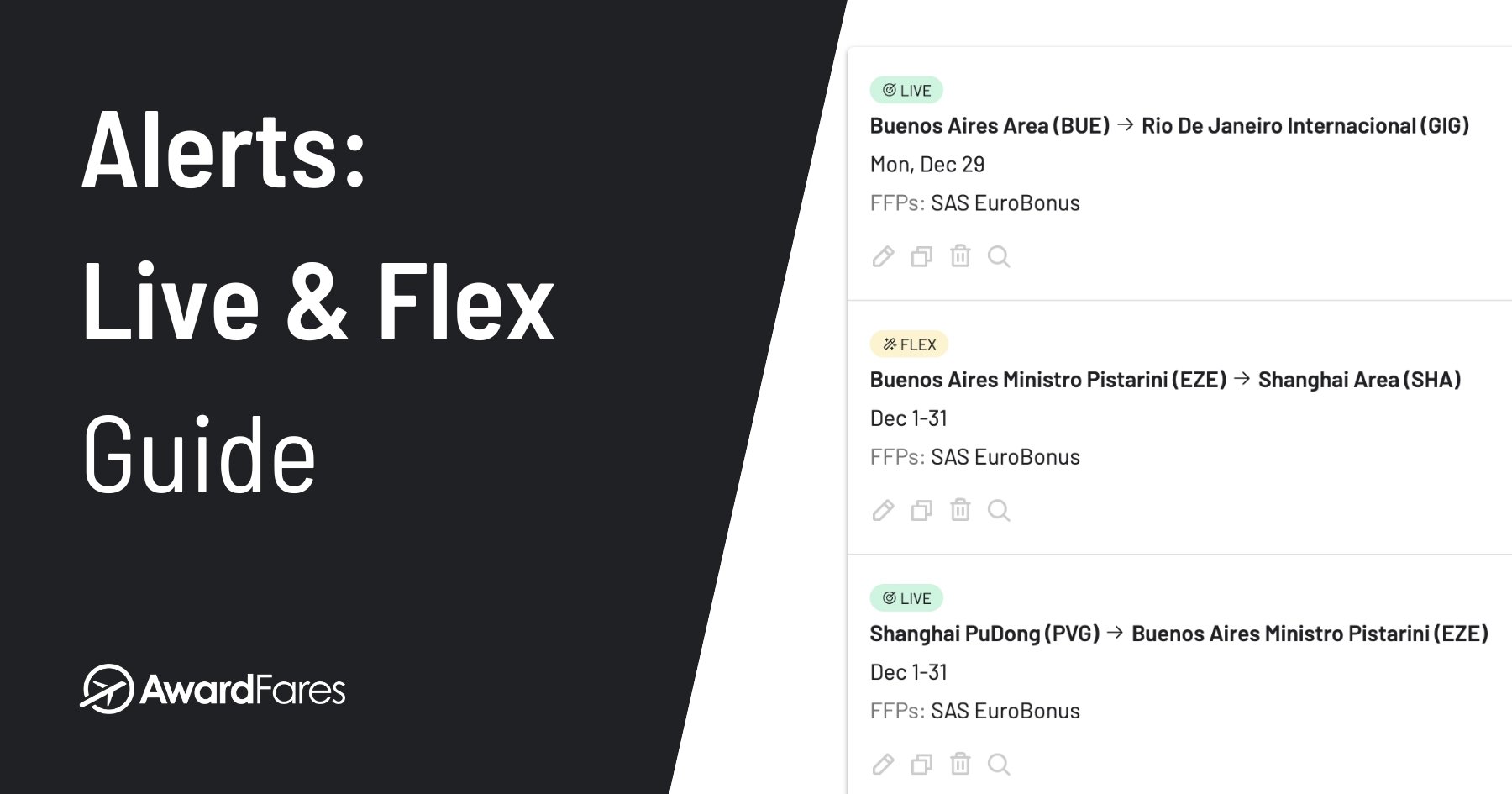
Flex Alerts can surface matching ideas without a scheduled live query for every possible route. They do not promise to discover every flight. When an alert arrives, refresh the search. The complete Alerts guide covers the setup and current behavior.

The alert editor separates scheduled Live Alerts from broader Flex Alerts.
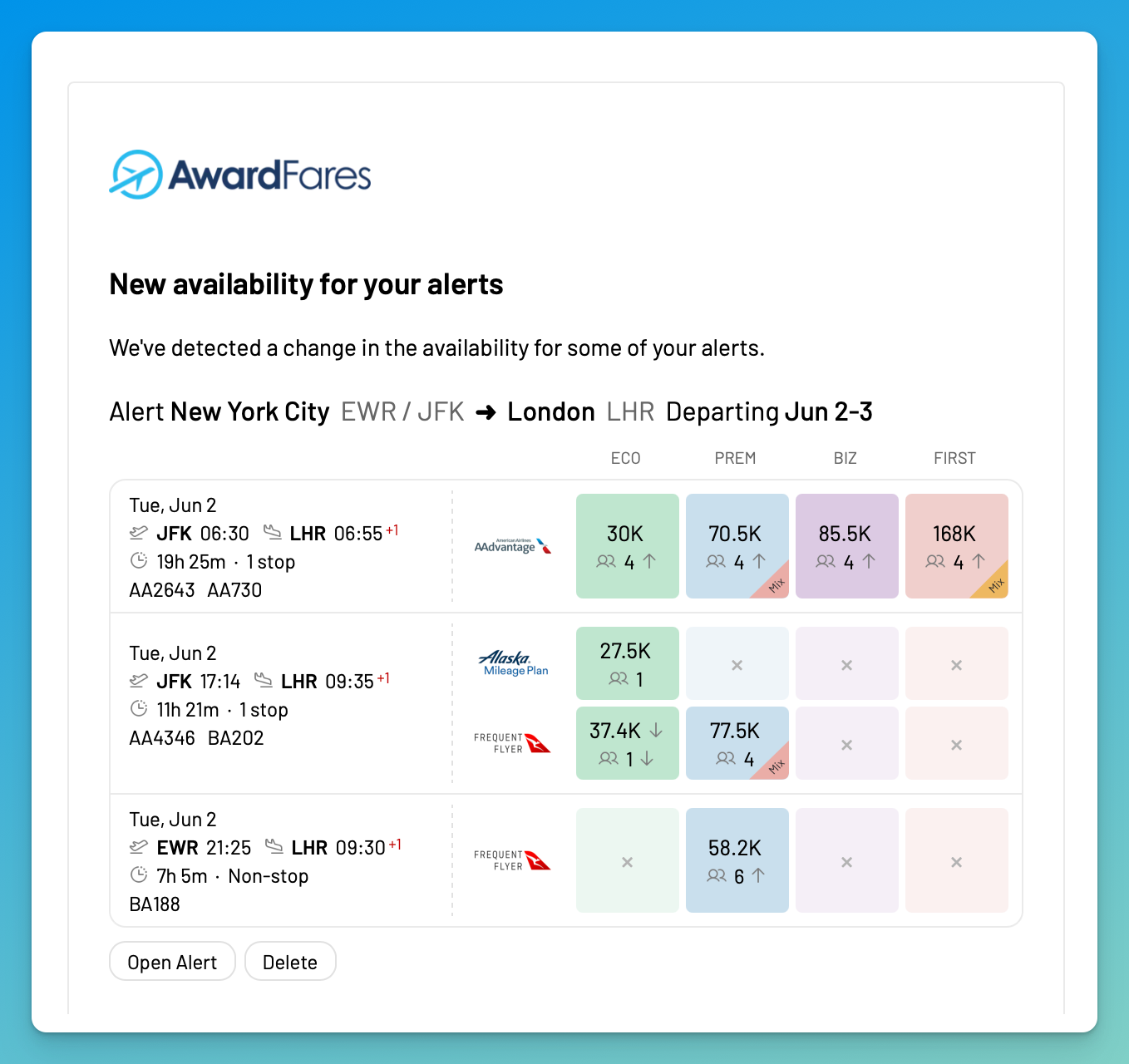
Live Alert emails use the same flight cards and cabin colors as Search, making a new match easier to review before refreshing it.
Building a Complete Trip
seats.aero currently supports Search in one direction at a time. A return or trip with several stops requires separate searches and alerts for each leg. This works well when the goal is to find one flight at a time.
Keeping Separate Flights in One Journey
Journey Planner lets me save and arrange separate flights into a possible itinerary, then share the plan. A Journey is not a reservation. It does not hold seats or prices, protect connections on separate tickets, or prove that one program will price every flight together. The Journey Planner guide shows the full process.
Flight Schedules help check when a route operates and which aircraft is scheduled. Seat Maps then provide seat assignment and cabin context. See the Seat Maps guide for the difference between available, blocked, occupied, and unsold seats.
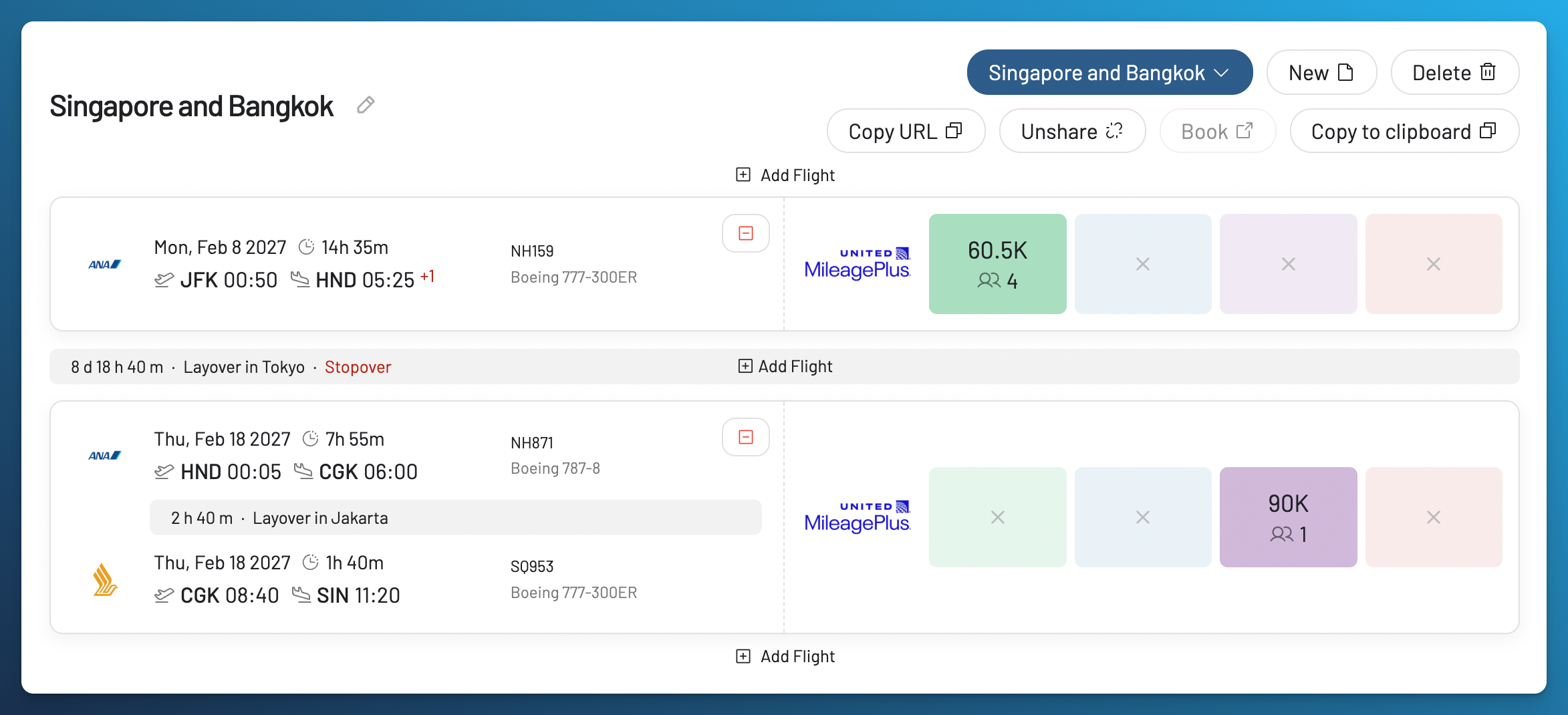
Journey Planner organizes flight results; it does not book or hold them.
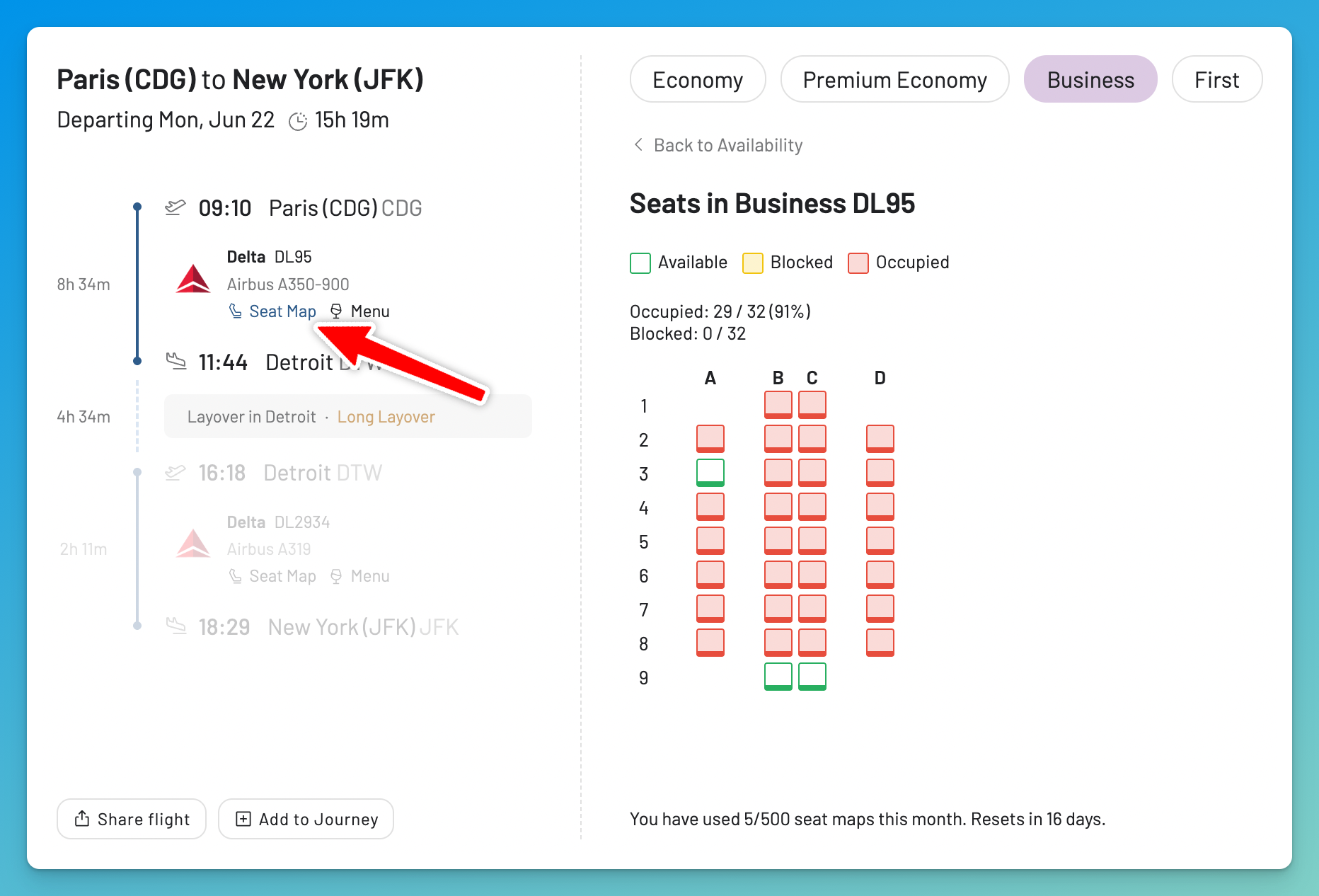
Seat Maps add cabin and seat assignment context, not proof of award inventory or flight fullness.
Plans, Prices, and Access
The current pricing is listed below. Prices, promotions, taxes, and plan limits can change, so check the linked pricing pages before subscribing.
AwardFares Gold and seats.aero Pro both currently start at $9.99 per month, while their annual prices and included features differ. The sections below show what each entry paid tier includes.
AwardFares
- Basic is free. It provides a limited preview of existing availability for one program and includes five Seat Map lookups per month. It does not include live Search, Live or Flex Alerts, Journey Planner, or Flight Schedules.
- Gold currently costs $9.99 per month or $99 per year. It includes 100 Live Searches per day, 30 Live Alerts, 100 Flex Alerts, two programs per simultaneous search, Journey Planner, Flight Schedules, and 30 Seat Map lookups per month.
- Diamond currently costs $19.99 per month or $199 per year. It includes unlimited Live Searches and Flex Alerts subject to controls that prevent abuse, 500 Live Alerts, five programs per simultaneous search, Journey Planner, Flight Schedules, and 200 Seat Map lookups per month.
- The AwardFares pricing page currently advertises a separate 24 hour trial for new customers. The trial is separate from Basic.
seats.aero
- Free includes basic Search and Explore without an account, with a Search window of up to 30 days.
- Pro currently costs $9.99 per month or $99.99 per year. It adds unlimited alerts, advanced filters, faster or more frequent refreshes, upgrade alerts, priority support, the Seat Map Viewer, and live Search for supported programs when the query is narrow enough.
- The Pro Search window extends beyond 60 days. The exact range still depends on the product surface and route.
- The status page listed 25 mileage programs in August 2026. Check the route coverage for the program you need.
Which One Should You Use?
I put AwardFares first when I want to move from a collected lead to a current search, compare the programs that can book the flight, and keep monitoring or planning the same trip. That is especially useful when I hold transferable points and have more than one way to book the seat.
seats.aero is useful for broad discovery from collected data, browsing tracked routes, its specialist tools, and supported Pro live Search. Explore, collected Search, and live Search are different surfaces and should be treated that way.
If another product supports a program or route that AwardFares does not, I may check it separately. I still start with AwardFares because I can keep searching, monitoring, and planning the same trip.
Start With Your Programs
Check the 17 loyalty programs supported by AwardFares, then use Basic to preview existing availability. A paid plan lets me turn a promising lead into a current search and keep working on the same trip.
For a broader comparison of award search tools, including methodology, market history, and a full directory, read the 2026 award search tools guide.


Frequently Asked Questions
What Is the Best seats.aero Alternative?
AwardFares is my first choice when you want to turn a promising result into a current program comparison and keep working on the trip after that. Check the current program list first because no search tool supports every loyalty program.
Is AwardFares Free?
Yes. AwardFares Basic is free and provides a limited preview of existing availability for one program, plus five Seat Map lookups per month. It does not include live Search, Alerts, Journey Planner, or Flight Schedules. New customers may also receive a separate 24 hour trial of paid features.
Is seats.aero Free?
Yes. seats.aero provides basic Search and Explore without an account, with a Search window of up to 30 days. Pro adds a longer date range, supported live Search, advanced filters, alerts, and other tools.
Does seats.aero Show Live Award Availability?
Sometimes. Explore and most Search results use data collected earlier. Pro members can run live Search for supported loyalty programs when the query is narrow enough. Live Search is not available in Explore, and not every Pro result is live.
How Do AwardFares and seats.aero Alerts Differ?
AwardFares has scheduled Live Alerts for specific searches and Flex Alerts for broader criteria using availability found across AwardFares. seats.aero has one time alerts and Pro continuous alerts using its own Search data. Continuous alerts currently cover nonstop tracked routes. Both products offer several filters.
Can Both Tools Search Multiple Airports and Flexible Dates?
Yes, but their interfaces and data surfaces differ. AwardFares combines multiple airports and metro areas with multiple dates, Timeline View, and Broad Search. seats.aero supports multiple airports, city codes, custom groups, and date ranges, with the available horizon depending on the plan and surface.
Do AwardFares or seats.aero Have Mobile Apps?
seats.aero has native iOS and Android apps. It also has a Chrome extension for Google Flights. AwardFares is a responsive web app that can be installed on a phone, but it is not a native mobile app.
Methodology
We use AwardFares firsthand. seats.aero facts come from its public product, help, status, media, and terms pages. We did not use a seats.aero account, benchmark its speed or accuracy, use its API, or reproduce its interface.
This guide uses 25 mileage programs, a Free Search window of up to 30 days, and a Pro Search window beyond 60 days. For the wider category, history, methodology, and directory, see our guide to award search tools.
Prices, trials, plan limits, supported programs, alert behavior, apps, and date windows can change. We reviewed this comparison in August 2026 and check it quarterly or after a major product change.
Find & Monitor Award Flight Availability
Use AwardFares to instantly search multiple frequent flyer programs. Find available award seats, set up alerts to monitor availability, check flight schedules, view seat maps, and more—all in one place.